Instagram Image Sizes 2026: Complete Size Guide for Posts, Stories & Reels
Choosing the right Instagram image size can make the difference between a clean, professional-looking post and one with awkward cropping, blurry text, or important details cut off.
If you’re creating Instagram content in 2026, you don’t need to memorize every specification. You just need to know which dimensions work best for feed posts, carousels, Stories, Reels, and profile images—and how to keep important content inside the visible area.
This guide covers the most useful Instagram image sizes for 2026, plus practical tips for resizing, cropping, designing, and avoiding common mistakes.
Instagram Image Sizes 2026: Quick Reference
Here’s the easiest Instagram size cheat sheet to save:
| Instagram Content Type | Recommended Size | Aspect Ratio |
|---|---|---|
| Square Feed Post | 1080 × 1080 px | 1:1 |
| Portrait Feed Post | 1080 × 1350 px | 4:5 |
| Extended Vertical Post | 1080 × 1440 px | 3:4 |
| Landscape Feed Post | 1080 × 566 px | 1.91:1 |
| Instagram Story | 1080 × 1920 px | 9:16 |
| Instagram Reel | 1080 × 1920 px | 9:16 |
| Reel Cover | 1080 × 1920 px | 9:16 |
| Profile Picture | 320 × 320 px or larger | 1:1 |
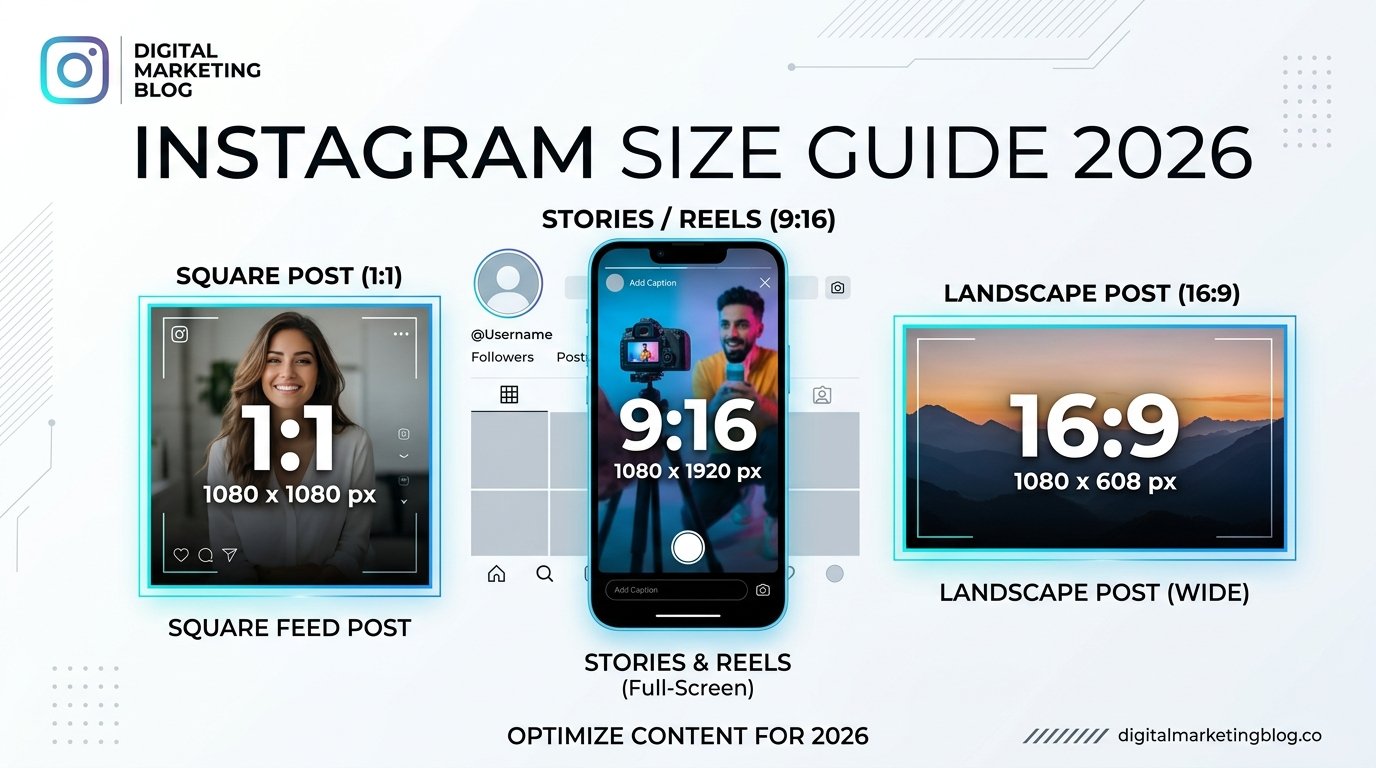
The 1080 × 1350 px portrait format remains a practical choice for standard feed posts, while 1080 × 1920 px is the standard canvas for full-screen Stories and Reels. Current 2026 guides also account for Instagram’s taller 3:4 profile-grid presentation.
What Is the Best Instagram Image Size in 2026?
For most regular Instagram feed posts, 1080 × 1350 pixels at a 4:5 ratio is a strong default.
Why? It gives your visual more vertical space in the mobile feed than a square image while remaining within the commonly supported portrait format.
For full-screen content, use 1080 × 1920 pixels at 9:16 for Stories and Reels.
If you’re creating a simple square graphic, 1080 × 1080 pixels is still perfectly useful.
The best choice ultimately depends on what you’re publishing rather than trying to force every piece of content into one format.
Instagram Feed Post Sizes
Instagram feed posts can use several different aspect ratios.
1. Portrait Instagram Post: 1080 × 1350 px
Aspect ratio: 4:5
This is one of the best all-purpose sizes for feed graphics, educational posts, product images, quotes, and photography.
The taller format occupies more vertical space while someone scrolls, making it particularly useful for mobile-first designs.
Use 1080 × 1350 when:
- You’re creating educational graphics.
- You want more room for visual storytelling.
- You’re designing a promotional post.
- You’re creating a text-based social media graphic.
- You want a strong default size for feed content.
2. Square Instagram Post: 1080 × 1080 px
Aspect ratio: 1:1
The square format is Instagram’s classic image size and remains useful in 2026.
It’s particularly convenient when your design is centered and doesn’t need extra vertical space.
Square posts work well for:
- Product photos
- Simple announcements
- Quotes
- Infographics
- Brand graphics
- Centered photography
- Carousel designs
If you already have a library of 1080 × 1080 templates, there’s no need to abandon them simply because portrait posts are popular.
3. Landscape Instagram Post: 1080 × 566 px
Aspect ratio: 1.91:1
Landscape posts are useful when the horizontal composition is important.
Think wide travel photography, landscapes, group scenes, or images where cropping into a portrait format would remove important information.
The downside is simple: landscape images take up less vertical space in a scrolling feed.
What About 3:4 Instagram Posts?
Instagram’s profile presentation has moved beyond the old square-only grid. Current 2026 guidance commonly references a 3:4 presentation, with 1080 × 1440 pixels representing that ratio.
This matters when you’re designing photography or visual content that needs to look good both as an individual post and within your profile.
If you’re creating important text or visual elements, keep them comfortably away from the edges so they’re less likely to be affected by different previews or crops.
For everyday feed graphics, though, 1080 × 1350 remains a straightforward and widely used choice.
Instagram Carousel Image Size
For carousel posts, consistency is more important than trying to mix different dimensions.
A practical choice is:
1080 × 1350 pixels — 4:5
You can also create square carousels at 1080 × 1080 pixels.
The key is to design the slides at the same ratio, especially when the carousel tells a visual story from one slide to the next.
Before publishing, check every slide individually.
Ask yourself:
- Is any text too close to the edge?
- Are faces or products being cropped?
- Does every slide use the same dimensions?
- Is the first slide easy to understand?
- Does the design still look good in the profile preview?
Creating the correct canvas before designing is much easier than trying to fix inconsistent crops after uploading.
Instagram Story Size
The recommended Instagram Story size is:
1080 × 1920 pixels
Aspect ratio: 9:16
This creates a full-screen vertical design that fits modern smartphones well.
Stories are different from feed posts because Instagram places interface elements over the content.
Your profile information, navigation, reply area, stickers, and other controls can cover parts of the screen.
Keep Important Content Away From the Edges
Don’t put essential text or logos directly against the top or bottom edges.
A practical approach is to leave roughly 250 pixels of breathing room around areas where Instagram’s interface may appear. Exact visual coverage can vary depending on the device and interface, so treat this as a design guideline rather than a rigid technical rule.
For example, if you’re creating a Story promoting a sale, don’t place:
“50% OFF — TODAY ONLY”
right at the bottom of the screen.
Move it toward the center so the message remains easy to read.
Instagram Reels Size
The standard Instagram Reel canvas is:
1080 × 1920 pixels
Aspect ratio: 9:16
This is the same basic vertical format used for Stories.
That makes it easier to repurpose vertical video between the two formats.
However, don’t assume that every part of a Reel will remain visible everywhere it appears.
Reels can appear in different Instagram surfaces, including the full-screen Reel experience and your profile.
Keep Text in the Safe Area
If your Reel contains text, subtitles, product information, or a call to action, avoid placing important elements too close to the edges.
A centered layout is generally safer than putting key information directly against the top, bottom, or side edges.
Before publishing, preview the finished Reel and check how the text looks on an actual phone.
Instagram Reel Cover Size
A Reel cover can be created on a 1080 × 1920 px canvas.
However, the cover may appear differently when shown as a preview on your profile. Current guides note that Instagram’s profile presentation uses a taller crop rather than the old square-only grid.
That’s why you shouldn’t place your headline at the extreme top or bottom.
Instead:
- Create the cover at 1080 × 1920.
- Put the main subject toward the center.
- Keep important text comfortably inside the central area.
- Preview the cover on your profile.
- Adjust the design if anything important is cropped.
This small step can make your profile look much more polished.
Instagram Profile Picture Size
For your profile picture, use a square image.
Recommended working size: 320 × 320 pixels or larger.
Instagram displays the profile image as a circle, so important details near the corners can disappear.
For a logo, face, or simple icon, keep the main subject centered.
If you’re using a logo with small text, check it at the actual profile-picture size. Text that looks readable on your computer may become impossible to read inside Instagram’s small circular image.
Instagram Image Size Cheat Sheet
If you only want the essentials, remember these four numbers:
- 1080 × 1080 — square feed post
- 1080 × 1350 — portrait feed post
- 1080 × 1440 — 3:4 vertical presentation
- 1080 × 1920 — Stories and Reels
Save this list somewhere you can easily access it when creating content.
How to Choose the Right Instagram Size
You don’t need to overthink the decision.
Use this simple approach:
Choose 1080 × 1350 for most feed graphics
This is a practical option for educational content, tips, quotes, product graphics, and many photography posts.
Choose 1080 × 1080 for simple square designs
Use this when your composition naturally works as a square or you already have a consistent square template system.
Choose 1080 × 1920 for Stories and Reels
This is the standard full-screen vertical canvas.
Choose landscape when the image needs it
Don’t force a wide photograph into a vertical crop if doing so destroys the composition.
The goal isn’t to follow a size rule blindly. The goal is to present your content clearly.
How to Resize an Image for Instagram
You can resize Instagram images using design and photo-editing tools such as Canva, Adobe Express, Photoshop, or many mobile editing apps.
Here’s a simple workflow:
Step 1: Choose the final format
Decide whether you’re creating a feed post, Story, Reel, or carousel.
Step 2: Create the correct canvas
For example:
Feed: 1080 × 1350 px
Story/Reel: 1080 × 1920 px
Step 3: Place your image
Position the photo so the main subject isn’t accidentally cropped.
Step 4: Check text placement
Make sure headlines, prices, usernames, and calls to action aren’t too close to the edges.
Step 5: Export a high-quality file
Use a suitable image format and avoid repeatedly saving and compressing the same image.
Step 6: Preview it on your phone
This final step is easy to skip—and it’s one of the most useful.
Your desktop design may look perfect, but Instagram content is primarily experienced on a small screen.
Best File Format for Instagram Images
For everyday photo-based Instagram content, JPG/JPEG is a practical choice.
For graphics where transparency or specific image-quality requirements matter, other formats may be useful depending on your workflow and Instagram’s current upload support.
The more important point is to start with a clean, appropriately sized source rather than relying on Instagram to fix a poorly sized image.
Why Does Instagram Crop My Images?
Instagram may crop an image when its aspect ratio doesn’t match the format you’re using.
For example, imagine you’ve taken a wide horizontal photo but want to publish it as a portrait post.
If you simply force it into a 4:5 frame, part of the original image may disappear.
You have three better options:
- Crop the image yourself.
- Resize it while preserving the composition.
- Place the original image inside a correctly sized canvas with a suitable background.
The best option depends on the type of image.
How to Avoid Blurry Instagram Images
Blurry Instagram posts can happen for several reasons.
Common causes include:
- Starting with a low-resolution image.
- Enlarging a small image too much.
- Repeatedly saving and compressing the file.
- Uploading a screenshot instead of the original.
- Using an incorrect canvas size.
- Adding very small text to a graphic.
A simple workflow is to create your design at the intended Instagram dimensions and export a clean, high-quality version.
Also remember that Instagram processes uploaded media, so you cannot completely control how the platform compresses your content.
Instagram Image Size Mistakes to Avoid
Using the Same Size for Everything
A feed post and a Story serve different purposes.
Don’t automatically resize every piece of content to one dimension.
Putting Text Too Close to the Edges
This is especially risky with Stories and Reels because interface elements can overlap your design.
Ignoring the Profile Preview
A cover can look great full-screen but awkward inside your profile.
Always check how important text and subjects appear in the profile presentation.
Uploading Low-Resolution Images
Starting with a tiny image and enlarging it won’t magically create more detail.
Use the highest-quality original you reasonably have.
Designing Only on Desktop
Your audience may see your content on a much smaller screen.
Check your final design on a phone before publishing.
Assuming Dimensions Guarantee Engagement
Correct dimensions can help your content display properly, but they don’t guarantee likes, shares, followers, or reach.
Your topic, creative quality, audience, hook, consistency, and overall content strategy still matter.
Instagram Image Size Checklist
Before publishing an Instagram visual, run through this quick checklist:
- Is the canvas the correct size?
- Is the aspect ratio correct?
- Is the main subject fully visible?
- Is important text away from the edges?
- Does the design look good on a phone?
- Does the Reel or Story have enough space around interface areas?
- Does the carousel use consistent dimensions?
- Have you checked the profile preview?
- Is the image sharp enough?
- Have you avoided unnecessary compression?
If you can answer yes to most of these, you’re in good shape.
How to Put This Into Practice
If you’re creating Instagram content regularly, don’t recreate the dimensions from scratch every time.
Create a small template library:
Template 1: 1080 × 1350 feed post
Template 2: 1080 × 1080 square post
Template 3: 1080 × 1920 Story
Template 4: 1080 × 1920 Reel
Template 5: 1080 × 1920 Reel cover
Give each template a clear name and keep your brand fonts, colors, and layout styles ready to use.
FAQs
Final Takeaway
The good news is that you don’t need dozens of Instagram dimensions memorized.
For most creators and businesses, these four are enough to start:
1080 × 1350 for portrait feed posts.
1080 × 1080 for square posts.
1080 × 1440 for 3:4 vertical content.
1080 × 1920 for Stories and Reels.
Choose the format based on the content you’re creating, keep important elements away from areas where Instagram’s interface may appear, and always preview your design before publishing.
The right dimensions won’t make a weak post successful—but they can help your content look cleaner, sharper, and more intentional.
Internal Linking Opportunities
1. Best Time to Post on Instagram in 2026
Anchor: best time to post on Instagram
Placement: In the section discussing content publishing and optimization.
2. Instagram Caption Examples for Different Industries
Anchor: Instagram caption examples
Placement: After discussing feed post design and content quality.
3. Instagram Content Calendar for Beginners
Anchor: Instagram content calendar
Placement: In the practical action-plan section.
4. How to Grow on Instagram
Anchor: how to grow on Instagram
Placement: Near the final section discussing why image dimensions don’t guarantee engagement.
5. Best Instagram Hashtags for Different Niches
Anchor: Instagram hashtags
Placement: In a broader section about optimizing posts after preparing the visual.
6. Instagram Reels Ideas for Beginners
Anchor: Instagram Reels ideas
Placement: In the Instagram Reels size section.
7. How Often Should You Post on Instagram?
Anchor: how often to post on Instagram
Placement: Near the practical content-planning section.
8. Instagram Content Ideas for Small Businesses
Anchor: Instagram content ideas for small businesses
Placement: Near the section explaining how to build reusable Instagram templates.