30-Day Social Media Content Calendar: Daily Post Ideas for Beginners
Starting social media can feel surprisingly difficult when you don’t know what to post every day.
You may have plenty of ideas one day and absolutely nothing the next. A simple 30-day social media content calendar can solve that problem by giving you a clear direction without forcing you to post random content just to stay active.
In this guide, you’ll get 30 daily social media post ideas for beginners, plus a simple way to plan, create, and improve your content across Instagram, Facebook, TikTok, and YouTube.
What Is a 30-Day Social Media Content Calendar?
A 30-day social media content calendar is a simple plan that tells you what to post, when to post it, and what purpose each piece of content serves.
Instead of opening your social media app every morning and asking, “What should I post today?”, you prepare your ideas in advance.
Your calendar can include:
- Educational posts
- Tips and tutorials
- Questions
- Behind-the-scenes content
- Customer or audience stories
- Short-form videos
- Polls and interactive posts
- Product or service content
- Personal experiences
- Promotional posts
The goal isn’t necessarily to post every single day forever.
For beginners, the bigger benefit is learning how to create a consistent and sustainable content routine.
Why Beginners Should Use a Social Media Content Calendar
Consistency becomes much easier when you don’t have to create your strategy from scratch every day.
A content calendar can help you:
- Reduce the stress of deciding what to post
- Organize ideas before you need them
- Maintain a more consistent posting routine
- Balance different types of content
- Avoid posting promotional content constantly
- Repurpose successful ideas
- Understand what your audience responds to
- Save time when batching content
You also don’t need complicated marketing software.
A spreadsheet, notebook, Google Sheet, or simple calendar can be enough when you’re starting out.
How to Use This 30-Day Social Media Content Calendar
Don’t feel pressured to copy every idea exactly.
Instead, adapt each idea to your niche, audience, platform, and goals.
For example, a fitness creator could turn “share a common mistake” into:
“3 beginner mistakes that make home workouts harder than they need to be.”
A small bakery could use:
“3 mistakes people make when storing homemade cookies.”
The same content framework can work across many industries.
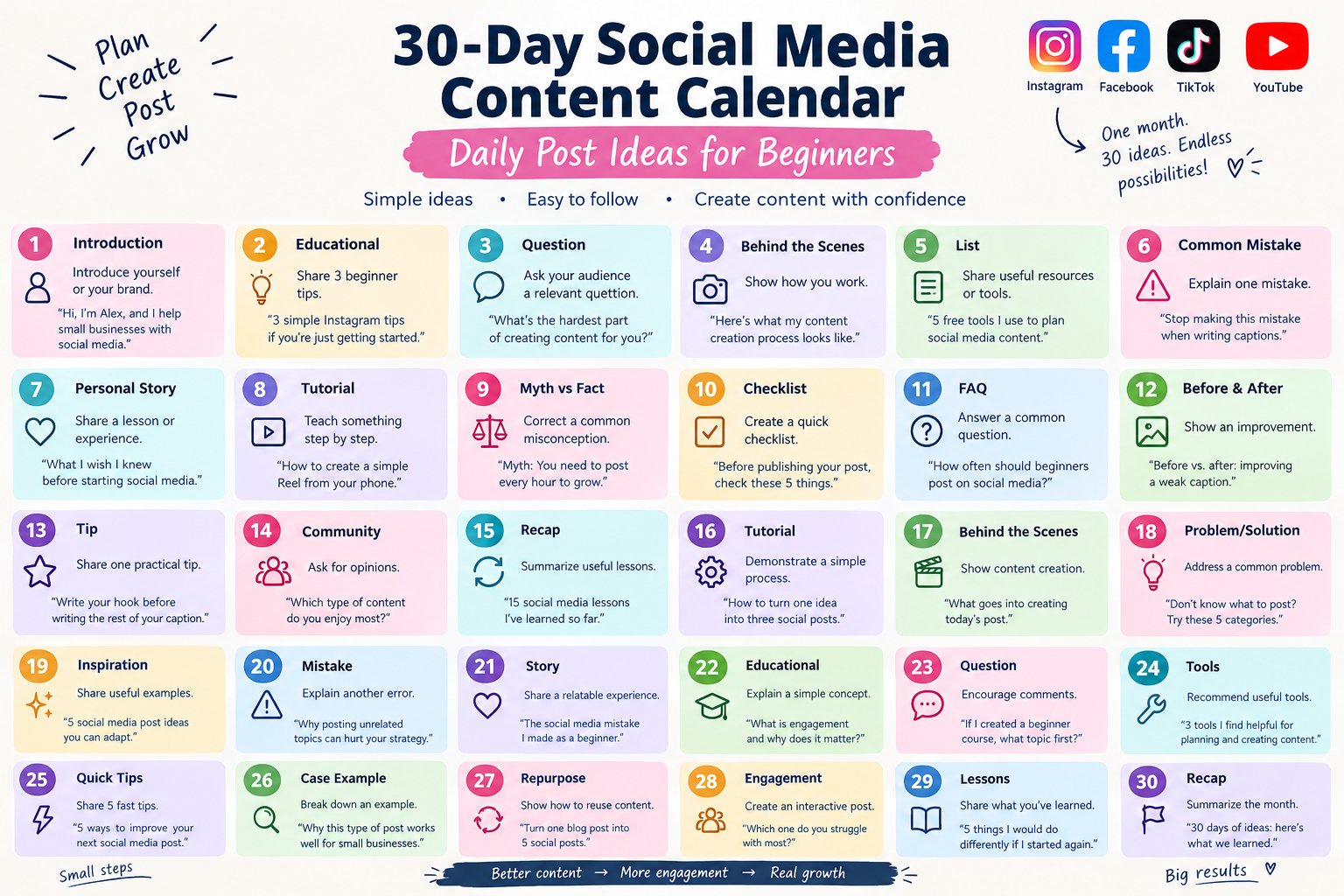
30-Day Social Media Content Calendar
Here is a complete 30-day social media content calendar for beginners.
| Day | Content Type | Daily Post Idea | Example |
|---|---|---|---|
| 1 | Introduction | Introduce yourself or your brand | “Hi, I’m Sarah, and I help small businesses create better social media content.” |
| 2 | Educational | Share 3 beginner tips | “3 simple Instagram tips if you’re just getting started.” |
| 3 | Question | Ask your audience a relevant question | “What’s the hardest part of creating content for you?” |
| 4 | Behind the Scenes | Show how you work | “Here’s what my content creation process looks like.” |
| 5 | List | Share useful resources or tools | “5 free tools I use to plan social media content.” |
| 6 | Common Mistake | Explain one mistake | “Stop making this mistake when writing social media captions.” |
| 7 | Personal Story | Share a lesson or experience | “What I wish I knew before starting social media.” |
| 8 | Tutorial | Teach something step by step | “How to create a simple Reel from your phone.” |
| 9 | Myth vs Fact | Correct a common misconception | “Myth: You need to post every hour to grow.” |
| 10 | Checklist | Create a quick checklist | “Before publishing your post, check these 5 things.” |
| 11 | FAQ | Answer a common question | “How often should beginners post on social media?” |
| 12 | Before & After | Show an improvement | “Before vs. after: improving a weak social media caption.” |
| 13 | Tip | Share one highly practical tip | “Write your hook before writing the rest of your caption.” |
| 14 | Community | Ask for opinions | “Which type of content do you enjoy most?” |
| 15 | Midpoint Recap | Summarize useful lessons | “15 social media lessons I’ve learned so far.” |
| 16 | Tutorial | Demonstrate another simple process | “How to turn one idea into three social posts.” |
| 17 | Behind the Scenes | Show content creation | “What goes into creating today’s post.” |
| 18 | Problem/Solution | Address a common problem | “Don’t know what to post? Try these 5 content categories.” |
| 19 | Inspiration | Share useful examples | “5 social media post ideas you can adapt to your niche.” |
| 20 | Mistake | Explain another common error | “Why posting without a clear purpose can hurt your content strategy.” |
| 21 | Story | Share a relatable experience | “The social media mistake I made as a beginner.” |
| 22 | Educational | Explain a simple concept | “What is content engagement and why does it matter?” |
| 23 | Question | Encourage comments | “What social media platform do you use most?” |
| 24 | Tools | Recommend useful tools | “3 simple tools that make content planning easier.” |
| 25 | Quick Tips | Share 5 fast tips | “5 ways to improve your next social media post.” |
| 26 | Case Example | Break down an example | “Why this type of post works well for small businesses.” |
| 27 | Repurpose | Show how to reuse content | “Turn one blog post into 5 social media posts.” |
| 28 | Engagement | Create an interactive post | “Choose one: educational posts, Reels, stories, or carousels?” |
| 29 | Lessons | Share what you’ve learned | “5 things I would do differently if I started again.” |
| 30 | Recap | Summarize the month and invite engagement | “30 days of content ideas: here’s what we learned.” |
Days 1–10: Build Your Foundation
The first 10 days should help your audience understand who you are, what you offer, and why they should follow your content.
Day 1: Introduce Yourself
Your first post can be simple.
Tell people:
- Who you are
- What you do
- Who you help
- What they can expect from your account
Example:
“Hi, I’m Alex. I help small businesses make social media less confusing. I’ll be sharing simple content ideas, practical tips, and strategies you can actually use.”
You don’t need an elaborate introduction.
A clear and genuine introduction is often enough.
Day 2: Share 3 Beginner Tips
Choose a topic your audience frequently struggles with.
For example:
3 social media tips for beginners:
- Choose a clear audience.
- Create content that solves specific problems.
- Focus on consistency rather than perfection.
Turn the tips into a carousel, short video, or text-based post depending on the platform.
Day 3: Ask a Question
Questions are useful for learning more about your audience.
Try something specific instead of a generic question like “How is everyone doing?”
For example:
“What’s harder for you: coming up with content ideas or actually creating the content?”
The answers can also give you ideas for future posts.
Day 4: Show Behind the Scenes
People don’t always need polished content.
Show:
- Your workspace
- Your planning process
- How you record videos
- How you create graphics
- How you organize ideas
This gives your audience a more realistic view of your work.
Day 5: Share Useful Resources
Recommend tools, websites, templates, books, or resources that are genuinely useful for your audience.
Don’t simply create a list of popular tools.
Explain what each resource helps you do and who might benefit from it.
Day 6: Explain a Common Mistake
Mistake-based content works well because it addresses a problem directly.
For example:
“One common caption mistake is explaining everything before giving readers a reason to keep reading.”
Then show a weak example and improve it.
Day 7: Tell a Personal Story
Share a short experience connected to your niche.
A useful structure is:
Problem → What happened → Lesson → Advice
For example:
“When I started creating content, I tried to talk about everything. Eventually, I realized that having a clear topic made it much easier to attract the right audience.”
Day 8: Create a Tutorial
Teach one small task.
For example:
How to create a simple social media post:
- Choose one audience problem.
- Write a useful solution.
- Create a simple visual.
- Add a clear caption.
- Review the post before publishing.
Keep tutorials focused instead of trying to teach everything at once.
Day 9: Myth vs. Fact
Choose a misconception that your audience may believe.
For example:
Myth: You must post constantly to grow.
Reality: A sustainable schedule and useful content are more practical than posting simply for the sake of frequency.
The ideal schedule depends on the platform, audience, content format, and your available resources.
Day 10: Create a Checklist
Checklists make complicated tasks easier to follow.
Try:
Before publishing a social media post:
- Is the main idea clear?
- Does the first line create interest?
- Is the visual easy to understand?
- Does the caption provide value?
- Is the call to action relevant?
- Have I checked spelling and formatting?
Days 11–20: Educate and Build Engagement
Once you’ve introduced yourself, start creating more content that demonstrates your knowledge.
Day 11: Answer a Frequently Asked Question
Think about questions beginners repeatedly ask.
Examples:
- How often should I post?
- What should I post first?
- Do hashtags still matter?
- Should I use short-form video?
- How long should my captions be?
Answer one question thoroughly rather than trying to answer ten at once.
Day 12: Show a Before-and-After
Take something ordinary and improve it.
For example:
Before:
“We sell handmade candles. Buy now!”
After:
“Looking for a simple way to make your evening feel a little more relaxing? Our handmade candles are designed for cozy nights at home.”
The point isn’t to claim that one caption guarantees better performance.
Instead, explain why the second version communicates a clearer benefit and audience context.
Day 13: Share One Actionable Tip
Keep this post extremely focused.
For example:
“Before creating your next post, write down the one thing you want the reader to remember.”
One useful idea can be more valuable than a long list of generic tips.
Day 14: Ask Your Community
Invite your audience to share their preferences.
For example:
“What would you like me to post more about: content ideas, captions, Reels, hashtags, or content planning?”
The responses can help shape your next month’s calendar.
Day 15: Create a Midpoint Recap
You’re halfway through the calendar.
Create a recap post such as:
15 social media lessons for beginners:
- Know your audience.
- Keep your message clear.
- Don’t chase every trend.
- Test different formats.
- Study your analytics.
- Make content useful.
- Repurpose good ideas.
This can also become a carousel or short-form video.
Day 16: Teach a Simple Process
Show your audience how to complete a task from beginning to end.
For example:
How I turn one topic into multiple posts:
- Choose the main topic.
- Identify three questions about it.
- Create one post for each question.
- Turn the main idea into a short video.
- Revisit the topic later with a new angle.
Day 17: Share More Behind-the-Scenes Content
Show something your audience normally doesn’t see.
For example:
“Here’s how I plan a week’s worth of social media content in one sitting.”
You can show your notebook, calendar, computer screen, or planning workflow.
Day 18: Solve a Specific Problem
Choose one frustrating problem.
For example:
“Don’t know what to post on Instagram? Start with these five categories: teach, demonstrate, answer, entertain, and tell a story.”
Give examples for each category.
Day 19: Share Content Inspiration
Instead of telling people to copy another creator, explain content structures they can adapt.
For example:
- “3 things I learned from…”
- “Before you buy…”
- “Beginner’s guide to…”
- “Mistakes to avoid…”
- “Step-by-step tutorial”
These formats can be adapted to different niches.
Day 20: Explain Another Common Mistake
Choose a mistake that affects beginners.
For example:
“Posting about completely unrelated topics can make it harder for your audience to understand what your account is about.”
Explain that variety is fine, but your content should still make sense for the audience you’re trying to reach.
Days 21–30: Build Trust and Improve Your Strategy
The final 10 days can focus on stronger engagement, content repurposing, and lessons you’ve learned.
Day 21: Tell a Relatable Story
Share something your audience can recognize.
For example:
“I used to spend an hour designing a post and only five minutes thinking about whether the topic actually helped my audience.”
Then explain what you changed.
Stories can make educational content feel more personal.
Day 22: Explain a Social Media Concept
Choose one concept and explain it in plain English.
For example:
What does engagement mean?
Engagement can include actions such as likes, comments, shares, saves, replies, clicks, or other interactions depending on the platform.
The important part is understanding which actions matter for your specific goal, rather than chasing one number.
Day 23: Ask Another Specific Question
Use your audience’s answers to guide future content.
For example:
“If I created a beginner social media course, what topic would you want covered first?”
You can also ask:
“Which platform do you find most difficult: Instagram, Facebook, TikTok, or YouTube?”
Day 24: Share Your Favorite Tools
Give practical recommendations.
Instead of saying:
“These are the best tools.”
Try:
“Here are three tools I personally find useful for planning and creating content.”
Explain what each tool is useful for.
Day 25: Share 5 Quick Tips
Keep every tip short.
For example:
5 quick social media tips:
- Write for one audience.
- Start with a clear hook.
- Use simple visuals.
- Make your captions easy to scan.
- Review your analytics regularly.
Day 26: Break Down an Example
Take a hypothetical or publicly available example and explain its structure.
Look at:
- Hook
- Visual
- Main message
- Caption
- Call to action
- Audience relevance
Focus on what readers can learn rather than simply saying a post is “good.”
Day 27: Show How to Repurpose Content
One useful topic can become several pieces of content.
For example, one blog article can become:
- An Instagram carousel
- A Reel
- A Facebook post
- A TikTok video
- A YouTube Short
- A question for your community
This saves time while keeping your overall content strategy connected.
Day 28: Create an Interactive Post
Give your audience an easy way to participate.
For example:
“Which one do you struggle with most?”
A. Content ideas
B. Captions
C. Reels
D. Consistency
Simple choices can make participation easier.
Day 29: Share 5 Lessons
Reflect on the month.
For example:
5 things I learned from creating content consistently:
- Not every post needs to be complicated.
- Audience questions are valuable content ideas.
- Some ideas work better as videos than text posts.
- Good content can be repurposed.
- Analytics are more useful than assumptions.
Day 30: Finish With a Recap
Bring the month together.
You could write:
“That’s 30 days of social media content ideas. If you’re just getting started, don’t worry about making every post perfect. Choose the ideas that fit your audience, create consistently, and use what you learn to improve next month’s content.”
Then invite your audience to share which post they found most useful.
How to Turn These Ideas Into Different Content Formats
You don’t have to create a completely different concept for every platform.
Instead, adapt the same idea to the format that makes sense.
| Content Idea | TikTok | YouTube | ||
|---|---|---|---|---|
| Tutorial | Carousel/Reel | Video/Post | Short video | Short or full video |
| Tips | Carousel | Text/Image | Short video | Short/long video |
| Behind the scenes | Story/Reel | Photo/Video | Short video | Vlog/Short |
| FAQ | Carousel/Reel | Text/Video | Short video | Tutorial |
| Personal story | Reel/Carousel | Text/Video | Story video | Story/video |
| Checklist | Carousel | Image/Post | Short video | Short video |
| Mistakes | Reel | Video/Post | Short video | Educational video |
The content doesn’t need to look identical everywhere.
Adjust the hook, length, presentation, and call to action for each platform.
A Simple Weekly Content Mix for Beginners
If creating 30 posts in advance feels overwhelming, start with a smaller weekly system.
A simple seven-day structure could look like this:
| Day | Content Focus |
|---|---|
| Monday | Educational tip |
| Tuesday | Question |
| Wednesday | Tutorial |
| Thursday | Behind the scenes |
| Friday | Common mistake |
| Saturday | Personal story |
| Sunday | Recap or community post |
You can repeat this framework while changing the subject each week.
This gives you structure without making your content feel repetitive.
How to Create Your 30-Day Content Calendar Faster
You don’t need to create all 30 posts in one day.
Instead, use a simple batching process.
Step 1: Choose 5–7 Main Topics
For example, a social media website might focus on:
- TikTok
- YouTube
- Content creation
- Engagement
- Content planning
Step 2: Create Several Questions for Each Topic
For Instagram, questions might include:
- What should beginners post?
- What image sizes should I use?
- How often should I post?
- How can I improve captions?
- How can I create better Reels?
Each question can become a separate content idea.
Step 3: Assign Different Formats
Don’t turn every idea into the same type of post.
Mix:
- Short videos
- Carousels
- Images
- Stories
- Text posts
- Tutorials
- Questions
Step 4: Batch Similar Tasks
Instead of creating one post from beginning to end, consider doing similar tasks together.
For example:
Monday: Write captions
Tuesday: Create graphics
Wednesday: Record videos
Thursday: Edit videos
Friday: Schedule or organize content
This can make content production feel much more manageable.
How to Choose the Right Posting Frequency
There isn’t one universal posting schedule that works for every social media account.
Your ideal frequency depends on:
- Your audience
- Platform
- Content format
- Industry
- Available time
- Content quality
- Account goals
- Audience behavior
If posting every day makes you burn out after two weeks, it’s probably not a sustainable strategy.
A consistent schedule you can maintain is often more useful than creating an ambitious schedule you quickly abandon.
Use your platform’s available analytics to understand when your audience is active and which content formats receive meaningful responses.
Common Social Media Content Calendar Mistakes
Even a detailed calendar can fail if the strategy behind it is weak.
Posting Just to Fill the Calendar
Every post should have a reason.
Ask:
“Why would my audience care about this?”
If you don’t have a good answer, improve the idea before publishing it.
Making Every Post Promotional
If every post asks people to buy something, your content can quickly feel repetitive.
Balance promotional posts with educational, entertaining, helpful, and community-focused content.
Copying Other Creators
It’s fine to study successful content.
But copying another creator’s exact ideas, personality, or presentation won’t help you build your own recognizable voice.
Learn the structure, then adapt it to your audience.
Ignoring Audience Questions
Your audience is constantly giving you content ideas through:
- Comments
- Messages
- Reviews
- Questions
- Poll responses
- Search behavior
- Conversations
Pay attention to those signals.
Trying Every Trend
Not every trend fits every business or creator.
Before joining a trend, ask whether it makes sense for your audience and brand.
A relevant evergreen post can be more useful than an irrelevant trend.
Focusing Only on Followers
Follower count is easy to notice, but it doesn’t tell the whole story.
Depending on your goal, you may care more about:
- Saves
- Shares
- Comments
- Replies
- Website visits
- Leads
- Sales
- Watch time
- Returning viewers
Choose metrics that connect to what you’re actually trying to accomplish.
How to Measure Your 30-Day Content Calendar
At the end of the month, don’t simply ask:
“Did I get more followers?”
Review your content more carefully.
Look for:
Posts That Got Attention
Which posts received strong reach or views?
Posts That Created Conversations
Which topics generated comments, replies, or messages?
Posts People Shared or Saved
These can indicate that the content was useful enough for someone to keep or pass along.
Posts That Drove Action
Depending on your goals, look for clicks, inquiries, sign-ups, or purchases.
Patterns
Maybe tutorials consistently perform better than generic tips.
Maybe your audience responds more to short videos than images.
Maybe certain topics generate more questions.
These patterns can help you create a better 30-day social media content calendar next month.
A Simple Content Calendar Template
You can create your own calendar using these columns:
| Date | Platform | Topic | Content Type | Hook | Caption | CTA | Status |
|---|---|---|---|---|---|---|---|
| Day 1 | Introduction | Reel | Meet the creator | Draft | Follow | Ready | |
| Day 2 | Beginner tips | Image | 3 tips to try | Draft | Comment | Ready | |
| Day 3 | TikTok | Common mistake | Video | Stop doing this | Draft | Save | Draft |
| Day 4 | YouTube | Tutorial | Short | Here’s how | Draft | Subscribe | Planned |
The Status column can include:
- Idea
- Writing
- Designing
- Recording
- Editing
- Scheduled
- Published
This makes it much easier to see what still needs to be done.
How to Put This 30-Day Content Calendar Into Practice
If you’re starting today, don’t try to make everything perfect.
Follow these steps:
- Choose your main platform.
- Identify your target audience.
- Pick 5–7 topics you can consistently discuss.
- Select 30 ideas from the calendar.
- Assign each idea a content format.
- Create content in batches where possible.
- Publish according to a realistic schedule.
- Respond to relevant comments and conversations.
- Review your analytics regularly.
- Use what you learn to build your next calendar.
The most important part is to learn from the process.
Your first 30 days don’t need to produce perfect results. They should give you useful information about what your audience wants.
Final Thoughts
A 30-day social media content calendar for beginners doesn’t need to be complicated.
The best calendar is one that gives you enough structure to stay consistent while leaving room to respond to your audience, experiment with formats, and adjust your strategy.
Use these 30 ideas as a starting point rather than a rigid rulebook.
Create useful content, pay attention to your audience, review your analytics, and keep improving one month at a time.