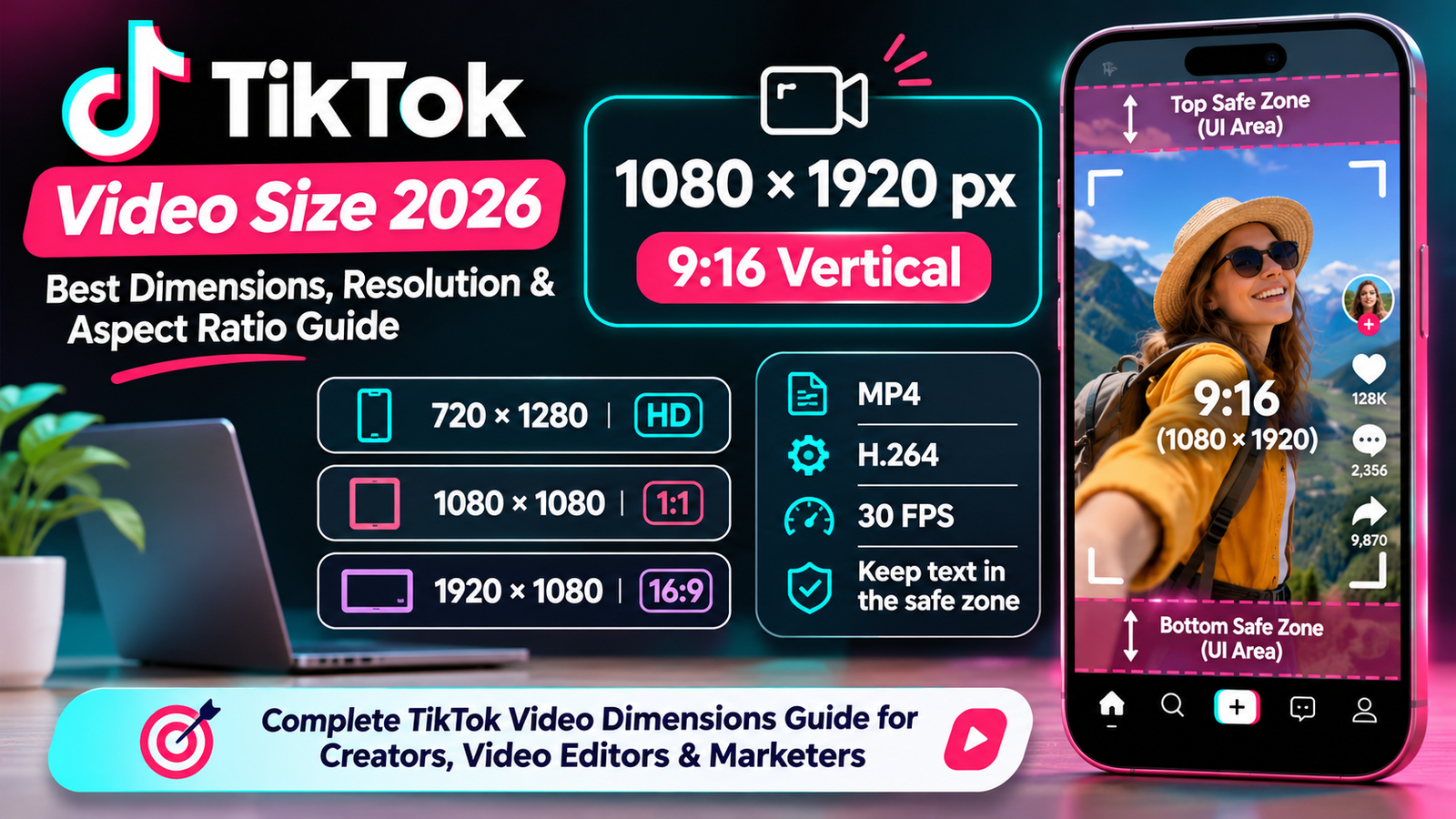
Creating high-quality TikTok videos requires more than interesting ideas, trending sounds, and creative editing. The dimensions, resolution, aspect ratio, and export settings of your videos also play an important role in how your content appears on the platform.
Whether you are a TikTok creator, influencer, video editor, social media manager, or business owner, using the correct TikTok video dimensions can help your videos look professional and fit the mobile screen properly.
Have you ever uploaded a TikTok video only to discover unwanted black bars, blurry visuals, cropped text, or an incorrectly positioned subject? These issues can occur when your original video does not match the dimensions or aspect ratio of the intended placement.
TikTok is primarily designed around vertical, full-screen video content. This is why a vertical video measuring 1080 × 1920 pixels, with a 9:16 aspect ratio, is generally the best starting point for creating regular TikTok videos.
However, TikTok supports additional video formats, resolutions, and publishing options. The right settings can depend on whether you are creating an organic video, an advertisement, or content that will be shared across multiple social media platforms.
In this complete guide, you will learn the recommended TikTok video size, dimensions, aspect ratios, resolution requirements, supported formats, and video export settings.
You will also discover the correct dimensions for TikTok covers, practical editing tips, safe-zone recommendations, common mistakes, and ways to resize videos without losing important visual details.
Whether you use CapCut, Adobe Premiere Pro, Canva, or another video editing application, this guide will help you prepare videos that look clear and properly formatted before uploading.
What Are TikTok Video Dimensions?
TikTok video dimensions refer to the width and height of a video, measured in pixels.
These measurements determine the shape and resolution of your video.
For example, a video measuring 1080 × 1920 pixels has:
A width of 1080 pixels.
A height of 1920 pixels.
A vertical orientation.
A 9:16 aspect ratio.
This is the commonly recommended format for regular TikTok videos because it fills the smartphone screen in portrait orientation.
Other video dimensions are also possible.
A square video uses a 1:1 aspect ratio, while a horizontal video generally uses a 16:9 aspect ratio.
However, these formats do not provide the same full-screen vertical presentation as a 9:16 video.
Understanding the difference between resolution, dimensions, and aspect ratio is important.
Video dimensions describe the pixel width and height of a video.
Resolution describes the number of pixels used to represent the video image.
Aspect ratio describes the proportional relationship between its width and height.
For example, 1080 × 1920 and 720 × 1280 have different resolutions but share the same 9:16 aspect ratio.
This means both videos have the same general shape, although the 1080 × 1920 version contains more pixels.
TikTok Video Size 2026: Complete Dimensions Chart
Before creating a TikTok video, it is helpful to understand the recommended dimensions for different formats.
Here is a practical reference chart.
| TikTok Video Format | Dimensions | Aspect Ratio | Recommended Use |
| Standard vertical video | 1080 × 1920 px | 9:16 | Regular TikTok videos |
| Square video | 1080 × 1080 px | 1:1 | Square social content |
| Horizontal video | 1920 × 1080 px | 16:9 | Landscape footage |
| HD vertical video | 720 × 1280 px | 9:16 | Smaller HD files |
| Vertical advertisement | 1080 × 1920 px | 9:16 | Full-screen video ads |
| Video cover canvas | 1080 × 1920 px | 9:16 | Designing Reel-style vertical thumbnails |
| Profile image reference | 200 × 200 px | 1:1 | Practical square profile design |
These are recommended working dimensions, not one universal set of mandatory settings for every TikTok placement.
TikTok’s official advertising specifications accept vertical, horizontal, and square advertising creatives with different minimum dimensions. Its Content Posting API also specifies technical upload restrictions that are separate from the recommended canvas size.
For most regular creators, 1080 × 1920 pixels remains a reliable starting point.
1. Best TikTok Video Size: 1080 × 1920 Pixels
Aspect ratio: 9:16
The recommended TikTok video size is 1080 pixels wide by 1920 pixels tall.
This creates a vertical video with a 9:16 aspect ratio.
It is designed for smartphone screens and allows your content to fill the screen when viewed in portrait orientation.
For most creators, this is the best default setting when recording, editing, and exporting TikTok videos.
Recommended TikTok Video Specifications
| Specification | Recommended Setting |
| Width | 1080 pixels |
| Height | 1920 pixels |
| Aspect Ratio | 9:16 |
| Resolution | Full HD (1080p) |
| Orientation | Vertical |
| Video Format | MP4 |
| Video Codec | H.264 |
| Frame Rate | 30 FPS |
| Audio Format | AAC |
MP4 with H.264 is a practical export combination for general video editing and uploading.
TikTok’s Content Posting API also supports MOV and WebM containers and additional video codecs.
Why Is 1080 × 1920 the Best TikTok Video Size?
There are several reasons why creators commonly choose this format.
1. Full-screen mobile viewing
A 9:16 video matches the portrait orientation of modern smartphones.
This provides a more immersive viewing experience.
2. Better content framing
Vertical videos provide sufficient space for people, products, demonstrations, and other subjects.
3. More room for mobile-first storytelling
You can arrange your subject, background, captions, and visual elements around a tall screen.
4. Suitable for different content niches
The format works well for travel videos, product demonstrations, tutorials, entertainment, fitness videos, educational content, and many other categories.
5. Easier cross-platform publishing
A 1080 × 1920 vertical video can also be adapted for Instagram Reels and YouTube Shorts.
You may still need to adjust captions, branding, and platform-specific features before reusing the same video.
2. TikTok Square Video Size (1080 × 1080 Pixels)
Aspect ratio: 1:1
Square videos use equal width and height.
A commonly used square canvas is 1080 × 1080 pixels.
Although TikTok is designed around vertical viewing, square videos may be accepted in certain publishing and advertising contexts.
However, a square video does not fill the entire vertical smartphone screen in the same way as a 9:16 video.
Recommended Square Video Dimensions
| Specification | Details |
| Width | 1080 pixels |
| Height | 1080 pixels |
| Aspect Ratio | 1:1 |
| Orientation | Square |
| Best Use | Repurposed square video content |
When Should You Use Square Videos?
Square videos can be useful when repurposing content that was originally created for other social platforms.
For example, an ecommerce business may already have square product videos prepared for its website or social media campaigns.
A square video can preserve its original composition without requiring substantial cropping.
However, if your main objective is to create a full-screen TikTok experience, vertical video is generally a better option.
Advantages of Square Videos
Useful for existing square content.
Suitable for centered product demonstrations.
Convenient for certain advertising workflows.
Can be reused across other social platforms.
Disadvantages of Square Videos
Do not fill the entire vertical screen.
May leave empty space around the video.
Provide less vertical room for text and demonstrations.
May look less native than full-screen vertical content.
Before using square videos, preview how they appear in your intended TikTok placement.
3. TikTok Landscape Video Size (1920 × 1080 Pixels)
Aspect ratio: 16:9
Landscape videos are wider than they are tall.
A common Full HD landscape video measures 1920 × 1080 pixels and uses a 16:9 aspect ratio.
This format is popular for traditional video production, desktop video content, tutorials, presentations, and camera-recorded footage.
TikTok supports horizontal video formats in certain publishing and advertising contexts.
However, landscape videos generally occupy less vertical screen space than 9:16 videos.
Recommended Landscape Video Dimensions
| Specification | Details |
| Width | 1920 pixels |
| Height | 1080 pixels |
| Aspect Ratio | 16:9 |
| Orientation | Horizontal |
| Best Use | Landscape footage and repurposed video |
When Should You Use Landscape Videos on TikTok?
Landscape footage can be useful when the original scene requires a wide frame.
For example:
Wide landscape photography.
Group demonstrations.
Gaming recordings.
Traditional camera footage.
Desktop tutorials.
Existing YouTube videos.
Imagine you have a landscape video showing a wide mountain range.
Cropping it into a vertical frame might remove important details from the left and right sides.
In such cases, retaining the horizontal format may preserve the original composition.
However, you should understand that TikTok is primarily a mobile-first platform, and a horizontal video will not provide the same full-screen effect as vertical content.
Should You Convert Landscape Videos to Vertical?
It depends on the original footage.
Converting a landscape video into a vertical format may work well when the main subject stays near the center.
For example, a person speaking directly to the camera can often be repositioned within a vertical crop.
However, wide scenes, group recordings, and videos containing several important subjects may lose information when cropped.
Instead of automatically converting every video, review the composition and decide whether a crop, background extension, or original landscape presentation is better.
4. TikTok Vertical Video Size (720 × 1280 Pixels)
Aspect ratio: 9:16
Another common vertical video resolution is 720 × 1280 pixels.
This format uses the same 9:16 aspect ratio as a 1080 × 1920 video.
The main difference is the number of pixels.
A 720 × 1280 video contains fewer pixels than a 1080 × 1920 video, but both share the same general shape.
Recommended Specifications
| Specification | Details |
| Width | 720 pixels |
| Height | 1280 pixels |
| Aspect Ratio | 9:16 |
| Resolution | HD |
| Orientation | Vertical |
Is 720 × 1280 Good for TikTok?
720 × 1280 can be suitable when you need a smaller HD vertical video.
For example, it may be useful when working with limited storage, slower upload connections, or existing HD footage.
However, if you are creating new content and your device supports Full HD recording, 1080 × 1920 is generally a better starting point.
TikTok’s business creative guidance recommends video resolution of at least 720p for advertising creative.
Always review the quality after uploading because platform processing can change how the final video appears.
5. TikTok Video Aspect Ratio Explained
Aspect ratio describes the proportional relationship between the width and height of a video.
It determines whether your video appears vertical, square, or horizontal.
Understanding aspect ratios helps you choose the correct video layout before editing.
Common TikTok Video Aspect Ratios
| Aspect Ratio | Orientation | Example Dimensions |
| 9:16 | Vertical | 1080 × 1920 |
| 1:1 | Square | 1080 × 1080 |
| 16:9 | Horizontal | 1920 × 1080 |
| 4:5 | Portrait | 1080 × 1350 |
The 9:16 format is the preferred choice for standard full-screen vertical TikTok content.
What Does 9:16 Mean?
A 9:16 ratio means that for every nine units of width, the video has sixteen units of height.
This produces a taller-than-wide image.
For example:
1080 ÷ 9 = 120
1920 ÷ 16 = 120
Both dimensions use the same proportional scale, producing a 9:16 image.
This is why 1080 × 1920 and 720 × 1280 both have the same aspect ratio.
Why Does Aspect Ratio Matter?
The wrong aspect ratio can cause:
Unwanted black bars.
Cropped video content.
Poor subject positioning.
Smaller viewing areas.
Hidden text and graphics.
Inconsistent presentation.
Choosing the correct ratio before editing helps you avoid unnecessary resizing.
6. TikTok Video Resolution: 720p vs. 1080p vs. 4K
Resolution determines the number of pixels used to represent your video.
Higher pixel dimensions can provide more visual detail, but video quality also depends on several other factors.
These include:
Camera quality.
Lighting.
Focus.
Bitrate.
Compression.
Export settings.
Original recording quality.
Here is a comparison of common video resolutions.
| Resolution | Example Vertical Dimensions | Quality Category |
| 480p | 480 × 854 | Standard definition |
| 720p | 720 × 1280 | HD |
| 1080p | 1080 × 1920 | Full HD |
| 1440p | 1440 × 2560 | Quad HD |
| 2160p | 2160 × 3840 | 4K UHD |
720p TikTok Videos
720p videos can be suitable for basic content.
They use fewer pixels than 1080p videos and may be easier to upload when bandwidth or storage is limited.
However, fine details and small text may not look as sharp as they do in higher-resolution footage.
1080p TikTok Videos
1080p is a practical resolution for most creators.
It provides a good balance between image detail, file size, and editing convenience.
For standard vertical TikTok content, use 1080 × 1920 pixels.
4K TikTok Videos
Some smartphones and cameras can record vertical footage in 4K.
Recording in 4K may provide additional detail and flexibility when cropping or reframing footage.
For example, you could record a vertical 4K video and export a 1080 × 1920 version.
This can be useful during editing, especially when you need to make small adjustments to framing.
However, uploading a larger 4K file does not automatically guarantee a better-looking result after platform processing.
TikTok’s Content Posting API documentation lists a maximum dimension of 4096 pixels for both width and height, but that is an API restriction and should not be interpreted as a recommendation to upload every video in 4K.
Which Resolution Should You Choose?
For most users, 1080 × 1920 is a suitable default.
Choose 720p when a smaller file is more practical.
Consider recording in 4K when you need additional editing flexibility and have sufficient storage and processing power.
7. TikTok Video File Formats: MP4 vs. MOV vs. WebM
The file format determines how a video is stored and packaged.
TikTok supports different video formats, but MP4 is a practical choice for regular video exports.
MP4 Format
MP4 is commonly used for social media videos.
It works with a wide range of devices and video editing applications.
Advantages include:
Broad software compatibility.
Convenient file management.
Support for common video codecs.
Suitable for social media publishing.
For a typical TikTok workflow, MP4 with H.264 video is a good starting point.
MOV Format
MOV is commonly associated with Apple video workflows.
It can preserve high-quality footage and is supported by TikTok’s Content Posting API.
However, exported MOV files can be larger depending on the codec and settings.
WebM Format
WebM is another supported format in TikTok’s Content Posting API.
It is commonly used for web-based media workflows.
For most beginners, MP4 is easier to work with because it is widely supported by video editors and mobile devices.
Supported TikTok Video Formats
TikTok’s official Content Posting API lists:
MP4.
WebM.
MOV.
It also supports several codecs, including H.264, H.265, VP8, and VP9.
The API recommends MP4 and H.264.
These are technical API specifications. Other publishing methods and ad placements may have their own supported-format lists.
8. Best TikTok Video Export Settings
Correct dimensions are only one part of preparing a high-quality TikTok video.
You should also select suitable export settings.
These settings affect visual clarity, motion, compatibility, and file size.
Recommended TikTok Export Settings
| Setting | Recommended Choice |
| Resolution | 1080 × 1920 px |
| Aspect Ratio | 9:16 |
| Container | MP4 |
| Video Codec | H.264 |
| Frame Rate | 30 FPS |
| Audio Codec | AAC |
| Orientation | Vertical |
| Quality | High |
| Color | Standard SDR workflow where practical |
These are practical recommendations for a typical editing workflow, not a requirement that every TikTok upload use identical export settings.
1. Resolution
Set your video project to 1080 × 1920 pixels.
This creates a Full HD vertical video suitable for standard TikTok content.
2. Frame Rate
A frame rate determines how many individual frames appear each second.
Common options include:
24 FPS.
25 FPS.
30 FPS.
50 FPS.
60 FPS.
For general TikTok content, 30 FPS is a practical choice.
For sports, fast movement, and certain action recordings, 60 FPS may be useful.
TikTok’s Content Posting API lists a supported frame-rate range of 23 to 60 FPS.
3. Video Codec
H.264 is a widely supported video codec.
It provides practical compression and compatibility for common social media workflows.
Choose H.264 when exporting a standard MP4 video.
4. Audio Settings
Clear audio improves the viewing experience.
Use appropriate audio settings for your workflow and check that:
Voice recordings are understandable.
Background music is not excessively loud.
Music and narration are properly balanced.
There is no unwanted background noise.
Audio remains synchronized with the video.
The exact audio export options depend on your editing software and source recording.
5. Export Quality
Choose a high-quality export setting.
Avoid excessive compression because it can introduce visible artifacts, especially in detailed footage, gradients, and text overlays.
Review the exported file before uploading.
9. TikTok Video File Size and Upload Restrictions
Video file size matters because larger files can take longer to upload and may be more difficult to manage.
However, file-size limits vary according to the publishing method.
For example, TikTok’s Content Posting API and TikTok Ads Manager specify different restrictions.
TikTok Content Posting API Restrictions
TikTok’s official Content Posting API documentation currently lists the following video restrictions:
| Technical Requirement | API Specification |
| Recommended Format | MP4 |
| Other Supported Formats | WebM, MOV |
| Recommended Codec | H.264 |
| Other Supported Codecs | H.265, VP8, VP9 |
| Minimum Frame Rate | 23 FPS |
| Maximum Frame Rate | 60 FPS |
| Minimum Width and Height | 360 pixels each |
| Maximum Width and Height | 4096 pixels each |
| Maximum Video Size | 4 GB |
| Developer Upload Endpoint Duration | Up to 10 minutes |
The same documentation states that all TikTok creators can post videos of up to three minutes, while some accounts have access to five-minute or ten-minute publishing durations.
The developer upload endpoint’s ten-minute limit should not be confused with the maximum duration available to every TikTok account.
Your account’s own publishing interface and permissions determine the actual duration available to you.
TikTok In-Feed Video Ad Restrictions
Advertising specifications are different from organic posting requirements.
TikTok’s June 2026 auction in-feed ad documentation lists:
| Ad Format | Minimum Dimensions | Aspect Ratio |
| Vertical | 540 × 960 px | 9:16 |
| Horizontal | 960 × 540 px | 16:9 |
| Square | 640 × 640 px | 1:1 |
For non-Spark in-feed ads, the documentation also lists:
Supported video formats: MP4, MOV, MPEG, 3GP, and AVI.
Maximum duration: 10 minutes.
Maximum file size: 500 MB.
Minimum listed bitrate: 516 kbps.
Always check the current specifications of your particular advertising placement before exporting campaign videos.
Do not use the organic publishing API’s 4 GB maximum as the file-size limit for TikTok ads.
10. TikTok Video Length: How Long Can a TikTok Video Be?
Video dimensions are important, but creators should also understand TikTok’s video-duration rules.
The available duration can depend on how the video is created, uploaded, or published.
TikTok’s Content Posting API documentation states that all creators can post videos up to three minutes, while some have access to five-minute or ten-minute videos.
The API’s developer upload endpoint allows a video of up to ten minutes to be sent, but the platform may require users to trim the video according to their account’s actual publishing limit.
For TikTok ads, the restrictions are different.
For example, the June 2026 non-Spark in-feed auction ad specifications list a maximum duration of ten minutes.
Should You Create Short or Long TikTok Videos?
There is no single duration that works for every topic.
A short tutorial may need only 20 seconds, while a detailed product demonstration may require more time.
Consider the following examples:
| Content Type | Possible Duration |
| Quick Tip | 15–30 seconds |
| Product Demonstration | 30–60 seconds |
| Short Tutorial | 30–90 seconds |
| Educational Explanation | 60–180 seconds |
| Detailed Storytelling | Depends on the topic |
These are creative planning examples, not guaranteed platform performance benchmarks.
The best duration is the amount of time needed to communicate your message clearly.
Avoid extending a video simply to make it longer.
11. TikTok Video Safe Zones: Where Should You Place Text?
One of the most important parts of TikTok video design is understanding safe zones.
TikTok displays interface elements over videos.
These can include:
Profile information.
Captions.
Account names.
Like buttons.
Comment buttons.
Share buttons.
Audio information.
Other interactive controls.
If you place important text or visual elements in these areas, they may be partially hidden.
This can make your video harder to understand.
What Is a TikTok Safe Zone?
A safe zone is an area where important video elements are less likely to be covered by interface controls.
For example, if you create a tutorial with text instructions, you should position the main instructions within the central area of the video.
Avoid placing essential information too close to the right edge, where interactive buttons typically appear.
Also leave room near the bottom for captions and other interface elements.
TikTok Safe-Zone Design Tips
Keep headlines near the upper-middle area.
Avoid placing your headline directly against the top edge.
Keep important text away from the right side.
The interactive controls can cover text located along the right edge.
Avoid placing important information at the bottom.
Captions and other interface elements may overlap with this area.
Keep faces and products visible.
When demonstrating a product, make sure its important details are not covered by interface elements.
Preview your video before publishing.
The exact interface layout can vary with the device, placement, and additional features.
TikTok provides downloadable safe-zone templates for advertising creatives. These should be used when preparing ads because safe areas depend on the selected placement and creative setup.
For organic videos, previewing your final design inside the TikTok app is a practical way to check the placement of your text and graphics.
12. TikTok Video Cover and Thumbnail Size
A TikTok video cover is the thumbnail associated with your video.
It helps viewers identify a video before opening it and contributes to the appearance of your profile.
A good cover should communicate the subject quickly.
For example, a cooking creator might use a cover displaying the finished dish and a short recipe title.
A fitness creator could use a cover that introduces the exercise demonstrated in the video.
Recommended TikTok Cover Design Canvas
A 1080 × 1920 pixel vertical design is a practical starting point for creating a full-height TikTok video cover.
It matches the overall 9:16 video canvas.
However, remember that a cover may appear in different crops across TikTok.
Cover Design Tips
Use a clear headline.
Select an image that represents the video.
Keep important elements near the center.
Avoid tiny text.
Use consistent colors and fonts.
Preview the cover on your profile.
Avoid placing important information close to the edges.
Why Does a TikTok Cover Matter?
A recognizable cover can help organize your profile and explain what a video contains.
For example, a creator publishing a series of tutorials could use a consistent cover design.
This allows viewers to understand the topics covered in each video.
13. How to Resize Videos for TikTok Without Cropping
Sometimes, your original video will not match TikTok’s recommended 9:16 dimensions.
For example, you might have a 1920 × 1080 landscape video recorded for YouTube.
If you directly crop it into a vertical format, important content may disappear.
There are several ways to solve this problem.
Method 1: Crop the Video
Cropping removes part of the original video to fit a new aspect ratio.
This approach works well when the main subject remains near the center.
For example, a person speaking directly into the camera can often be placed within a vertical crop.
However, cropping may remove other important details.
Method 2: Add a Blurred Background
You can place your original video in the center of a 9:16 canvas and use an enlarged, blurred version of the same footage as the background.
This keeps the original scene visible without removing important details.
It is a common method for adapting landscape content to vertical formats.
Method 3: Add Background Space
Instead of using a blurred background, create a solid or branded background.
You can place your landscape video in the middle and use the remaining space for a headline or other supporting information.
Make sure the design does not become overcrowded.
Method 4: Reframe the Video
Some editing applications provide automatic subject tracking or reframing features.
These tools can help keep the main subject within the vertical frame as the video progresses.
However, automated cropping should always be reviewed manually.
Method 5: Use an Online Video Resizer
An online video resizer can help you convert videos to different aspect ratios.
Depending on the tool, you may be able to:
Upload an original video.
Select a 9:16 format.
Adjust the crop.
Add background space.
Preview the result.
Export the resized file.
This is useful for people who need to prepare several videos for social media.
14. How to Create TikTok Videos in CapCut
CapCut is a popular video editing application for creating vertical social media content.
You can use it to prepare videos specifically for TikTok.
Here is a simple workflow.
Step 1: Open CapCut
Launch CapCut on your computer or smartphone.
Create a new project.
Step 2: Import Your Video
Select the footage you want to edit.
Make sure the original video has sufficient quality.
Step 3: Select the Aspect Ratio
Open the Ratio or Canvas settings.
Choose 9:16 for a standard TikTok video.
Step 4: Adjust Your Footage
Fit your video inside the vertical canvas.
If your original footage is horizontal, decide whether to crop it, reposition the subject, or add a background.
Step 5: Add Text and Captions
Add relevant text, titles, and subtitles.
Keep important information away from the right edge and bottom interface areas.
Step 6: Adjust the Audio
Check the voice recording, background music, and other audio elements.
Make sure the spoken content is understandable.
Step 7: Export the Video
Choose a suitable export configuration.
A practical setting is:
Resolution: 1080p.
Frame rate: 30 FPS.
Format: MP4.
Video codec: H.264 when available.
Step 8: Preview and Upload
Play the exported video from beginning to end.
Check whether the text is readable and the image looks clear.
Then upload the video to TikTok and preview it within the app.
15. How to Export TikTok Videos in Adobe Premiere Pro
Adobe Premiere Pro provides detailed controls for video editing and export settings.
It is useful for creators who want more control over their video projects.
Step 1: Create a New Sequence
Open Premiere Pro and create a new sequence.
Set the frame size to:
Width: 1080 pixels.
Height: 1920 pixels.
This creates a vertical 9:16 project.
Step 2: Import Your Footage
Import your original video files.
Place the selected footage on the editing timeline.
Step 3: Adjust the Position and Scale
If your video is already vertical, check that it fits correctly.
If it is horizontal, adjust the scale and position.
Make sure the main subject remains visible.
Step 4: Add Graphics and Captions
Add your titles, subtitles, and graphical elements.
Position them within the visible safe area.
Step 5: Open Export Settings
Go to the Export panel.
Choose a suitable video format and output settings.
Step 6: Choose MP4 and H.264
Select H.264 as the export format when available.
This produces a commonly compatible MP4 video.
Step 7: Select Resolution and Frame Rate
Set the dimensions to 1080 × 1920 pixels.
Use a frame rate that matches your project, such as 30 FPS.
Step 8: Export and Review
Export your video and play the final file.
Check its resolution, aspect ratio, audio synchronization, and overall quality before uploading.
16. How to Create TikTok Videos Using Canva
Canva is another convenient option for creating vertical video graphics.
It can be useful for beginners, marketers, and people who regularly create promotional content.
Step 1: Open Canva
Sign in to Canva and select a video design.
Step 2: Choose Custom Dimensions
Create a custom canvas measuring 1080 × 1920 pixels.
Step 3: Upload Your Video
Upload the original footage or select relevant visual material.
Step 4: Adjust the Layout
Arrange your footage, headings, images, and supporting elements.
Keep the main subject within the visible area.
Step 5: Add Text and Branding
Include your brand name, subtitles, and other relevant information.
Use readable fonts and balanced colors.
Step 6: Download Your Video
Export the project as an MP4 video if the selected Canva plan and features support the required video export.
Review the downloaded file before posting.
17. TikTok Video Dimensions for Advertisements
TikTok advertisements have their own creative specifications.
These requirements should not be confused with the recommended dimensions for regular organic videos.
According to TikTok’s June 2026 auction in-feed ad specifications, non-Spark advertisements support three major aspect ratios.
| Advertising Format | Minimum Dimensions | Aspect Ratio |
| Vertical | 540 × 960 px | 9:16 |
| Horizontal | 960 × 540 px | 16:9 |
| Square | 640 × 640 px | 1:1 |
For non-Spark auction in-feed ads, TikTok also lists:
Supported formats: MP4, MOV, MPEG, 3GP, and AVI.
Maximum video duration: 10 minutes.
Maximum file size: 500 MB.
Minimum bitrate: 516 kbps.
Best Format for TikTok Ads
The 9:16 vertical format is the recommended option for full-screen creative.
It provides a more natural mobile presentation.
However, square and horizontal formats can be used in the advertising placements that support them.
TikTok Ad Safe Zones
For advertisements, safe-zone requirements depend on the aspect ratio, caption length, and selected interactive elements.
Make sure important text and logos remain within the relevant safe-zone template.
Review the advertisement using TikTok’s preview tools before launching a campaign.
This helps you identify possible cropping and interface-overlap issues.
18. Common TikTok Video Size Mistakes to Avoid
Even a creative video can look unprofessional if it is exported using unsuitable dimensions or settings.
Here are some common mistakes to avoid.
1. Using the Wrong Aspect Ratio
A horizontal video may not provide a full-screen viewing experience.
For regular vertical TikTok videos, use 9:16.
2. Uploading Low-Resolution Footage
Very low-resolution videos may appear blurry on larger mobile displays.
Whenever possible, start with high-quality original footage.
3. Placing Text Near Interface Buttons
Important text can become hidden behind the right-side controls or other interface elements.
Keep essential information inside the central safe area.
4. Exporting With Unnecessary Compression
Aggressive compression may create visible artifacts.
Use appropriate quality settings and review the final export.
5. Stretching a Video to Fit the Screen
Stretching horizontal footage into a vertical frame can distort the appearance of people and objects.
Instead, crop thoughtfully or add background space.
6. Ignoring Audio Quality
A video may have good visuals but still provide a poor experience if its audio is difficult to understand.
Check the narration, background music, and volume balance.
7. Forgetting the Cover Image
A poor cover may make a video difficult to recognize on your profile.
Choose a cover that communicates the subject clearly.
8. Ignoring Mobile Preview
A desktop editing preview does not always show how a video looks inside the TikTok interface.
Open the final video on a smartphone and review it before publishing.
19. Best Practices for High-Quality TikTok Videos
Correct dimensions provide a good foundation, but creating professional videos requires attention to the complete production process.
Here are useful practices for improving your video quality.
Record in Good Lighting
Lighting affects how clear and detailed your video looks.
Try to record in a well-lit environment.
Natural daylight can be useful for simple indoor recordings.
Keep Your Camera Stable
Unnecessary camera movement can make a video difficult to watch.
Use a tripod or stable surface when recording demonstrations, tutorials, or product videos.
Focus on Clear Framing
Keep your main subject visible.
Avoid cutting off important parts of a product, face, or demonstration.
Use Readable Captions
Captions help communicate your message, particularly when viewers cannot listen to audio.
Choose a readable font and appropriate contrast.
Create a Strong Opening
Introduce the topic early.
For example, a tutorial could begin by showing the result or explaining the problem it will solve.
Keep the Editing Consistent
Use transitions, subtitles, and effects only when they support the message.
Excessive effects can distract viewers from your actual content.
Review the Final Export
Watch the complete video before uploading.
Check for visual errors, black bars, incorrect positioning, audio issues, and unreadable text.
20. Frequently Asked Questions About TikTok Video Dimensions
1. What are the best TikTok video dimensions in 2026?
The recommended TikTok video dimensions are 1080 × 1920 pixels with a 9:16 vertical aspect ratio.
This format is designed for full-screen smartphone viewing and works well for regular TikTok videos.
2. What is the TikTok video aspect ratio?
The recommended aspect ratio for standard vertical TikTok videos is 9:16.
Other ratios, including 1:1 and 16:9, are supported in certain content and advertising contexts.
3. Is 1080 × 1920 the best TikTok video size?
Yes. It is a practical Full HD vertical video size for most creators.
It provides sufficient detail for standard mobile viewing while matching the platform’s vertical-first presentation.
4. Can I upload 4K videos to TikTok?
TikTok’s Content Posting API documentation permits dimensions of up to 4096 pixels for both width and height.
However, that is an API restriction rather than a universal recommendation for all upload methods.
For most creators, 1080 × 1920 is a practical export size.
5. Is 720p good enough for TikTok?
720p can be suitable for basic video content.
However, 1080p generally provides more visual detail and is a better starting point when your device and editing workflow support it.
6. What is the best TikTok video resolution?
1080 × 1920 pixels is the recommended working resolution for standard vertical videos.
It provides Full HD quality in a 9:16 format.
7. What is the recommended TikTok video frame rate?
30 FPS is a practical choice for general TikTok videos.
TikTok’s Content Posting API lists a supported frame-rate range from 23 FPS to 60 FPS.
Fast-motion footage may benefit from 60 FPS when the original recording supports it.
8. Is MP4 or MOV better for TikTok?
MP4 with H.264 is a practical option for most creators.
MOV is also supported by TikTok’s Content Posting API.
Choose a format compatible with your editing software and intended publishing method.
9. What is the best video format for TikTok?
MP4 is a convenient and widely supported format.
TikTok’s Content Posting API also accepts WebM and MOV.
H.264 is the recommended video codec in that documentation.
10. What is the maximum TikTok video file size?
TikTok’s Content Posting API lists a maximum video size of 4 GB.
However, TikTok Ads Manager uses separate advertising specifications. For non-Spark auction in-feed ads, the listed maximum is 500 MB.
Do not assume that every publishing method has the same limit.
11. How long can a TikTok video be?
TikTok’s Content Posting API documentation states that all creators can post videos of up to three minutes, while some accounts have access to five-minute or ten-minute videos.
The actual duration available depends on your account and publishing method.
12. Can I upload horizontal videos to TikTok?
Yes. Horizontal videos are supported in certain TikTok publishing and advertising contexts.
However, 16:9 horizontal videos do not provide the same full-screen vertical experience as 9:16 videos.
13. Why does my TikTok video have black bars?
Black bars can appear when your original video does not match the intended display area.
This commonly happens when uploading horizontal or square footage into a vertical layout.
You can solve this by cropping the video or placing it inside a 9:16 canvas with a background.
14. How do I resize a video to 9:16?
You can use CapCut, Adobe Premiere Pro, Canva, or an online video resizer.
Select a 9:16 canvas, adjust your original footage, position the subject, and export the final video at 1080 × 1920 pixels.
15. What is the best TikTok video size for CapCut?
Use 1080 × 1920 pixels with a 9:16 aspect ratio for a standard TikTok project in CapCut.
Exporting in MP4 at 30 FPS is a practical starting point.
16. What is the TikTok video cover size?
A 1080 × 1920 pixel vertical canvas is a practical design starting point for a full-height video cover.
Keep important text near the center because the cover may appear in differently cropped profile and video previews.
17. What are TikTok video safe zones?
Safe zones are areas where important text, logos, and subjects are less likely to be covered by TikTok interface elements.
Avoid placing important content too close to the right side or bottom edge.
For advertisements, use TikTok’s official placement-specific safe-zone templates.
18. Can I use the same video on TikTok and Instagram Reels?
Yes. A 1080 × 1920 video with a 9:16 aspect ratio is a useful common format for both platforms.
However, you should adapt captions, covers, music, and branding to each platform before publishing.
19. Does TikTok reduce video quality after uploading?
TikTok processes uploaded videos, and the final playback quality can differ from the original file.
Starting with high-quality footage, using appropriate export settings, and avoiding excessive compression can help preserve visual clarity.
20. Why is my TikTok video blurry after uploading?
Common reasons include low-resolution source footage, excessive compression, incorrect export settings, poor focus, and insufficient lighting.
Check your original footage and export quality before uploading again.
21. What is the best aspect ratio for TikTok ads?
TikTok recommends a vertical 9:16 aspect ratio for in-feed auction ads.
Its specifications also support 16:9 horizontal and 1:1 square formats for non-Spark ads.
22. Can I resize a YouTube video for TikTok?
Yes. You can adapt a horizontal YouTube video into a 9:16 format.
You may crop the original footage, use a blurred background, or reposition the subject.
Choose the method that preserves the important parts of the video.
23. Should I export TikTok videos at 30 FPS or 60 FPS?
Use 30 FPS for most everyday content.
Choose 60 FPS when your original footage contains fast motion and you want smoother playback.
Avoid exporting at 60 FPS simply to increase a technical number if your original footage was recorded at a lower frame rate.
24. Is vertical video better than horizontal video on TikTok?
For standard full-screen mobile content, vertical 9:16 video is generally the better choice.
Horizontal video can still be useful when preserving a wide composition is more important than filling the entire screen.
Final Thoughts
Choosing the correct TikTok video dimensions is an important part of creating professional short-form content.
The right resolution and aspect ratio can help your videos fit the screen, preserve important visual details, and look more consistent across different devices.
For most creators, 1080 × 1920 pixels with a 9:16 aspect ratio is the best starting point.
Use MP4 with H.264 for a practical export workflow, select a suitable frame rate, and keep important text and graphics away from TikTok’s interface elements.
Remember that standard organic posting, developer API publishing, and TikTok advertising can have different technical requirements.
Before publishing, check the actual upload options available to your account and preview the final video on a mobile device.
You do not need expensive equipment or complicated editing software to create good TikTok videos. A smartphone, clear lighting, thoughtful framing, and the correct export settings can provide a strong foundation.
Ready to prepare your next TikTok video?
Use our free Social Media Video Resizer to adjust your videos for TikTok’s vertical format, change aspect ratios, and prepare content for different social media platforms.
Create properly sized videos, check your final export, and publish with confidence.
Further Reading and Official References
TikTok for Developers: Media Transfer Guide and Video Restrictions.
TikTok for Business: Creative Quality Control Checklist.
TikTok for Business: Auction In-Feed Ads Specifications.
TikTok for Business: Top Tips for Making TikTok Videos.
Leave a Reply