Category: TikTok Tools

Explore free TikTok tools to generate hashtags, captions, usernames, calculate engagement rates and improve your TikTok growth.

  • TikTok Engagement Rate Calculator: Measure Your Performance

    TikTok Engagement Rate Calculator: Measure Your Performance

    TikTok Engagement Rate Calculator: Measure Your Performance

    Creating videos on TikTok is only one part of building a successful social media presence. Understanding how people interact with your videos is equally important. You might receive thousands of views on a video, but those views do not always translate into likes, comments, shares, or meaningful audience interactions.

    This is where a TikTok engagement rate calculator becomes useful.

    It helps you measure how effectively your content encourages viewers to interact with your videos. By entering your video views, likes, comments, shares, and other available engagement metrics, you can calculate an engagement percentage and better understand your content performance.

    Whether you are a TikTok creator, influencer, digital marketer, social media manager, small business owner, or brand representative, tracking engagement rate can help you make more informed content decisions.

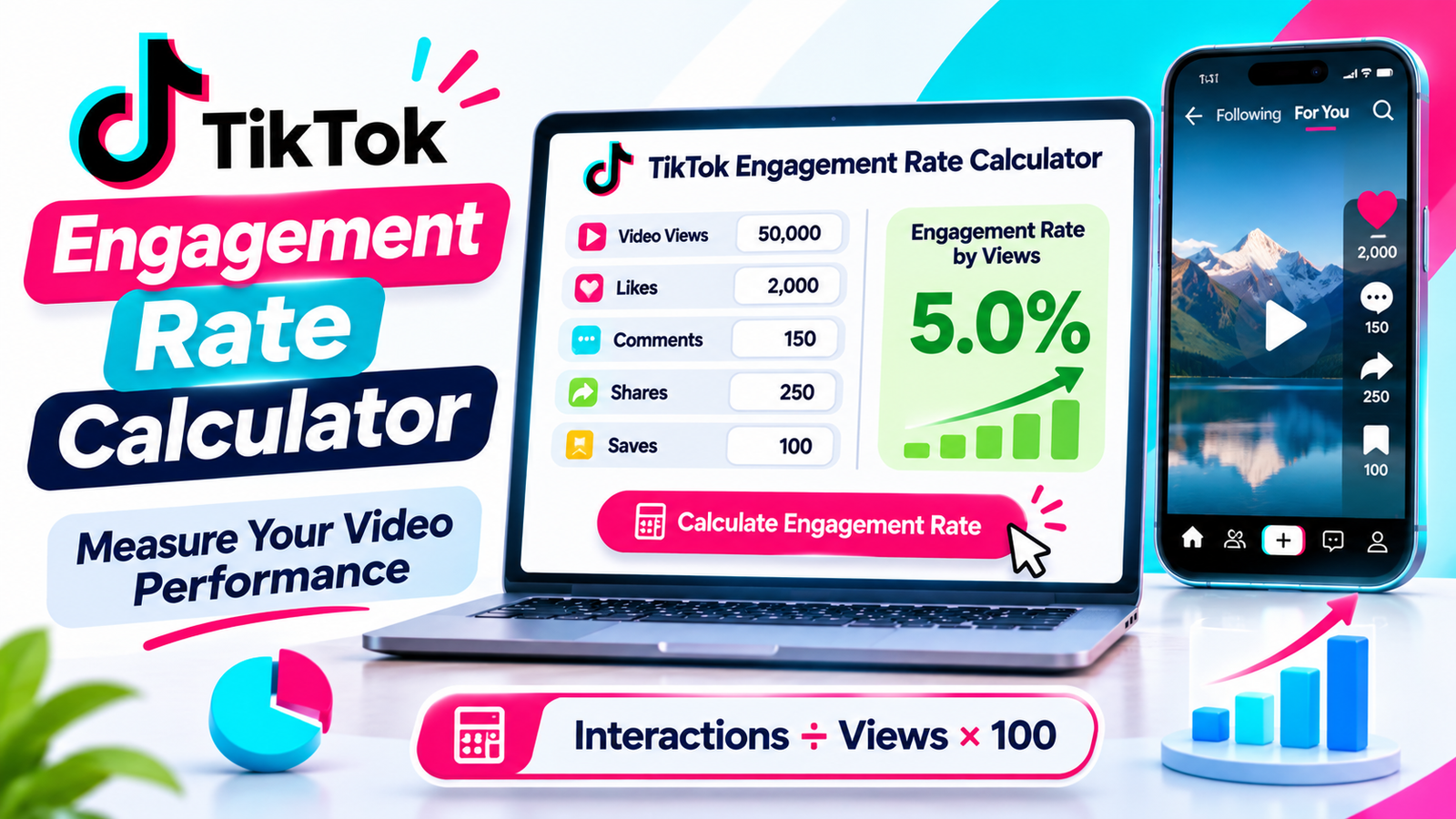
    For example, imagine that one of your TikTok videos receives 50,000 views, 2,000 likes, 100 comments, and 250 shares. Although the video has attracted significant attention, you still need to understand how many of those views resulted in active interactions.

    A TikTok engagement rate calculator helps turn these numbers into a percentage that is easier to evaluate and compare.

    In this complete guide, you will learn how to calculate TikTok engagement rate, understand the different formulas, use an online engagement calculator, interpret your results, and identify opportunities to improve your video performance.

    You will also discover current engagement benchmarks, practical examples for different industries, important TikTok analytics metrics, and common calculation mistakes to avoid.

    What Is a TikTok Engagement Rate Calculator?

    A TikTok engagement rate calculator is an online tool that measures the percentage of interactions generated by a TikTok video relative to a selected performance metric, such as video views or follower count.

    It helps you understand whether viewers are simply watching your content or actively interacting with it.

    Engagement usually includes actions such as:

    Likes.

    Comments.

    Shares.

    Saves or favorites, when included in the selected calculation method.

    The exact calculation depends on the formula used by the calculator.

    For example, a views-based engagement rate compares the total interactions on a video with its total views.

    A follower-based engagement rate compares interactions with the creator’s follower count.

    Both measurements can provide useful information, but they answer different questions.

    A free TikTok engagement rate calculator makes these calculations easier by allowing you to enter your available statistics and receive a result without manually performing the mathematical operations.

    Depending on the tool’s features, you may also be able to calculate average engagement across multiple videos, compare performance between posts, and evaluate different content strategies.

    The main purpose is simple: help you understand how effectively your TikTok content encourages audience interaction.

    Why Is TikTok Engagement Rate Important?

    Views and followers are useful performance indicators, but they do not explain everything about your TikTok account.

    A creator might have a large audience but receive relatively few comments or shares on individual videos.

    Another creator might have a smaller following but attract meaningful discussions and interactions.

    Engagement rate provides additional context by comparing audience interactions with views or another selected denominator.

    Here are several reasons why this metric matters.

    1. Measure Your Content Performance

    Engagement rate helps you understand whether viewers respond to your videos.

    For example, imagine two videos receive 20,000 views each.

    The first video receives 500 interactions, while the second receives 1,500 interactions.

    Although both videos receive the same number of views, their engagement rates are different.

    The second video generates more interactions relative to its views.

    This information can help you identify which topics, formats, and creative approaches deserve further testing.

    2. Understand Audience Interest

    People interact with videos for different reasons.

    A useful tutorial might receive many saves, while an entertaining video might generate more shares and comments.

    Reviewing these actions can help you understand which types of content your audience finds valuable.

    Instead of focusing only on views, you can look at the complete interaction pattern.

    3. Evaluate Influencer Performance

    Brands often examine engagement metrics when evaluating potential influencer partnerships.

    A creator’s follower count alone does not explain how actively their audience interacts with sponsored or organic content.

    Engagement rate can provide another way to evaluate a creator’s performance.

    However, it should not be used alone. Brands should also examine audience relevance, content quality, audience authenticity, average views, and campaign results.

    4. Compare Different TikTok Videos

    A calculator makes it easier to compare multiple videos using the same formula.

    For example, you might discover that educational tutorials generate a higher views-based engagement rate than general entertainment videos.

    You can use these observations to plan future content experiments.

    5. Identify Changes in Performance

    Your engagement rate may increase or decrease over time.

    These changes can indicate shifts in audience interest, content quality, video topics, or distribution.

    Monitoring performance consistently helps you notice patterns instead of reacting to the results of only one video.

    6. Make Better Content Decisions

    Engagement data can help creators identify which ideas deserve more attention.

    For example, if practical tutorials consistently generate comments and saves, you might test a series of related educational videos.

    If behind-the-scenes videos encourage more discussion, you could explore additional content in that format.

    Use the results as evidence for experimentation rather than assuming that the same approach will always work.

    7. Support Social Media Marketing Decisions

    Businesses can use TikTok engagement metrics alongside website visits, leads, purchases, and other campaign outcomes.

    A high engagement rate does not automatically mean a campaign generates sales.

    However, the metric can help businesses understand how viewers respond to their content.

    This makes it useful as one part of a wider marketing performance report.

    How to Use Our Free TikTok Engagement Rate Calculator

    Using a free TikTok engagement rate calculator is simple.

    You do not need advanced mathematical knowledge or professional analytics software to calculate your engagement percentage.

    Follow these steps.

    Step 1: Select Your TikTok Video

    Start by choosing the video you want to evaluate.

    You can calculate the performance of an individual video or prepare statistics for several videos if your calculator supports account-level analysis.

    For a single-video calculation, make sure all the numbers come from the same video.

    Step 2: Enter Your Video Views

    Enter the total number of views received by your selected TikTok video.

    For example:

    Video Views: 50,000

    Views are used as the denominator when calculating engagement rate by views.

    Step 3: Enter Your Total Likes

    Enter the number of likes received by the video.

    Likes provide one indication of how viewers respond to your content.

    For example:

    Likes: 2,000

    Step 4: Enter Your Comments

    Add the total number of comments received by the video.

    Comments can provide useful information about audience discussion and interest.

    For example:

    Comments: 150

    Step 5: Add Shares

    Enter the number of times the video was shared.

    Shares are particularly useful when evaluating whether viewers found a video interesting or relevant enough to pass along.

    For example:

    Shares: 250

    Step 6: Include Saves or Favorites

    If your calculator supports saves, enter the available number.

    Saves can indicate that someone wants to return to the video later.

    For example:

    Saves: 100

    Do not add a value for a metric you cannot reliably verify. Use the same interaction fields whenever you compare multiple videos.

    Step 7: Enter Your Follower Count if Needed

    If you want to calculate engagement relative to your audience size, enter your current follower count.

    For example:

    Followers: 10,000

    This is optional when calculating a views-based engagement rate.

    Step 8: Select the Calculation Method

    Choose whether you want to measure engagement relative to video views or followers.

    The views-based formula is generally more useful for understanding interaction relative to video consumption.

    The follower-based formula is useful for comparing interaction volume with account audience size.

    Step 9: Calculate Your Engagement Rate

    Select the Calculate button.

    The calculator uses your entered metrics to calculate the percentage.

    Review the result and record the formula used.

    Step 10: Use Your Result to Evaluate Performance

    Once you have your result, consider the content topic, audience, video format, and publishing period.

    Do not judge your entire account based on one video.

    Compare several videos using consistent formulas and observation periods to identify more reliable patterns.

    TikTok Engagement Rate Formula: How to Calculate It

    Understanding the formula behind your calculator helps you interpret the result correctly.

    There is no single universally standardized TikTok engagement rate formula for every reporting purpose.

    However, engagement rate by views is a widely used approach for evaluating TikTok video performance.

    1. Engagement Rate by Views

    The views-based formula measures total interactions relative to video views.

    Formula:

    Engagement Rate by Views = (Likes + Comments + Shares + Saves) ÷ Video Views × 100

    This formula is useful when you want to understand how many interactions a video generated relative to its views.

    For example, suppose your TikTok video receives:

    MetricResult
    Video Views50,000
    Likes2,000
    Comments150
    Shares250
    Saves100

    First, calculate total engagement:

    2,000 + 150 + 250 + 100 = 2,500

    Next, divide total interactions by video views:

    2,500 ÷ 50,000 = 0.05

    Finally, multiply by 100:

    0.05 × 100 = 5%

    Example Result: 5% Engagement Rate by Views

    This means the video generated interactions equivalent to 5% of its total view count.

    It does not mean that exactly 5% of unique viewers interacted with the video. Views can include repeat plays, depending on how the platform counts them.

    2. Engagement Rate by Followers

    Another commonly used formula measures interactions relative to your follower count.

    This approach can help evaluate how a video performs in relation to the size of your existing audience.

    Formula:

    Engagement Rate by Followers = (Likes + Comments + Shares + Saves) ÷ Followers × 100

    For example, imagine the following account statistics:

    MetricResult
    Followers10,000
    Likes2,000
    Comments150
    Shares250
    Saves100

    First, calculate total interactions:

    2,000 + 150 + 250 + 100 = 2,500

    Now divide by followers:

    2,500 ÷ 10,000 = 0.25

    Multiply by 100:

    0.25 × 100 = 25%

    Example Result: 25% Follower-Based Engagement Rate

    This means interactions on the selected video are equivalent to 25% of the account’s follower count.

    It does not mean that 25% of your followers necessarily interacted with the video.

    A video may also reach many people who do not follow the account, which is why follower-based and views-based rates can produce very different results.

    3. Engagement Rate by Reach

    Some analytics systems provide a reach metric representing the number of unique accounts that viewed content.

    When reliable reach data is available, you can use it as another denominator.

    Formula:

    Engagement Rate by Reach = Total Interactions ÷ Accounts Reached × 100

    For example:

    Total interactions: 2,500

    Accounts reached: 40,000

    Calculation:

    2,500 ÷ 40,000 × 100 = 6.25%

    Example Result: 6.25% Reach-Based Engagement Rate

    This measurement compares interactions with unique accounts reached rather than total video plays.

    Use this method only when you have access to a suitable reach figure for the same video and reporting period.

    Which Formula Should You Use?

    The best formula depends on your objective.

    FormulaDenominatorBest Use
    Engagement by ViewsVideo viewsMeasuring video interaction
    Engagement by FollowersFollower countComparing audience-size-based performance
    Engagement by ReachUnique accounts reachedMeasuring interactions relative to reach

    For most TikTok video performance reviews, engagement rate by views is a practical starting point.

    For influencer comparisons, follower-based engagement may also be useful.

    Always label the formula when sharing results with clients or comparing accounts.

    What Counts as Engagement on TikTok?

    Not every TikTok metric should be included in an engagement rate calculation.

    Understanding which interactions count is important because different calculators may use different formulas.

    Let’s look at the most common engagement metrics.

    1. Likes

    Likes are one of the most visible forms of interaction.

    When viewers appreciate your video, they may tap the Like button.

    For example, a travel creator might receive likes on a destination video because viewers enjoy the scenery.

    Likes can help indicate audience response, but they do not explain every aspect of video performance.

    2. Comments

    Comments represent written responses from viewers.

    They can include questions, opinions, feedback, and conversations about the content.

    For example, a cooking creator might receive comments asking about ingredients or preparation methods.

    Comments can reveal the topics viewers want to discuss.

    3. Shares

    Shares occur when viewers send or share your video with other people.

    A useful tutorial, entertaining video, or informative demonstration may encourage viewers to share it.

    Shares are worth tracking because they provide a different form of interaction from likes.

    4. Saves or Favorites

    Favorites allow viewers to save videos for later.

    For example, someone might save a fitness workout, recipe, educational tutorial, or product guide.

    When the metric is available, saves can provide additional information about the usefulness of your content.

    However, not every reporting system includes saves in its engagement calculation.

    5. Views

    Views measure video playback activity.

    They are especially important when calculating engagement by views.

    However, views are the denominator in this formula, not an additional engagement interaction.

    Adding views to likes, comments, shares, and saves would incorrectly mix exposure with interaction.

    6. New Followers

    A video may generate new followers.

    This is a useful growth metric, but follower acquisition is usually better measured separately from engagement rate.

    For example, you could calculate follow conversion by dividing new followers attributed to a video by its views, then multiplying by 100, when reliable video-level follow data is available.

    7. Profile Visits

    Profile visits show that viewers took an additional step after discovering your content.

    They are useful for understanding interest in your account, but they should generally be tracked as a separate profile-conversion metric.

    Important: For a consistent views-based calculation, use likes, comments, shares, and saves if available. Do not add views to the interaction total or switch between including and excluding saves when comparing results over time.

    What Is a Good TikTok Engagement Rate in 2026?

    One of the most common questions among creators is whether their TikTok engagement rate is good, average, or low.

    The answer depends on several factors, including:

    Account size.

    Industry.

    Content format.

    Audience interests.

    Video topic.

    Calculation method.

    Observation period.

    There is no single percentage that guarantees good performance for every account.

    A useful starting point is the latest available industry benchmark.

    2026 TikTok Engagement Benchmark

    Socialinsider’s 2026 TikTok benchmark report provides a useful reference for views-based engagement.

    Its quarterly update reports an average TikTok engagement rate by views of 3.90% in Q3 2026, based on its analysis of approximately 40.7 million videos from 257,000 TikTok brand accounts.

    The study’s views-based calculation includes likes, comments, shares, and saves divided by video views.

    This is a benchmark for the particular dataset and methodology, not a guarantee of what every creator should achieve.

    The report also provides 2025 engagement rates by follower-size category:

    TikTok Account Size2025 Engagement by Views
    1K–5K followers4.40%
    5K–10K followers4.00%
    10K–50K followers3.90%
    50K–100K followers3.75%
    100K–1M followers3.95%

    These figures illustrate why comparing accounts of different sizes can require additional context.

    The report focuses on organic brand posts and does not represent every personal creator or industry.

    Is a 1% TikTok Engagement Rate Good?

    A 1% result may be worth investigating, but it cannot be judged accurately without knowing the formula and account category.

    If the rate is calculated by views, compare it with relevant views-based benchmarks and your own historical results.

    If it is calculated by followers, use follower-based benchmarks instead.

    Never compare a follower-based rate directly with a views-based rate.

    Is a 3% TikTok Engagement Rate Good?

    A 3% views-based engagement rate can be a useful result.

    It is close to the 3.90% Q3 2026 views-based benchmark reported by Socialinsider.

    However, the comparison depends on the creator’s niche, account type, and interaction-counting method.

    Is a 5% TikTok Engagement Rate Good?

    A 5% views-based rate is above the 3.90% Q3 2026 reference point from Socialinsider.

    That can indicate positive interaction relative to views.

    However, one unusually successful video does not necessarily establish your normal account performance.

    Review several comparable posts before making a long-term judgment.

    Why Do Engagement Benchmarks Differ?

    Different research companies use different datasets and measurement methods.

    Some use followers as the denominator, while others use views.

    They may also include different interaction types, reporting periods, industries, and account sizes.

    For this reason, always read the methodology behind a benchmark before comparing it with your own calculator result.

    TikTok Engagement Rate Examples for Different Creators

    Understanding formulas becomes easier when you see how they work in different situations.

    Below are practical examples.

    These figures are illustrative calculations, not industry benchmark claims.

    Example 1: Small TikTok Creator

    Imagine a creator with 5,000 followers publishes a video that receives:

    Views: 10,000

    Likes: 600

    Comments: 40

    Shares: 60

    Saves: 50

    Total interactions:

    600 + 40 + 60 + 50 = 750

    Views-based engagement:

    750 ÷ 10,000 × 100 = 7.5%

    The video has a 7.5% engagement rate by views.

    Example 2: Fitness Influencer

    A fitness influencer publishes a workout tutorial.

    The video receives:

    Views: 80,000

    Likes: 3,200

    Comments: 160

    Shares: 320

    Saves: 320

    Total interactions:

    3,200 + 160 + 320 + 320 = 4,000

    Views-based engagement:

    4,000 ÷ 80,000 × 100 = 5%

    The result is a 5% engagement rate by views.

    For a fitness creator, saves may also be a useful supporting metric because viewers might want to revisit a workout tutorial.

    Example 3: Food Creator

    A food creator publishes a simple recipe video.

    The video receives:

    Views: 40,000

    Likes: 1,500

    Comments: 100

    Shares: 200

    Saves: 200

    Total interactions:

    1,500 + 100 + 200 + 200 = 2,000

    Views-based engagement:

    2,000 ÷ 40,000 × 100 = 5%

    The result is a 5% engagement rate by views.

    Example 4: Business Account

    A small business publishes a product demonstration.

    The video receives:

    Views: 100,000

    Likes: 2,500

    Comments: 150

    Shares: 250

    Saves: 100

    Total interactions:

    2,500 + 150 + 250 + 100 = 3,000

    Views-based engagement:

    3,000 ÷ 100,000 × 100 = 3%

    The business can review this result alongside product clicks, website traffic, enquiries, and sales.

    A 3% engagement rate does not automatically indicate a successful sales campaign.

    It measures interaction relative to video views, not purchases.

    Example 5: Entertainment Creator

    An entertainment creator shares a funny video.

    The video receives:

    Views: 250,000

    Likes: 12,000

    Comments: 800

    Shares: 1,200

    Saves: 500

    Total interactions:

    12,000 + 800 + 1,200 + 500 = 14,500

    Views-based engagement:

    14,500 ÷ 250,000 × 100 = 5.8%

    The creator can compare this video with other entertainment videos to understand whether similar themes generate consistent audience interaction.

    How to Find Your TikTok Engagement Statistics

    Before calculating your engagement rate, you need accurate performance data.

    TikTok provides analytics tools that allow creators and businesses to review content performance.

    The exact interface can vary with account type, app version, and region.

    Step 1: Open TikTok

    Launch the TikTok application.

    Make sure you are logged into the account you want to evaluate.

    Step 2: Visit Your Profile

    Tap Profile at the bottom of the screen.

    This opens your account page.

    Step 3: Open TikTok Studio

    Tap the menu button in the upper-right corner.

    Select TikTok Studio.

    Step 4: Open Analytics

    Find the Analytics section and open it.

    The available sections may include overview, content, audience, or other performance categories.

    Step 5: Review Individual Video Performance

    Select the video you want to evaluate.

    Open its analytics or More insights section, depending on the interface.

    Review the available information, including video views and engagement metrics.

    Step 6: Record Your Statistics

    For your views-based calculation, record the metrics included in your chosen formula:

    Likes.

    Comments.

    Shares.

    Saves, if available.

    Total video views.

    Use the same video and observation period for all the values.

    Step 7: Enter the Numbers Into the Calculator

    Open the TikTok engagement rate calculator.

    Enter the required statistics and calculate your result.

    Keep a record of the result so that you can compare it with future videos.

    Why Should You Track TikTok Engagement Over Time?

    Calculating engagement once can be useful, but regular tracking provides more meaningful information.

    A single video may perform unusually well because of its subject, timing, or distribution.

    Looking at multiple videos helps you understand whether the result represents a consistent pattern.

    1. Compare Weekly Performance

    Review your latest videos once a week.

    Record views, likes, comments, shares, saves, and engagement rates.

    This allows you to identify changes in performance.

    2. Compare Monthly Results

    A monthly review can provide a broader view of your content strategy.

    You might discover that certain content categories consistently generate more interactions.

    3. Identify Your Best Content Format

    Compare tutorials, demonstrations, entertainment videos, educational posts, and behind-the-scenes content.

    Look for formats that produce meaningful audience responses.

    4. Review Audience Growth

    Track how many followers your videos generate alongside their engagement rates.

    A video can receive a high engagement rate without generating many new followers.

    Likewise, a viral video may attract many views without converting viewers into long-term followers.

    5. Use Consistent Measurement Methods

    Always use the same formula when comparing results.

    If one month’s report includes saves and another does not, the comparison may become misleading.

    Consistency is essential for meaningful tracking.

    How to Improve Your TikTok Engagement Rate

    Calculating your engagement rate is only the beginning.

    The next step is understanding what your audience responds to and using that information to improve future videos.

    Here are practical approaches to consider.

    1. Create an Interesting Opening

    The opening moments of a video should help viewers understand why they should continue watching.

    Instead of beginning with a long introduction, show the main result, introduce a question, or explain the problem your video addresses.

    For example, a cooking creator could start by showing the completed recipe.

    A fitness creator could demonstrate the final exercise result before explaining the steps.

    The opening should match the actual content rather than making exaggerated promises.

    2. Understand Your Target Audience

    Create videos that address your audience’s interests, questions, and problems.

    For example:

    A fitness audience may appreciate workout demonstrations.

    A food audience may prefer practical recipes.

    A technology audience may want useful tutorials and product explanations.

    Understanding audience interests can help you choose more relevant topics.

    3. Encourage Meaningful Comments

    Ask questions that are naturally connected to your video.

    For example:

    “Which recipe would you try first?”

    “Have you used this editing technique before?”

    “Which destination should we explore next?”

    Avoid repeatedly asking generic questions that do not add value.

    4. Create Useful and Shareable Content

    People may share videos that are informative, entertaining, relatable, or useful.

    Think about what someone would gain by sending your video to a friend.

    Examples include:

    Quick tutorials.

    Helpful demonstrations.

    Practical tips.

    Interesting discoveries.

    Creative ideas.

    Relatable experiences.

    Focus on providing value rather than asking viewers to share every video.

    5. Reply to Relevant Comments

    Responding to genuine questions can help maintain conversations.

    If someone asks how you created a particular video, consider explaining the process.

    You can also turn common questions into future video ideas.

    6. Experiment With Different Video Formats

    Try different content formats within your niche.

    For example:

    A business could test product demonstrations, customer questions, behind-the-scenes videos, and educational content.

    A creator could experiment with tutorials, storytelling, and short explanatory videos.

    Compare the results using the same engagement calculation method.

    7. Use Clear Captions

    Your caption should provide useful context.

    A short description can explain the subject and help viewers understand what the video contains.

    Avoid writing captions that repeat the entire video without adding anything useful.

    8. Use Relevant Hashtags

    Choose hashtags that accurately describe the topic of your video.

    Avoid using unrelated tags simply because they seem popular.

    A hashtag generator can help you brainstorm ideas, but review the final selection before publishing.

    9. Maintain Consistent Content Quality

    Consistency does not mean publishing videos without considering quality.

    Prepare a manageable publishing schedule that allows enough time for planning, recording, and editing.

    It is better to maintain a realistic schedule than to publish additional videos that do not provide value.

    10. Study Watch Time and Video Completion

    Engagement rate is only one performance measure.

    Average watch time and completion rate can help you understand whether viewers continue watching.

    If viewers leave very early, review the opening and overall structure.

    If they watch most of the video but rarely interact, consider whether the content encourages a natural response.

    11. Experiment With Video Length

    Different topics require different amounts of explanation.

    A short tip may need only a few seconds, while a detailed tutorial may require a longer video.

    Test different lengths and review performance rather than assuming that all videos should have the same duration.

    12. Learn From Your Best-Performing Videos

    Identify videos that perform consistently well.

    Review their:

    Topics.

    Opening hooks.

    Visual presentation.

    Video length.

    Captions.

    Audience response.

    Interaction patterns.

    Use these observations to create new experiments without simply duplicating the same content.

    13. Avoid Artificial Engagement

    Buying followers, likes, or automated comments may make account statistics less meaningful.

    Artificial interactions also create risks for your account and undermine the reliability of performance reporting.

    Focus on genuine audience interest instead.

    14. Review Analytics Regularly

    Use TikTok Studio to monitor available video metrics.

    Compare views, interactions, watch time, and audience information.

    Do not depend on engagement rate alone when evaluating overall performance.

    TikTok Engagement Rate Calculator vs. Manual Calculation

    You can calculate engagement rate manually using a basic mathematical formula.

    However, an online calculator can make repeated calculations more convenient.

    FeatureManual CalculationOnline Calculator
    Calculate total interactionsManualAutomatic if supported
    Calculate percentageManualAutomatic
    Compare multiple videosRequires a recordDepends on the tool
    Check follower-based rateManualDepends on the tool
    Save resultsSeparate documentDepends on the tool
    Time requiredMore effortUsually quicker
    Mathematical knowledgeBasic arithmeticMinimal

    Manual calculations are useful when evaluating one or two videos.

    An online TikTok engagement rate calculator is more convenient when you regularly review content or compare multiple performance results.

    The best approach is to use a calculator for the mathematics while keeping a consistent record of the original metrics.

    Common TikTok Engagement Rate Calculation Mistakes

    Even when using an accurate calculator, incorrect input values can produce misleading results.

    Here are some common mistakes to avoid.

    1. Using the Wrong Denominator

    The views-based and follower-based formulas measure different things.

    Do not use views in one calculation and followers in another while treating the results as directly comparable.

    2. Adding Views to Total Engagement

    Views represent video exposure, not an interaction in the standard views-based formula.

    The numerator should contain the selected interaction metrics.

    3. Counting Saves Inconsistently

    Some methods include saves, while others use likes, comments, and shares only.

    Choose a consistent method and label it clearly.

    4. Using Statistics From Different Videos

    All values should relate to the same video when calculating an individual video’s engagement rate.

    Combining likes from one video with views from another produces an incorrect result.

    5. Comparing Different Reporting Periods

    A video measured after one day may have fewer interactions than the same video measured after two weeks.

    Allow a consistent observation window when comparing posts.

    6. Confusing Views With Unique Viewers

    Video views are not necessarily the same as the number of unique individuals who watched the video.

    Repeated plays can affect the views-based calculation.

    7. Looking Only at One Video

    One unusually successful or unsuccessful video may not represent your normal content performance.

    Compare a reasonable group of recent posts.

    8. Ignoring Account Size

    Follower count can influence comparisons between accounts.

    When evaluating creators, consider both follower-based and views-based engagement where appropriate.

    9. Treating a High Rate as Guaranteed Business Success

    A high engagement rate does not automatically mean a video produces sales or leads.

    Track conversions separately when evaluating business results.

    10. Ignoring the Original Data

    A calculator cannot independently verify your TikTok statistics unless it connects to an authorized data source.

    The accuracy of a manually entered result depends on the numbers you provide.

    How to Calculate Average TikTok Engagement Rate Across Multiple Videos

    Calculating engagement for a single video is useful, but creators often need to evaluate their overall account performance.

    There are two common ways to calculate an average across several videos.

    Method 1: Average the Individual Video Rates

    First, calculate the views-based engagement rate for each video.

    Then add the individual rates and divide by the number of videos.

    Formula:

    Average Engagement Rate = Sum of Individual Video Engagement Rates ÷ Number of Videos

    For example:

    VideoEngagement Rate
    Video 14%
    Video 25%
    Video 36%

    Calculation:

    (4% + 5% + 6%) ÷ 3 = 5%

    The average engagement rate across the three videos is 5%.

    This method gives each video equal weight, regardless of how many views it received.

    Method 2: Calculate a Combined Engagement Rate

    You can also combine all interactions and all views across the selected videos.

    Formula:

    Combined Engagement Rate = Total Interactions Across Videos ÷ Total Views Across Videos × 100

    For example:

    VideoViewsInteractions
    Video 110,000500
    Video 220,000800
    Video 370,0002,100
    Total100,0003,400

    Calculation:

    3,400 ÷ 100,000 × 100 = 3.4%

    The combined engagement rate is 3.4%.

    Which Method Is Better?

    Neither method is universally better.

    The arithmetic average gives every video the same importance.

    The combined calculation gives more weight to videos with more views.

    For account-level reporting, label which method you used and apply it consistently.

    Do not compare an arithmetic average with a combined rate as though they were identical measurements.

    How Businesses and Brands Can Use TikTok Engagement Rate

    TikTok engagement rate is useful for businesses because it provides additional context about audience interaction.

    However, businesses should connect engagement data with their actual marketing goals.

    For Ecommerce Businesses

    Online stores can use engagement rate to evaluate product demonstrations, product comparisons, and educational videos.

    For example, a clothing store might compare videos showing different styling ideas.

    The business can review interaction rates alongside product clicks and purchases.

    For Influencer Marketing

    Brands can calculate engagement rates when comparing creators for potential partnerships.

    They should also examine audience quality, content relevance, average views, historical sponsorship performance, and campaign objectives.

    For Local Businesses

    Restaurants, salons, fitness studios, and local shops can evaluate the response to their TikTok content.

    A restaurant might compare recipe videos, food demonstrations, and customer experiences.

    The business can use these findings to guide future content planning.

    For Digital Marketing Agencies

    Agencies may manage several TikTok accounts simultaneously.

    A consistent engagement reporting method makes it easier to compare results across clients and campaigns.

    However, different industries should be evaluated using suitable benchmarks.

    For Personal Brands

    Coaches, educators, consultants, and professional creators can use engagement data to understand whether their content connects with their intended audience.

    They can also track profile visits, enquiries, and other actions separately.

    Frequently Asked Questions About TikTok Engagement Rate Calculator

    1. What is a TikTok engagement rate calculator?

    A TikTok engagement rate calculator is an online tool that measures audience interactions relative to video views or follower count.

    It helps creators and businesses understand how effectively their content encourages likes, comments, shares, and saves.

    2. Is there a free TikTok engagement rate calculator?

    Yes. You can use a free TikTok engagement rate calculator to calculate your engagement percentage using available video statistics.

    Enter the required metrics, select the calculation method, and review the result.

    3. How do I calculate my TikTok engagement rate?

    For a common views-based calculation, add likes, comments, shares, and saves if available.

    Divide the total interactions by video views and multiply by 100.

    For example, 2,500 interactions on 50,000 views produce a 5% engagement rate.

    4. What is the TikTok engagement rate formula?

    A commonly used formula is:

    Engagement Rate by Views = (Likes + Comments + Shares + Saves) ÷ Views × 100.

    Some calculators use a follower-based formula instead.

    Always check the calculation method before comparing results.

    5. What is a good TikTok engagement rate?

    There is no universal engagement rate that applies to every account.

    Socialinsider reported a 3.90% average views-based engagement rate for Q3 2026 in its brand-account dataset.

    However, your own industry, account size, and calculation method should be considered when interpreting the result.

    6. Is a 5% TikTok engagement rate good?

    A 5% views-based engagement rate is above the 3.90% Q3 2026 reference point reported by Socialinsider.

    It may indicate positive interaction relative to video views.

    Compare several videos before treating it as your normal account performance.

    7. Does TikTok provide an official engagement rate?

    TikTok provides analytics and interaction metrics, but there is no single universally standardized engagement-rate formula used for every reporting purpose.

    Creators and third-party tools calculate engagement using selected metrics and denominators.

    8. Do views count as engagement?

    Views indicate video playback and are generally used as the denominator in a views-based engagement rate.

    They should not be added to likes, comments, shares, or saves when calculating the interaction total.

    9. Do saves count toward TikTok engagement rate?

    Some engagement-rate formulas include saves or favorites, while others do not.

    If you include them, use the same definition whenever you compare videos.

    10. Should I calculate engagement by views or followers?

    Use views when evaluating how viewers interact with a video.

    Use followers when comparing interactions with account audience size.

    The correct method depends on your reporting objective.

    11. Can I calculate engagement rate for one TikTok video?

    Yes. You can calculate the engagement rate of an individual video using its own views and interaction statistics.

    Make sure every input belongs to the same video.

    12. Can I calculate average engagement rate for my TikTok account?

    Yes. You can calculate an average across individual video rates or combine total interactions and total views across several videos.

    These methods produce different results, so identify the method you choose.

    13. Why is my TikTok engagement rate low?

    A lower rate may reflect differences in audience interest, content topics, video format, views, or interaction patterns.

    Review several videos and compare similar content before deciding what needs improvement.

    14. Does a higher TikTok engagement rate mean more followers?

    Not necessarily.

    Engagement rate measures interactions relative to a selected denominator.

    Follower growth is a separate outcome. Track new followers alongside your engagement results.

    15. Does engagement rate affect TikTok video performance?

    Engagement metrics provide useful information about how audiences respond to content.

    However, TikTok recommendations involve multiple factors. Engagement rate alone does not determine whether a video will be recommended.

    16. How often should I calculate TikTok engagement rate?

    For regular content reviews, calculating engagement weekly or monthly can help identify patterns.

    Use consistent reporting periods and compare similar types of videos.

    17. Can brands use a TikTok engagement rate calculator?

    Yes. Brands can use it to evaluate content performance and compare creators.

    They should also examine audience relevance, authenticity, campaign results, and business outcomes.

    18. Can I use an engagement rate calculator for influencer marketing?

    Yes. It can help evaluate how much interaction a creator receives relative to views or followers.

    However, engagement rate should be considered alongside average video views, audience quality, niche relevance, and previous sponsored content performance.

    19. Why do different TikTok calculators show different results?

    Calculators may use different formulas, interaction types, and denominators.

    One may include saves, while another counts only likes, comments, and shares.

    Others may divide engagement by views or followers.

    Compare the formulas before comparing the percentages.

    20. Can a viral TikTok video have a low engagement rate?

    Yes. A video may receive a large number of views but a relatively small number of interactions.

    This can result in a lower views-based engagement rate even when the video has significant reach.

    21. Does TikTok engagement rate include profile visits?

    Profile visits are generally tracked separately from standard video engagement calculations.

    They can provide additional information about whether viewers are interested in exploring your account.

    22. Can I improve TikTok engagement without buying followers?

    Yes. Focus on relevant content, clear video openings, useful information, audience interaction, and consistent experimentation.

    Artificial followers and interactions do not provide a reliable foundation for measuring genuine audience interest.

    23. What is the difference between engagement rate and engagement count?

    Engagement count represents the total number of selected interactions.

    Engagement rate expresses those interactions as a percentage of views, followers, or another selected denominator.

    For example, 2,500 interactions on 50,000 views produce a 5% views-based rate.

    24. Can I compare TikTok engagement with Instagram engagement?

    You can compare engagement metrics across platforms, but the formulas, audiences, and platform behaviors may differ.

    Use clearly labeled formulas and appropriate industry benchmarks to avoid misleading comparisons.

    25. Is a TikTok engagement rate calculator useful for beginners?

    Absolutely. Beginners can use an online calculator to understand basic performance metrics without manually performing calculations.

    It is a practical way to learn how views, likes, comments, shares, and saves relate to one another.

    Final Thoughts

    Understanding how people interact with your TikTok videos is an important part of building a more effective content strategy.

    A TikTok engagement rate calculator helps you measure audience interaction relative to video views or follower count, giving you a clearer picture of how your content performs.

    Whether you are a beginner, influencer, business owner, or professional marketer, calculating engagement can help you identify useful content patterns, compare video performance, and make more informed decisions.

    Remember to select the right formula, enter accurate statistics, and use consistent measurement methods.

    Do not focus only on one video or a single percentage. Review your results over time and consider other important metrics such as watch time, completion rate, audience growth, and conversions.

    Most importantly, concentrate on creating original and relevant videos that give viewers a reason to interact.

    Ready to measure your TikTok performance?

    Try our free TikTok engagement rate calculator, enter your video statistics, and discover how effectively your content engages its audience.

    Further Reading and Research Sources

    TikTok Newsroom – TikTok Analytics.

    TikTok Help Center – Comment Insights on TikTok.

    Hootsuite – How to Boost TikTok Engagement: Tips and Free Calculator.

    Hootsuite – How to Calculate Engagement Rate in 2026.

    Socialinsider – 2026 TikTok Engagement Benchmarks.

    Search Engine Land – TikTok Engagement Rate Calculator and Formulas.
  • TikTok Bio Generator: Create a Short and Catchy Profile Bio for Any Niche

    TikTok Bio Generator: Create a Short and Catchy Profile Bio for Any Niche

    TikTok Bio Generator: Create a Short and Catchy Profile Bio for Any Niche

    Your TikTok profile is often the first place people visit when they want to learn more about you. After watching one of your videos, a potential follower may open your profile to discover what type of content you create, what your account offers, and why they should follow you.

    This is where your TikTok bio becomes important.

    A well-written bio can introduce your personality, explain your content niche, highlight your business, and give visitors a reason to explore your videos.

    However, writing a short and memorable profile description is not always easy. You have very limited space to communicate your message, especially when you want to include emojis, keywords, a business description, or a call to action.

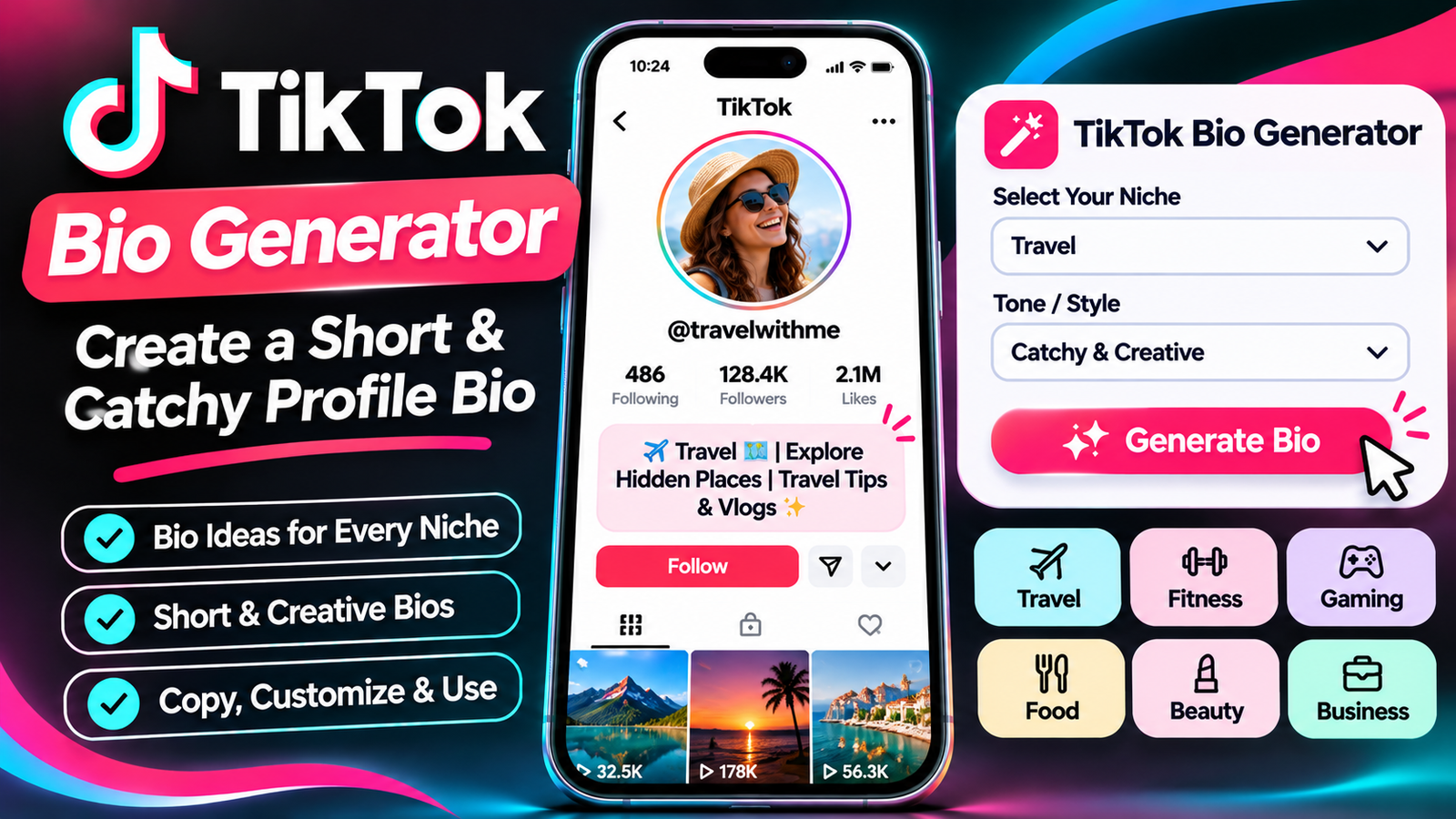
    A TikTok bio generator makes this process easier by helping you create short, creative, and attractive profile descriptions based on your niche, personality, or account purpose.

    Whether you are a content creator, influencer, gamer, entrepreneur, photographer, fitness enthusiast, or small business owner, a free TikTok bio generator can help you discover different bio ideas without spending hours writing them manually.

    For example, a travel creator might want a bio that communicates adventure and destination inspiration, while a fitness coach may prefer a description that highlights workout tips and healthy living.

    Similarly, an online business may need a professional bio that explains its products and encourages potential customers to explore its profile.

    In this guide, you will learn how to use a TikTok bio generator, understand the TikTok bio character limit, discover creative bio ideas for different niches, and learn how to write a short profile description that represents your account.

    You will also find practical examples, profile optimization tips, common mistakes to avoid, and answers to frequently asked questions.

    What Is a TikTok Bio Generator?

    A TikTok bio generator is an online writing tool that helps users create short profile descriptions for their TikTok accounts.

    Instead of starting from a blank text box, you can provide information about your account, interests, business, or content niche and explore suitable bio ideas.

    The purpose of the tool is to make bio writing faster and easier.

    For example, imagine that you run a TikTok account where you publish travel videos, destination guides, and photography content.

    You could enter keywords such as:

    Travel creator

    Adventure

    Photography

    Exploring new places

    Travel inspiration

    A TikTok bio generator can use these details to suggest short profile descriptions that reflect your content.

    Some generators also allow users to explore different writing styles, including funny, professional, aesthetic, creative, minimalist, and motivational bios.

    Depending on the tool’s features, you may be able to generate ideas for:

    Personal TikTok bios.

    Creator profile bios.

    Business account bios.

    Funny TikTok bios.

    Aesthetic TikTok bios.

    Professional profile descriptions.

    Gaming bios.

    Fitness bios.

    Travel bios.

    Influencer bios.

    You can review the suggestions, select your favorite, customize the wording, and add it to your TikTok profile.

    A generator provides ideas, but your final bio should accurately represent who you are and what visitors can expect from your account.

    Why Should You Use a Free TikTok Bio Generator?

    Creating a professional profile description may seem like a small task, but it can take more time than expected.

    You might write several versions, change the wording, remove unnecessary information, and try different emojis before finding a suitable option.

    A free TikTok bio generator can simplify this process.

    Here are some practical reasons to use one.

    1. Save Time When Writing a Bio

    Writing a short bio from scratch can be challenging.

    You might know exactly what your account is about but struggle to explain it in a few words.

    A generator gives you a starting point by producing ideas based on your selected niche and keywords.

    Instead of creating every sentence yourself, you can review different options and choose the one that communicates your message.

    2. Discover Creative Bio Ideas

    Sometimes, the biggest difficulty is finding inspiration.

    You may want a bio that sounds different from other accounts in your niche.

    A bio generator can help you explore alternative wording, creative descriptions, and different tones.

    For example, instead of writing:

    “I post fitness videos.”

    You could use a more descriptive version:

    “Helping you move better, train smarter, and stay consistent.”

    The second description communicates more personality and provides a clearer idea of the content.

    3. Create Short and Catchy Bios

    TikTok bios have limited space.

    You cannot write a long introduction explaining your complete background, business history, or content strategy.

    You need to focus on the most important information.

    A TikTok bio generator can help you explore shorter descriptions that communicate your account’s purpose.

    4. Find Ideas for Different Niches

    A general bio may not be suitable for every account.

    A gaming creator needs a different writing style from a business owner or travel influencer.

    A generator can help you discover niche-specific ideas.

    For example:

    Fitness accounts can emphasize workouts and healthy living.

    Food accounts can describe recipes and cooking content.

    Travel accounts can highlight destinations and adventures.

    Business accounts can communicate products and services.

    Educational accounts can introduce the knowledge they share.

    5. Improve Your Profile Presentation

    Your bio is one part of your overall profile.

    When combined with a recognizable profile picture, suitable username, and consistent video content, it can help make your account easier to understand.

    A clear description tells visitors what they can expect before they scroll through your videos.

    6. Experiment With Different Writing Styles

    A bio generator can help you compare several approaches.

    You might prefer a professional introduction for a business account, while a personal creator profile may benefit from a relaxed and humorous tone.

    Testing different versions helps you find wording that fits your identity.

    7. Useful for Beginners and Experienced Creators

    You do not need professional copywriting experience to create a good TikTok bio.

    Beginners can use a generator for inspiration, while experienced creators can use it to explore new ways of communicating their content.

    The main objective is to create a description that is short, clear, relevant, and memorable.

    How to Use Our Free TikTok Bio Generator

    Using a TikTok bio generator is a straightforward process.

    You only need a few details about your account to begin exploring bio ideas.

    Follow these steps to create a profile description.

    Step 1: Identify Your TikTok Niche

    First, decide what your account is about.

    Your niche is the main subject or category of content you publish.

    For example, your account might focus on:

    Travel and adventure.

    Fitness and workouts.

    Food and recipes.

    Fashion and styling.

    Beauty and skincare.

    Gaming and entertainment.

    Business and entrepreneurship.

    Photography and videography.

    Education and learning.

    Lifestyle and daily routines.

    Choosing a clear niche makes it easier to create a bio that matches your content.

    Step 2: Enter Your Keywords

    Think about the words that best describe your account.

    For example, a travel creator could enter:

    “Travel, adventure, destinations, photography.”

    A fitness creator might enter:

    “Fitness, workout tips, healthy lifestyle, motivation.”

    Keywords help establish the main subject of your bio.

    Choose descriptive terms rather than adding unrelated popular words.

    Step 3: Choose Your Preferred Bio Style

    Depending on the generator, you may be able to select a writing style.

    Common styles include:

    Professional.

    Funny.

    Cute.

    Aesthetic.

    Minimalist.

    Creative.

    Motivational.

    Inspirational.

    Friendly.

    Business-focused.

    Choose the style that matches your personality and audience.

    For example, a personal entertainment account may use a humorous bio, while a professional business account may prefer a clear and informative description.

    Step 4: Generate Bio Ideas

    After entering your niche and relevant keywords, select the Generate option.

    The generator can provide bio suggestions based on the information you entered.

    Review the results carefully.

    Look for a description that communicates your account’s purpose without sounding confusing or unnecessarily complicated.

    Step 5: Customize Your Favorite Bio

    You do not have to use a generated bio exactly as written.

    Change the wording to match your personality or brand.

    You can add:

    Your name or brand identity.

    Your content category.

    A special interest.

    A short description.

    A relevant emoji.

    A call to action.

    For example:

    “Fitness tips for everyday life.”

    Could become:

    “💪 Simple fitness tips | Stronger every day.”

    The revised version communicates the topic while giving the profile a more personal style.

    Step 6: Check the Character Limit

    Before adding your bio to TikTok, check the total character count.

    TikTok’s Help Center documentation states that bios cannot exceed 80 characters.

    Your letters, spaces, punctuation, and emojis all contribute to the available space.

    Some emoji combinations can contain multiple underlying characters, so the app’s own bio counter should be treated as the final check.

    Step 7: Copy and Paste Your Bio

    Once you are satisfied with the result, copy your selected bio.

    Open TikTok, visit your profile, and select Edit profile.

    Find the Bio field and paste your text.

    Review the final result and save the changes.

    Your updated bio should now appear on your profile.

    What Is the TikTok Bio Character Limit?

    One of the most important things to understand before writing a profile description is the available character allowance.

    TikTok’s Help Center states that a bio cannot exceed 80 characters.

    This means you need to communicate your main message using a limited number of characters.

    For many people, 80 characters may sound sufficient.

    However, when you include emojis, spaces, punctuation, and descriptive phrases, the available space can disappear quickly.

    TikTok Bio Character Limit Explained

    Bio ElementUses Character Space?
    LettersYes
    NumbersYes
    SpacesYes
    PunctuationYes
    EmojisYes
    SymbolsYes
    Hashtag textYes
    Line breaksYes

    For example:

    “Travel lover | Sharing adventures ✈️”

    This short description introduces a travel-related account while keeping the message simple.

    However, remember that emoji sequences may be counted differently by some tools and interfaces.

    Always check the final version using TikTok’s own bio field before saving it.

    How to Write a Bio Within 80 Characters

    The easiest way to stay within the available space is to focus on three important elements:

    What your account is about.

    What type of content people can expect.

    Why someone might want to follow you.

    For example:

    “Easy recipes 🍳 | Simple meals for busy days.”

    This description communicates the content category and its intended audience.

    You do not need to explain everything about your account.

    A short and understandable description is usually more useful than a complicated introduction.

    What If Your Bio Is Longer Than 80 Characters?

    If your profile description exceeds the supported limit, TikTok may prevent you from saving it.

    To shorten your bio:

    Remove unnecessary words.

    Replace long phrases with shorter expressions.

    Remove repetitive information.

    Use fewer emojis.

    Focus on one primary content topic.

    Check the result again.

    You can also use an online TikTok character counter before pasting the final version into your profile.

    What Makes a Good TikTok Bio?

    A good TikTok bio should be short, understandable, and connected to your account.

    It should give visitors a quick idea of what they can expect from your content.

    However, creating an effective bio involves more than adding a few keywords.

    Here are the main qualities of a strong profile description.

    1. Clear and Understandable

    Your bio should explain the purpose of your account without confusing visitors.

    For example:

    “Daily recipes and easy cooking tips.”

    This immediately tells visitors what type of content the account provides.

    Avoid descriptions that use too many unrelated phrases.

    2. Short and Memorable

    Because TikTok has a limited bio character allowance, every word should contribute to your message.

    Try to remove unnecessary expressions.

    For example:

    Long version:

    “I am a person who really enjoys creating and sharing interesting videos about traveling to different places.”

    Short version:

    “✈️ Exploring new places and sharing adventures.”

    The second option is easier to scan and more suitable for a short profile description.

    3. Relevant to Your Content

    Your bio should reflect the videos you actually publish.

    If your account focuses on fitness tutorials, a bio about cooking or travel may confuse visitors.

    Keep your profile description aligned with your content niche.

    4. Shows Your Personality

    A personal account does not need to sound like a business advertisement.

    You can use humor, creativity, interests, or an individual writing style.

    For example:

    “Living on coffee, creativity, and good vibes ☕”

    This communicates a more relaxed personality.

    5. Includes a Useful Call to Action

    A call to action encourages visitors to take a relevant next step.

    Examples include:

    Follow for daily tips.

    Explore my latest videos.

    Discover new recipes.

    Follow my fitness journey.

    Shop my collection.

    Choose a call to action that matches your account and the features available on your profile.

    6. Uses Emojis Naturally

    Emojis can make your bio more visually interesting.

    For example:

    “📸 Photography | 🌍 Travel | ✨ Creative moments”

    However, too many emojis can make the description difficult to understand.

    Use a few that support your message.

    7. Represents Your Brand Consistently

    For businesses and professional creators, the bio should match the overall brand presentation.

    Use a consistent tone across your profile picture, username, video covers, and profile description.

    This can help visitors recognize your content and understand your brand.

    Best TikTok Bio Ideas for Different Niches

    Choosing a bio becomes easier when you look at examples created for specific interests.

    Below are original TikTok bio ideas for different categories.

    You can use them as inspiration and customize them according to your account.

    1. TikTok Bio Ideas for Travel Creators

    Travel creators share destination videos, travel experiences, photography, and adventure content.

    Their bio can introduce their interest in exploring different places.

    Bio examples:

    ✈️ Exploring places and sharing adventures.

    🌍 Travel stories from around the world.

    📍 New destinations, unforgettable memories.

    Adventure seeker | Travel creator ✨

    🌎 Your daily dose of travel inspiration.

    Collecting memories, not things ✈️

    📸 Capturing beautiful places and moments.

    One trip at a time 🌍

    A good travel bio should reflect the destinations and experiences featured in your videos.

    2. TikTok Bio Ideas for Fitness Creators

    Fitness creators can use their bios to introduce their workouts, health interests, and motivational content.

    Bio examples:

    💪 Stronger every day.

    Fitness tips for everyday life.

    🏋️ Workout smarter, live healthier.

    Building strength one day at a time.

    Fitness | Motivation | Progress 🔥

    Helping beginners enjoy fitness.

    Your daily fitness inspiration 💪

    Progress over perfection.

    If you are a fitness professional, make sure your bio describes your actual qualifications and services accurately.

    3. TikTok Bio Ideas for Food Creators

    Food accounts can use their bios to introduce recipes, cooking tutorials, restaurant experiences, and food photography.

    Bio examples:

    🍳 Simple recipes, delicious moments.

    Sharing food worth remembering.

    🍕 Food lover | Recipe creator.

    Easy meals for busy days.

    Cooking with love and creativity ❤️

    🥗 Fresh ideas for your kitchen.

    Your daily dose of food inspiration.

    Good food, good mood 🍽️

    A specific description can help food lovers understand what type of cooking content they will find.

    4. TikTok Bio Ideas for Fashion Creators

    Fashion creators share outfit inspiration, styling advice, clothing collections, and personal fashion content.

    Bio examples:

    ✨ Style ideas for everyday living.

    Fashion, outfits, and creative looks.

    👗 Helping you discover your style.

    Everyday fashion inspiration.

    Style is my favorite language.

    Fashion lover | Outfit creator 🖤

    Dressing with confidence every day.

    Trends, outfits, and good vibes.

    5. TikTok Bio Ideas for Beauty and Skincare

    Beauty creators often publish makeup tutorials, skincare routines, product reviews, and beauty tips.

    Bio examples:

    ✨ Beauty tips and skincare routines.

    Makeup, skincare, and self-care.

    💄 Your daily beauty inspiration.

    Simple routines, confident moments.

    Exploring beauty one video at a time.

    Skincare lover | Beauty creator 🌸

    Makeup ideas for everyday looks.

    Beauty begins with self-care.

    6. TikTok Bio Ideas for Gaming Creators

    Gaming accounts can use creative and energetic bios to introduce gameplay, gaming tutorials, live sessions, and entertainment content.

    Bio examples:

    🎮 Playing, learning, and leveling up.

    Gaming is my favorite adventure.

    Daily gameplay and good vibes.

    🎧 Gamer | Creator | Entertainer.

    One more game, one more victory.

    Your daily gaming destination.

    Gaming moments worth sharing.

    Respawn. Retry. Repeat. 🎮

    7. TikTok Bio Ideas for Business Owners

    A business bio should make it easy for visitors to understand what the company offers.

    Bio examples:

    Quality products for everyday life.

    Helping you find your next favorite.

    Small business | Big ideas ✨

    Discover products made with care.

    Creating better everyday experiences.

    Your trusted source for creative finds.

    Building a brand with purpose.

    Explore our latest collection.

    If you operate a business, consider including your category and a relevant website link when your account is eligible to use TikTok’s website field.

    8. TikTok Bio Ideas for Influencers

    Influencers often use their bios to describe their content niche, personality, and collaborations.

    Bio examples:

    Creating content worth watching ✨

    Sharing life, ideas, and inspiration.

    Digital creator | Everyday stories.

    A little creativity every day.

    Here to inspire and entertain.

    Lifestyle, laughter, and creativity.

    Making everyday moments memorable.

    Follow along for more inspiration.

    9. TikTok Bio Ideas for Photographers

    Photography creators can use their bios to introduce their visual style and the subjects they capture.

    Bio examples:

    📸 Capturing moments that matter.

    Photography | Creativity | Stories.

    Turning moments into memories.

    Through my lens, one story at a time.

    Visual storyteller ✨

    Finding beauty in everyday moments.

    Life looks better through a lens.

    Photography is my language.

    10. TikTok Bio Ideas for Educational Creators

    Educational creators share tutorials, learning resources, explanations, and practical information.

    Bio examples:

    Learning something new every day.

    Simple explanations, useful knowledge.

    📚 Making learning easier.

    Tips, tutorials, and useful ideas.

    Knowledge worth sharing.

    Your daily learning destination.

    Learn, practice, and improve.

    Making complicated topics simple.

    11. TikTok Bio Ideas for Lifestyle Creators

    Lifestyle creators publish a mixture of routines, personal experiences, inspiration, and daily activities.

    Bio examples:

    ✨ Everyday moments and good vibes.

    Creating a life I love.

    Lifestyle | Inspiration | Little joys.

    Sharing my everyday journey.

    Life, creativity, and positivity.

    Making ordinary moments special.

    A little bit of everything.

    Finding joy in simple things.

    12. TikTok Bio Ideas for Pet Creators

    Pet accounts can use friendly and playful descriptions.

    Bio examples:

    🐾 Life is better with pets.

    Daily adventures with furry friends.

    Pet moments and endless happiness.

    🐶 Sharing pawsome memories.

    Cats, cuddles, and cute moments.

    Your daily dose of pet happiness.

    Little paws, big personalities.

    Welcome to our pet family.

    13. TikTok Bio Ideas for Music Creators

    Music accounts can use their bios to introduce original songs, performances, covers, and music-related videos.

    Bio examples:

    🎵 Living life one song at a time.

    Music, creativity, and good vibes.

    Creating sounds and sharing stories.

    Music is my favorite language.

    🎧 Your daily music inspiration.

    Singing my way through life.

    Sounds, rhythms, and creativity.

    Making moments sound better.

    14. TikTok Bio Ideas for Comedy Creators

    Comedy creators benefit from bios that reflect their humorous personality.

    Bio examples:

    Here to make your day less serious.

    😂 Laugh first, think later.

    Professional overthinker.

    Making ordinary moments funny.

    Your daily dose of laughter.

    Humor is my superpower.

    Smiles are always in style.

    Creating laughs one video at a time.

    15. TikTok Bio Ideas for Technology Creators

    Technology creators publish gadget reviews, software tutorials, app recommendations, and technology news.

    Bio examples:

    💻 Exploring technology and innovation.

    Tech tips made simple.

    Gadgets, apps, and useful tools.

    Making technology easier to understand.

    Your daily dose of tech.

    Exploring the digital world.

    Smart tools, smarter ideas.

    Technology | Tutorials | Reviews.

    16. TikTok Bio Ideas for Real Estate Creators

    Real estate professionals can use their bios to explain their market, property content, or services.

    Bio examples:

    Helping you explore better home choices.

    🏡 Homes, property, and inspiration.

    Real estate insights made simple.

    Your guide to finding a home.

    Property tips and market updates.

    Exploring beautiful homes and spaces.

    Real estate | Homes | Lifestyle.

    Helping people find their next home.

    Only include licensed professional titles or service claims when they accurately describe your qualifications.

    17. TikTok Bio Ideas for Home Decor Creators

    Home decor creators can highlight interior design, organization, DIY projects, and decorating inspiration.

    Bio examples:

    🏡 Creating spaces that feel like home.

    Simple home decor inspiration.

    Interiors, ideas, and cozy spaces.

    Making everyday spaces beautiful.

    Home styling | DIY | Inspiration.

    Love creating cozy corners.

    Decorating with creativity and care.

    Your daily home inspiration.

    18. TikTok Bio Ideas for Motivation Creators

    Motivational accounts often focus on personal development, productivity, discipline, and positive thinking.

    Bio examples:

    Small steps. Big dreams. ✨

    Your daily reminder to keep going.

    Growth starts with one decision.

    Building better habits every day.

    Focus. Discipline. Progress.

    Inspiring better everyday choices.

    Dream big, work consistently.

    Progress is always worth it.

    19. TikTok Bio Ideas for Digital Marketing Creators

    Digital marketing creators share social media strategies, branding advice, online business tips, and marketing tutorials.

    Bio examples:

    📈 Simple digital marketing tips.

    Helping brands grow online.

    Social media | Marketing | Strategy.

    Turning ideas into digital growth.

    Practical tips for online businesses.

    Content strategy made simple.

    Learn marketing one tip at a time.

    Your daily marketing inspiration.

    20. TikTok Bio Ideas for Personal Accounts

    Personal accounts do not always need to focus on a specific business or niche.

    You can write something that represents your personality and interests.

    Bio examples:

    Just living, learning, and laughing.

    Creating memories every day.

    A little different, always myself.

    Good energy only ✨

    Simple life, big dreams.

    Making every moment count.

    Here to enjoy the journey.

    Just being me ❤️

    These examples can be customized according to your preferences, hobbies, and personality.

    Different TikTok Bio Styles: Which One Should You Choose?

    Not every TikTok account needs the same writing style.

    Your preferred style should reflect your account’s purpose and the audience you want to attract.

    Here are several popular approaches.

    1. Professional TikTok Bio

    A professional bio uses clear, informative language.

    It is suitable for businesses, consultants, educators, and creators building a recognizable brand.

    Example:

    “Digital creator | Sharing practical marketing tips.”

    This provides a simple introduction without unnecessary details.

    2. Aesthetic TikTok Bio

    An aesthetic bio focuses on visual presentation, minimal wording, and a creative tone.

    It is popular among lifestyle, photography, fashion, and personal accounts.

    Example:

    “Golden moments | Soft thoughts | Good energy ✨”

    Try using a consistent visual style without adding too many symbols.

    3. Funny TikTok Bio

    A funny bio communicates personality through humor.

    Example:

    “Part-time adult, full-time overthinker.”

    This style is suitable for personal, comedy, and entertainment accounts.

    4. Cute TikTok Bio

    A cute bio uses friendly expressions and playful language.

    Example:

    “Little moments, big smiles 🌸”

    It can work well for lifestyle, pet, personal, and creative profiles.

    5. Minimalist TikTok Bio

    A minimalist bio contains only the most important information.

    Example:

    “Travel | Photos | Adventures”

    This style is useful when you prefer a simple profile without long descriptions.

    6. Motivational TikTok Bio

    A motivational bio communicates a positive message.

    Example:

    “Building better habits, one day at a time.”

    This approach can work for personal development, fitness, educational, and inspirational accounts.

    7. Business TikTok Bio

    A business bio should explain what the brand offers.

    Example:

    “Modern home essentials | Designed for everyday living.”

    This gives potential customers a quick understanding of the business.

    How to Write a TikTok Bio That Attracts the Right Audience

    A bio should do more than fill the available space.

    It should tell visitors what your account is about and what they can expect from your videos.

    Here are practical ways to improve your writing.

    1. Explain What Your Account Offers

    Start with your main content category.

    For example:

    “Easy recipes and cooking tutorials.”

    This helps visitors understand your account immediately.

    2. Focus on Your Audience

    Think about the people you want to attract.

    Are you sharing information with beginners, experienced creators, students, fitness enthusiasts, or business owners?

    A bio can communicate its value more clearly when it considers the audience.

    For example:

    “Simple tech tips for everyday users.”

    This tells potential followers what they can expect.

    3. Use Specific Words

    Avoid descriptions that are too general.

    Instead of:

    “Posting videos.”

    Try:

    “Sharing home decor ideas and DIY inspiration.”

    The second option provides more context.

    4. Include Your Unique Value

    Think about what makes your account different.

    Perhaps you share budget-friendly recipes, beginner-friendly fitness tutorials, honest product reviews, or simple technology explanations.

    Highlight the most relevant point.

    Example:

    “Affordable style ideas for everyday outfits.”

    5. Write for Easy Reading

    Your bio appears in a small profile area.

    Use short phrases that are easy to understand.

    Avoid unnecessarily complicated expressions, long sentences, or excessive punctuation.

    6. Use a Call to Action

    A call to action can encourage visitors to follow your account or explore an eligible profile link.

    Examples include:

    “Follow for daily tutorials.”

    “Explore my latest creations.”

    “Discover simple home ideas.”

    Use a call to action only when it supports your account’s purpose.

    7. Review Your Character Count

    Before saving your bio, check its complete length.

    TikTok’s published Help Center guidance states that bios cannot exceed 80 characters.

    A character counter can help you identify unnecessary wording before adding the final description.

    How to Add or Change Your TikTok Bio

    After creating your bio, the next step is adding it to your profile.

    The process can be completed through the TikTok mobile application.

    Follow these steps.

    Step 1: Open TikTok

    Launch TikTok on your smartphone.

    Make sure you are logged into the account whose bio you want to update.

    Step 2: Visit Your Profile

    Tap the Profile option at the bottom of the screen.

    Your profile page will open.

    Step 3: Select Edit Profile

    Find the Edit profile button beneath your profile information.

    Tap it to access your editable profile details.

    Step 4: Open the Bio Field

    Locate the Bio option.

    Tap the field to edit your existing description or add a new one.

    Step 5: Paste Your New Bio

    Copy the description generated by your preferred tool.

    Paste it into the bio field.

    Review the spelling, emojis, spacing, and character count.

    Step 6: Save Your Changes

    After reviewing your description, save the updated profile.

    Visit your profile again to make sure everything appears as intended.

    If the bio does not fit, shorten the wording and repeat the process.

    How to Optimize Your TikTok Profile Beyond the Bio

    A strong bio is useful, but it is only one component of your TikTok profile.

    Your profile picture, username, nickname, videos, and links also contribute to the overall presentation.

    Consider these additional improvements.

    1. Choose a Recognizable Profile Picture

    Use a clear image that represents your account.

    For a personal profile, a recognizable photograph may be appropriate.

    For a business, use a brand logo or another suitable image.

    Avoid very complicated designs because profile pictures appear relatively small.

    2. Create a Memorable Username

    A username should be easy to read, recognize, and remember.

    Whenever possible, choose a name that reflects your account or brand.

    Avoid unnecessary symbols and complicated spelling.

    3. Choose an Appropriate Nickname

    Your nickname is displayed as your profile name.

    It can communicate your real name, business name, creator identity, or account topic.

    Keep it consistent with your overall branding.

    4. Organize Your Content

    Your videos should match the subject of your bio.

    For example, if your profile says “Easy cooking tutorials,” your published videos should regularly include useful cooking-related content.

    This creates a consistent visitor experience.

    5. Use an Eligible Website Link

    TikTok provides a separate website-link field for eligible accounts.

    According to its published guidance, personal accounts generally need at least 1,000 followers to add a website link, while eligible verified or registered business accounts may also receive access depending on TikTok’s applicable requirements.

    Availability can vary, so check the Links option under Edit profile.

    If the feature is available, link to a relevant website, product page, portfolio, or landing page.

    6. Keep Your Brand Consistent

    Use consistent colors, profile visuals, and writing styles.

    If you are a business, your TikTok profile should communicate the same identity as your website and other social media accounts.

    Consistency makes your profile easier to recognize.

    TikTok Bio Generator for Different Purposes

    A bio generator can serve different types of users.

    The best output depends on the purpose of your account.

    For Personal Branding

    Personal branding focuses on your identity, interests, skills, and professional activities.

    A suitable bio should introduce what you do and what type of content you publish.

    Example:

    “Creative thinker | Sharing ideas and experiences.”

    For Content Creators

    Creators can use a bio to describe their content category.

    Example:

    “Creating helpful videos about everyday technology.”

    This gives viewers a reason to explore the account.

    For Influencers

    Influencers often want a bio that communicates their niche and personality.

    Example:

    “Lifestyle creator | Sharing everyday inspiration.”

    If your account accepts business enquiries, you may also include a short collaboration call to action, provided it fits the character allowance.

    For Ecommerce Stores

    An ecommerce bio should make the product category understandable.

    Example:

    “Modern accessories for everyday style.”

    It may also direct eligible visitors toward the available shop or website link.

    For Local Businesses

    Local businesses can mention their service category or location when relevant.

    Example:

    “Local bakery | Fresh treats made daily.”

    This provides more information than a generic business description.

    For Educational Accounts

    Educational creators can explain the type of knowledge they share.

    Example:

    “Simple tutorials for curious minds.”

    The most useful bio is the one that accurately represents your content and audience.

    Common TikTok Bio Mistakes to Avoid

    Even when using a generator, it is possible to create a bio that looks confusing or does not represent your account properly.

    Here are some mistakes to avoid.

    1. Writing an Overly Long Bio

    Your bio has limited space.

    Trying to explain your complete background, achievements, services, and interests can make the description difficult to read.

    Focus on your most important message.

    2. Using Too Many Emojis

    Emojis can make a profile more expressive, but too many can create unnecessary visual clutter.

    Select a few that match your content.

    3. Adding Unrelated Keywords

    Using unrelated keywords does not make your profile more relevant.

    If your account focuses on gaming, a collection of unrelated business and travel terms may confuse visitors.

    Keep your description connected to your actual content.

    4. Copying Another Creator’s Bio

    It is fine to use other bios for inspiration.

    However, copying another creator’s complete identity or brand description can make your profile look unoriginal.

    Create wording that reflects your own personality.

    5. Forgetting Your Target Audience

    A business bio written only for internal company use may not communicate useful information to potential customers.

    Think about what a new visitor would want to know.

    6. Using Unclear Abbreviations

    Shortening words can save space, but excessive abbreviations may make the bio difficult to understand.

    Use familiar language wherever possible.

    7. Making Unsupported Claims

    Avoid descriptions that promise guaranteed results, unrealistic earnings, or qualifications you do not possess.

    Your bio should communicate accurate information.

    8. Never Updating Your Bio

    Your content niche or business may change over time.

    Review your bio whenever your account develops a new focus.

    For example, a personal account may gradually become a professional photography profile.

    Update the description to reflect the content you currently publish.

    9. Forgetting the Character Limit

    An attractive bio is not useful if you cannot save it.

    Always check the final text inside TikTok before completing the update.

    10. Using an Unclear Call to Action

    A call to action should tell visitors what to do.

    Avoid vague expressions that provide no useful direction.

    Choose a simple instruction that matches your profile.

    TikTok Bio Generator vs. Writing a Bio Manually

    You can create your profile description manually or use an online generator.

    Both approaches have advantages.

    FeatureManual WritingBio Generator
    Create original wordingYesYes, with customization
    Find instant inspirationRequires effortMore convenient
    Explore different stylesManualDepends on the tool
    Generate niche-based ideasManualConvenient
    Save writing timeDepends on experienceOften faster
    Personal customizationComplete controlEdit generated ideas
    Character reviewManual or separate counterDepends on the tool

    A generator is especially helpful when you are unsure how to begin.

    Manual writing gives you complete control over every word.

    A practical approach is to generate several ideas and customize your favorite one.

    This combines creative inspiration with personal authenticity.

    Tips for Creating an SEO-Friendly TikTok Bio

    TikTok profiles are not traditional website pages, so a bio should be written primarily for people rather than search engines.

    However, using clear niche-related language can help visitors and the platform understand your account.

    Here are some practical considerations.

    1. Use Your Main Topic Naturally

    If your account focuses on cooking, use relevant words such as recipes, food, cooking, or meal ideas.

    For example:

    “Easy recipes | Everyday cooking inspiration.”

    The description communicates the subject without unnecessary keyword repetition.

    2. Keep Your Niche Consistent

    Your profile description should match the content you publish.

    If your videos cover several related subjects, choose a broad but accurate description.

    3. Make Your Profile Name Clear

    Use a recognizable nickname that reflects your identity or brand.

    This helps visitors understand who they are viewing.

    4. Do Not Keyword Stuff

    Adding unrelated search phrases to your bio does not create a professional profile.

    A natural description is more useful than a list of disconnected keywords.

    5. Focus on Viewer Expectations

    Tell visitors what they can expect after following you.

    For example:

    “Weekly home decor ideas and simple DIY projects.”

    This communicates a clear content promise without suggesting guaranteed results.

    Frequently Asked Questions About TikTok Bio Generator

    1. What is a TikTok bio generator?

    A TikTok bio generator is an online tool that creates short profile description ideas based on your niche, keywords, personality, or account purpose.

    It helps users write attractive bios without starting from scratch.

    2. Is there a free TikTok bio generator?

    Yes. You can use a free TikTok bio generator to explore ideas for personal profiles, creators, influencers, businesses, and different content niches.

    The available features depend on the generator you choose.

    3. What is the TikTok bio character limit?

    TikTok’s published Help Center guidance states that a bio cannot exceed 80 characters.

    Spaces, punctuation, symbols, and emojis also use part of the available space.

    Always verify the final count in the TikTok app before saving your description.

    4. How do I create a catchy TikTok bio?

    Start by identifying your content niche.

    Then write a short description explaining what you publish and why people might want to follow you.

    Use clear language, relevant keywords, and a few suitable emojis if they fit your style.

    5. Can I use emojis in my TikTok bio?

    Yes. Emojis can make your bio more expressive and visually interesting.

    However, emojis contribute to the character allowance, so avoid using too many.

    6. How many words should a TikTok bio have?

    There is no fixed word count.

    Because the bio has a limited character allowance, focus on a short and clear description instead of trying to reach a specific number of words.

    7. What should I write in my TikTok bio?

    You should write a short description explaining your account’s subject, interests, products, or content.

    For example:

    “Travel creator | Exploring new destinations ✈️”

    Your bio should reflect what visitors will actually find on your profile.

    8. Can I create different TikTok bios for different niches?

    Yes. You can generate separate ideas for travel, fitness, food, fashion, business, gaming, photography, education, and many other subjects.

    Choose a description that accurately matches your videos.

    9. How do I change my TikTok bio?

    Open TikTok, visit your Profile, select Edit profile, and tap the Bio field.

    Enter your updated description, review the character count, and save your changes.

    10. Why is TikTok not accepting my bio?

    Your bio may exceed the supported character limit or contain content that does not meet TikTok’s requirements.

    Check the text, remove unnecessary characters, and try saving it again.

    11. Can I add a website link to my TikTok bio?

    Eligible accounts can use TikTok’s separate website-link field.

    Personal accounts generally need at least 1,000 followers, while certain verified or registered business accounts may qualify under TikTok’s applicable requirements.

    Check the Links option under Edit profile for availability in your account and region.

    12. What is the difference between a TikTok bio and username?

    A username is your unique account identifier, usually displayed with an @ symbol.

    Your bio is the short description that explains your account’s purpose.

    For example, @creativecook might be the username, while “Easy recipes for everyday cooking” could be its bio.

    13. Can a TikTok bio generator help businesses?

    Yes. Businesses can use a generator to create concise profile descriptions that explain their products, services, or brand identity.

    However, the final description should be customized to reflect the actual business.

    14. Are aesthetic TikTok bios useful?

    Aesthetic bios can help communicate a particular visual or personal style.

    They are often suitable for lifestyle, fashion, photography, and personal accounts.

    The important thing is to keep the wording understandable.

    15. Can I create a funny TikTok bio?

    Yes. A funny bio can communicate personality through humor, playful wording, and relatable expressions.

    For example:

    “Full-time dreamer, part-time overthinker.”

    Choose humor that suits your audience and account.

    16. Should my TikTok bio include hashtags?

    You can include relevant hashtags as text if they fit your profile.

    However, prioritize a clear description of your account.

    A hashtag should not replace useful information about what you publish.

    17. Can I use the same bio on Instagram and TikTok?

    You can reuse the same general message, but it may need adjustments.

    TikTok has a much shorter bio allowance than Instagram’s published bio allowance.

    Create a shorter version for TikTok when necessary.

    18. Is a long TikTok bio better than a short one?

    No. TikTok bios have limited space, and a long description is not necessarily more effective.

    A short bio that clearly explains your account may be easier for visitors to understand.

    19. How often should I update my TikTok bio?

    Update your bio whenever your account’s content, branding, business, or goals change.

    You do not need to rewrite it constantly when it already describes your profile accurately.

    20. Can a TikTok bio help me get more followers?

    A clear bio may help visitors understand your content and decide whether they want to follow your account.

    However, a bio generator cannot guarantee follower growth.

    Your content quality, relevance, presentation, and audience connection remain important factors.

    21. Does a TikTok bio generator require an account?

    That depends on the tool.

    Some online generators allow users to explore bio ideas without signing up, while others may require an account or provide additional features through registration.

    Check the requirements of the specific tool.

    22. Can beginners use a TikTok bio generator?

    Absolutely.

    Beginners can enter a simple description of their account and use the suggested bios as inspiration.

    No advanced copywriting experience is necessary.

    23. What makes a TikTok bio unique?

    A unique bio reflects your actual personality, niche, and style.

    Instead of using generic expressions, explain what makes your content interesting or useful to your intended audience.

    24. Should I include my name in my TikTok bio?

    You can include your name when it helps visitors identify you.

    However, your name may already appear in the profile nickname field, so consider using your limited bio space for additional information.

    25. Can I use a TikTok bio generator for a business account?

    Yes. Business owners can generate short descriptions explaining their industry, products, services, or brand identity.

    For example:

    “Modern accessories | Everyday style made simple.”

    Customize the wording to match your actual business.

    Final Thoughts

    Creating an attractive TikTok profile does not require complicated writing or professional copywriting experience.

    A clear and memorable bio can help visitors understand your account, discover your content niche, and decide whether your videos match their interests.

    A TikTok bio generator makes the process easier by helping you explore creative profile descriptions for different niches, personalities, and business purposes.

    Whether you are a travel creator, fitness enthusiast, gamer, influencer, photographer, entrepreneur, or small business owner, you can use a free bio generator to find inspiration and create a description that represents your account.

    Remember to keep your bio short, use relevant words, add emojis only when they support your message, and check the final character count before saving it.

    Most importantly, make sure your bio accurately describes the content you publish.

    Ready to create your TikTok profile bio?

    Try our free TikTok bio generator, enter your niche and keywords, explore creative suggestions, and choose a short, catchy description for your profile.

    Make your profile easier to understand and give visitors a clear reason to explore your content.

    Official and Further Reading Resources

    TikTok Help Center – Changing Your Bio.

    TikTok Help Center – Changing Your Nickname.

    TikTok Help Center – Changing Your Username.

    TikTok Help Center – Adding a Website Link to Your Profile.

    TikTok Help Center – Account Types on TikTok.

  • TikTok Video Size 2026: Best Dimensions, Resolution & Aspect Ratio Guide

    TikTok Video Size 2026: Best Dimensions, Resolution & Aspect Ratio Guide

    Creating high-quality TikTok videos requires more than interesting ideas, trending sounds, and creative editing. The dimensions, resolution, aspect ratio, and export settings of your videos also play an important role in how your content appears on the platform.

    Whether you are a TikTok creator, influencer, video editor, social media manager, or business owner, using the correct TikTok video dimensions can help your videos look professional and fit the mobile screen properly.

    Have you ever uploaded a TikTok video only to discover unwanted black bars, blurry visuals, cropped text, or an incorrectly positioned subject? These issues can occur when your original video does not match the dimensions or aspect ratio of the intended placement.

    TikTok is primarily designed around vertical, full-screen video content. This is why a vertical video measuring 1080 × 1920 pixels, with a 9:16 aspect ratio, is generally the best starting point for creating regular TikTok videos.

    However, TikTok supports additional video formats, resolutions, and publishing options. The right settings can depend on whether you are creating an organic video, an advertisement, or content that will be shared across multiple social media platforms.

    In this complete guide, you will learn the recommended TikTok video size, dimensions, aspect ratios, resolution requirements, supported formats, and video export settings.

    You will also discover the correct dimensions for TikTok covers, practical editing tips, safe-zone recommendations, common mistakes, and ways to resize videos without losing important visual details.

    Whether you use CapCut, Adobe Premiere Pro, Canva, or another video editing application, this guide will help you prepare videos that look clear and properly formatted before uploading.

    What Are TikTok Video Dimensions?

    TikTok video dimensions refer to the width and height of a video, measured in pixels.

    These measurements determine the shape and resolution of your video.

    For example, a video measuring 1080 × 1920 pixels has:

    A width of 1080 pixels.

    A height of 1920 pixels.

    A vertical orientation.

    A 9:16 aspect ratio.

    This is the commonly recommended format for regular TikTok videos because it fills the smartphone screen in portrait orientation.

    Other video dimensions are also possible.

    A square video uses a 1:1 aspect ratio, while a horizontal video generally uses a 16:9 aspect ratio.

    However, these formats do not provide the same full-screen vertical presentation as a 9:16 video.

    Understanding the difference between resolution, dimensions, and aspect ratio is important.

    Video dimensions describe the pixel width and height of a video.

    Resolution describes the number of pixels used to represent the video image.

    Aspect ratio describes the proportional relationship between its width and height.

    For example, 1080 × 1920 and 720 × 1280 have different resolutions but share the same 9:16 aspect ratio.

    This means both videos have the same general shape, although the 1080 × 1920 version contains more pixels.

    TikTok Video Size 2026: Complete Dimensions Chart

    Before creating a TikTok video, it is helpful to understand the recommended dimensions for different formats.

    Here is a practical reference chart.

    TikTok Video FormatDimensionsAspect RatioRecommended Use
    Standard vertical video1080 × 1920 px9:16Regular TikTok videos
    Square video1080 × 1080 px1:1Square social content
    Horizontal video1920 × 1080 px16:9Landscape footage
    HD vertical video720 × 1280 px9:16Smaller HD files
    Vertical advertisement1080 × 1920 px9:16Full-screen video ads
    Video cover canvas1080 × 1920 px9:16Designing Reel-style vertical thumbnails
    Profile image reference200 × 200 px1:1Practical square profile design

    These are recommended working dimensions, not one universal set of mandatory settings for every TikTok placement.

    TikTok’s official advertising specifications accept vertical, horizontal, and square advertising creatives with different minimum dimensions. Its Content Posting API also specifies technical upload restrictions that are separate from the recommended canvas size.

    For most regular creators, 1080 × 1920 pixels remains a reliable starting point.

    1. Best TikTok Video Size: 1080 × 1920 Pixels

    Aspect ratio: 9:16

    The recommended TikTok video size is 1080 pixels wide by 1920 pixels tall.

    This creates a vertical video with a 9:16 aspect ratio.

    It is designed for smartphone screens and allows your content to fill the screen when viewed in portrait orientation.

    For most creators, this is the best default setting when recording, editing, and exporting TikTok videos.

    Recommended TikTok Video Specifications

    SpecificationRecommended Setting
    Width1080 pixels
    Height1920 pixels
    Aspect Ratio9:16
    ResolutionFull HD (1080p)
    OrientationVertical
    Video FormatMP4
    Video CodecH.264
    Frame Rate30 FPS
    Audio FormatAAC

    MP4 with H.264 is a practical export combination for general video editing and uploading.

    TikTok’s Content Posting API also supports MOV and WebM containers and additional video codecs.

    Why Is 1080 × 1920 the Best TikTok Video Size?

    There are several reasons why creators commonly choose this format.

    1. Full-screen mobile viewing

    A 9:16 video matches the portrait orientation of modern smartphones.

    This provides a more immersive viewing experience.

    2. Better content framing

    Vertical videos provide sufficient space for people, products, demonstrations, and other subjects.

    3. More room for mobile-first storytelling

    You can arrange your subject, background, captions, and visual elements around a tall screen.

    4. Suitable for different content niches

    The format works well for travel videos, product demonstrations, tutorials, entertainment, fitness videos, educational content, and many other categories.

    5. Easier cross-platform publishing

    A 1080 × 1920 vertical video can also be adapted for Instagram Reels and YouTube Shorts.

    You may still need to adjust captions, branding, and platform-specific features before reusing the same video.

    2. TikTok Square Video Size (1080 × 1080 Pixels)

    Aspect ratio: 1:1

    Square videos use equal width and height.

    A commonly used square canvas is 1080 × 1080 pixels.

    Although TikTok is designed around vertical viewing, square videos may be accepted in certain publishing and advertising contexts.

    However, a square video does not fill the entire vertical smartphone screen in the same way as a 9:16 video.

    Recommended Square Video Dimensions

    SpecificationDetails
    Width1080 pixels
    Height1080 pixels
    Aspect Ratio1:1
    OrientationSquare
    Best UseRepurposed square video content

    When Should You Use Square Videos?

    Square videos can be useful when repurposing content that was originally created for other social platforms.

    For example, an ecommerce business may already have square product videos prepared for its website or social media campaigns.

    A square video can preserve its original composition without requiring substantial cropping.

    However, if your main objective is to create a full-screen TikTok experience, vertical video is generally a better option.

    Advantages of Square Videos

    Useful for existing square content.

    Suitable for centered product demonstrations.

    Convenient for certain advertising workflows.

    Can be reused across other social platforms.

    Disadvantages of Square Videos

    Do not fill the entire vertical screen.

    May leave empty space around the video.

    Provide less vertical room for text and demonstrations.

    May look less native than full-screen vertical content.

    Before using square videos, preview how they appear in your intended TikTok placement.

    3. TikTok Landscape Video Size (1920 × 1080 Pixels)

    Aspect ratio: 16:9

    Landscape videos are wider than they are tall.

    A common Full HD landscape video measures 1920 × 1080 pixels and uses a 16:9 aspect ratio.

    This format is popular for traditional video production, desktop video content, tutorials, presentations, and camera-recorded footage.

    TikTok supports horizontal video formats in certain publishing and advertising contexts.

    However, landscape videos generally occupy less vertical screen space than 9:16 videos.

    Recommended Landscape Video Dimensions

    SpecificationDetails
    Width1920 pixels
    Height1080 pixels
    Aspect Ratio16:9
    OrientationHorizontal
    Best UseLandscape footage and repurposed video

    When Should You Use Landscape Videos on TikTok?

    Landscape footage can be useful when the original scene requires a wide frame.

    For example:

    Wide landscape photography.

    Group demonstrations.

    Gaming recordings.

    Traditional camera footage.

    Desktop tutorials.

    Existing YouTube videos.

    Imagine you have a landscape video showing a wide mountain range.

    Cropping it into a vertical frame might remove important details from the left and right sides.

    In such cases, retaining the horizontal format may preserve the original composition.

    However, you should understand that TikTok is primarily a mobile-first platform, and a horizontal video will not provide the same full-screen effect as vertical content.

    Should You Convert Landscape Videos to Vertical?

    It depends on the original footage.

    Converting a landscape video into a vertical format may work well when the main subject stays near the center.

    For example, a person speaking directly to the camera can often be repositioned within a vertical crop.

    However, wide scenes, group recordings, and videos containing several important subjects may lose information when cropped.

    Instead of automatically converting every video, review the composition and decide whether a crop, background extension, or original landscape presentation is better.

    4. TikTok Vertical Video Size (720 × 1280 Pixels)

    Aspect ratio: 9:16

    Another common vertical video resolution is 720 × 1280 pixels.

    This format uses the same 9:16 aspect ratio as a 1080 × 1920 video.

    The main difference is the number of pixels.

    A 720 × 1280 video contains fewer pixels than a 1080 × 1920 video, but both share the same general shape.

    Recommended Specifications

    SpecificationDetails
    Width720 pixels
    Height1280 pixels
    Aspect Ratio9:16
    ResolutionHD
    OrientationVertical

    Is 720 × 1280 Good for TikTok?

    720 × 1280 can be suitable when you need a smaller HD vertical video.

    For example, it may be useful when working with limited storage, slower upload connections, or existing HD footage.

    However, if you are creating new content and your device supports Full HD recording, 1080 × 1920 is generally a better starting point.

    TikTok’s business creative guidance recommends video resolution of at least 720p for advertising creative.

    Always review the quality after uploading because platform processing can change how the final video appears.

    5. TikTok Video Aspect Ratio Explained

    Aspect ratio describes the proportional relationship between the width and height of a video.

    It determines whether your video appears vertical, square, or horizontal.

    Understanding aspect ratios helps you choose the correct video layout before editing.

    Common TikTok Video Aspect Ratios

    Aspect RatioOrientationExample Dimensions
    9:16Vertical1080 × 1920
    1:1Square1080 × 1080
    16:9Horizontal1920 × 1080
    4:5Portrait1080 × 1350

    The 9:16 format is the preferred choice for standard full-screen vertical TikTok content.

    What Does 9:16 Mean?

    A 9:16 ratio means that for every nine units of width, the video has sixteen units of height.

    This produces a taller-than-wide image.

    For example:

    1080 ÷ 9 = 120

    1920 ÷ 16 = 120

    Both dimensions use the same proportional scale, producing a 9:16 image.

    This is why 1080 × 1920 and 720 × 1280 both have the same aspect ratio.

    Why Does Aspect Ratio Matter?

    The wrong aspect ratio can cause:

    Unwanted black bars.

    Cropped video content.

    Poor subject positioning.

    Smaller viewing areas.

    Hidden text and graphics.

    Inconsistent presentation.

    Choosing the correct ratio before editing helps you avoid unnecessary resizing.

    6. TikTok Video Resolution: 720p vs. 1080p vs. 4K

    Resolution determines the number of pixels used to represent your video.

    Higher pixel dimensions can provide more visual detail, but video quality also depends on several other factors.

    These include:

    Camera quality.

    Lighting.

    Focus.

    Bitrate.

    Compression.

    Export settings.

    Original recording quality.

    Here is a comparison of common video resolutions.

    ResolutionExample Vertical DimensionsQuality Category
    480p480 × 854Standard definition
    720p720 × 1280HD
    1080p1080 × 1920Full HD
    1440p1440 × 2560Quad HD
    2160p2160 × 38404K UHD

    720p TikTok Videos

    720p videos can be suitable for basic content.

    They use fewer pixels than 1080p videos and may be easier to upload when bandwidth or storage is limited.

    However, fine details and small text may not look as sharp as they do in higher-resolution footage.

    1080p TikTok Videos

    1080p is a practical resolution for most creators.

    It provides a good balance between image detail, file size, and editing convenience.

    For standard vertical TikTok content, use 1080 × 1920 pixels.

    4K TikTok Videos

    Some smartphones and cameras can record vertical footage in 4K.

    Recording in 4K may provide additional detail and flexibility when cropping or reframing footage.

    For example, you could record a vertical 4K video and export a 1080 × 1920 version.

    This can be useful during editing, especially when you need to make small adjustments to framing.

    However, uploading a larger 4K file does not automatically guarantee a better-looking result after platform processing.

    TikTok’s Content Posting API documentation lists a maximum dimension of 4096 pixels for both width and height, but that is an API restriction and should not be interpreted as a recommendation to upload every video in 4K.

    Which Resolution Should You Choose?

    For most users, 1080 × 1920 is a suitable default.

    Choose 720p when a smaller file is more practical.

    Consider recording in 4K when you need additional editing flexibility and have sufficient storage and processing power.

    7. TikTok Video File Formats: MP4 vs. MOV vs. WebM

    The file format determines how a video is stored and packaged.

    TikTok supports different video formats, but MP4 is a practical choice for regular video exports.

    MP4 Format

    MP4 is commonly used for social media videos.

    It works with a wide range of devices and video editing applications.

    Advantages include:

    Broad software compatibility.

    Convenient file management.

    Support for common video codecs.

    Suitable for social media publishing.

    For a typical TikTok workflow, MP4 with H.264 video is a good starting point.

    MOV Format

    MOV is commonly associated with Apple video workflows.

    It can preserve high-quality footage and is supported by TikTok’s Content Posting API.

    However, exported MOV files can be larger depending on the codec and settings.

    WebM Format

    WebM is another supported format in TikTok’s Content Posting API.

    It is commonly used for web-based media workflows.

    For most beginners, MP4 is easier to work with because it is widely supported by video editors and mobile devices.

    Supported TikTok Video Formats

    TikTok’s official Content Posting API lists:

    MP4.

    WebM.

    MOV.

    It also supports several codecs, including H.264, H.265, VP8, and VP9.

    The API recommends MP4 and H.264.

    These are technical API specifications. Other publishing methods and ad placements may have their own supported-format lists.

    8. Best TikTok Video Export Settings

    Correct dimensions are only one part of preparing a high-quality TikTok video.

    You should also select suitable export settings.

    These settings affect visual clarity, motion, compatibility, and file size.

    Recommended TikTok Export Settings

    SettingRecommended Choice
    Resolution1080 × 1920 px
    Aspect Ratio9:16
    ContainerMP4
    Video CodecH.264
    Frame Rate30 FPS
    Audio CodecAAC
    OrientationVertical
    QualityHigh
    ColorStandard SDR workflow where practical

    These are practical recommendations for a typical editing workflow, not a requirement that every TikTok upload use identical export settings.

    1. Resolution

    Set your video project to 1080 × 1920 pixels.

    This creates a Full HD vertical video suitable for standard TikTok content.

    2. Frame Rate

    A frame rate determines how many individual frames appear each second.

    Common options include:

    24 FPS.

    25 FPS.

    30 FPS.

    50 FPS.

    60 FPS.

    For general TikTok content, 30 FPS is a practical choice.

    For sports, fast movement, and certain action recordings, 60 FPS may be useful.

    TikTok’s Content Posting API lists a supported frame-rate range of 23 to 60 FPS.

    3. Video Codec

    H.264 is a widely supported video codec.

    It provides practical compression and compatibility for common social media workflows.

    Choose H.264 when exporting a standard MP4 video.

    4. Audio Settings

    Clear audio improves the viewing experience.

    Use appropriate audio settings for your workflow and check that:

    Voice recordings are understandable.

    Background music is not excessively loud.

    Music and narration are properly balanced.

    There is no unwanted background noise.

    Audio remains synchronized with the video.

    The exact audio export options depend on your editing software and source recording.

    5. Export Quality

    Choose a high-quality export setting.

    Avoid excessive compression because it can introduce visible artifacts, especially in detailed footage, gradients, and text overlays.

    Review the exported file before uploading.

    9. TikTok Video File Size and Upload Restrictions

    Video file size matters because larger files can take longer to upload and may be more difficult to manage.

    However, file-size limits vary according to the publishing method.

    For example, TikTok’s Content Posting API and TikTok Ads Manager specify different restrictions.

    TikTok Content Posting API Restrictions

    TikTok’s official Content Posting API documentation currently lists the following video restrictions:

    Technical RequirementAPI Specification
    Recommended FormatMP4
    Other Supported FormatsWebM, MOV
    Recommended CodecH.264
    Other Supported CodecsH.265, VP8, VP9
    Minimum Frame Rate23 FPS
    Maximum Frame Rate60 FPS
    Minimum Width and Height360 pixels each
    Maximum Width and Height4096 pixels each
    Maximum Video Size4 GB
    Developer Upload Endpoint DurationUp to 10 minutes

    The same documentation states that all TikTok creators can post videos of up to three minutes, while some accounts have access to five-minute or ten-minute publishing durations.

    The developer upload endpoint’s ten-minute limit should not be confused with the maximum duration available to every TikTok account.

    Your account’s own publishing interface and permissions determine the actual duration available to you.

    TikTok In-Feed Video Ad Restrictions

    Advertising specifications are different from organic posting requirements.

    TikTok’s June 2026 auction in-feed ad documentation lists:

    Ad FormatMinimum DimensionsAspect Ratio
    Vertical540 × 960 px9:16
    Horizontal960 × 540 px16:9
    Square640 × 640 px1:1

    For non-Spark in-feed ads, the documentation also lists:

    Supported video formats: MP4, MOV, MPEG, 3GP, and AVI.

    Maximum duration: 10 minutes.

    Maximum file size: 500 MB.

    Minimum listed bitrate: 516 kbps.

    Always check the current specifications of your particular advertising placement before exporting campaign videos.

    Do not use the organic publishing API’s 4 GB maximum as the file-size limit for TikTok ads.

    10. TikTok Video Length: How Long Can a TikTok Video Be?

    Video dimensions are important, but creators should also understand TikTok’s video-duration rules.

    The available duration can depend on how the video is created, uploaded, or published.

    TikTok’s Content Posting API documentation states that all creators can post videos up to three minutes, while some have access to five-minute or ten-minute videos.

    The API’s developer upload endpoint allows a video of up to ten minutes to be sent, but the platform may require users to trim the video according to their account’s actual publishing limit.

    For TikTok ads, the restrictions are different.

    For example, the June 2026 non-Spark in-feed auction ad specifications list a maximum duration of ten minutes.

    Should You Create Short or Long TikTok Videos?

    There is no single duration that works for every topic.

    A short tutorial may need only 20 seconds, while a detailed product demonstration may require more time.

    Consider the following examples:

    Content TypePossible Duration
    Quick Tip15–30 seconds
    Product Demonstration30–60 seconds
    Short Tutorial30–90 seconds
    Educational Explanation60–180 seconds
    Detailed StorytellingDepends on the topic

    These are creative planning examples, not guaranteed platform performance benchmarks.

    The best duration is the amount of time needed to communicate your message clearly.

    Avoid extending a video simply to make it longer.

    11. TikTok Video Safe Zones: Where Should You Place Text?

    One of the most important parts of TikTok video design is understanding safe zones.

    TikTok displays interface elements over videos.

    These can include:

    Profile information.

    Captions.

    Account names.

    Like buttons.

    Comment buttons.

    Share buttons.

    Audio information.

    Other interactive controls.

    If you place important text or visual elements in these areas, they may be partially hidden.

    This can make your video harder to understand.

    What Is a TikTok Safe Zone?

    A safe zone is an area where important video elements are less likely to be covered by interface controls.

    For example, if you create a tutorial with text instructions, you should position the main instructions within the central area of the video.

    Avoid placing essential information too close to the right edge, where interactive buttons typically appear.

    Also leave room near the bottom for captions and other interface elements.

    TikTok Safe-Zone Design Tips

    Keep headlines near the upper-middle area.

    Avoid placing your headline directly against the top edge.

    Keep important text away from the right side.

    The interactive controls can cover text located along the right edge.

    Avoid placing important information at the bottom.

    Captions and other interface elements may overlap with this area.

    Keep faces and products visible.

    When demonstrating a product, make sure its important details are not covered by interface elements.

    Preview your video before publishing.

    The exact interface layout can vary with the device, placement, and additional features.

    TikTok provides downloadable safe-zone templates for advertising creatives. These should be used when preparing ads because safe areas depend on the selected placement and creative setup.

    For organic videos, previewing your final design inside the TikTok app is a practical way to check the placement of your text and graphics.

    12. TikTok Video Cover and Thumbnail Size

    A TikTok video cover is the thumbnail associated with your video.

    It helps viewers identify a video before opening it and contributes to the appearance of your profile.

    A good cover should communicate the subject quickly.

    For example, a cooking creator might use a cover displaying the finished dish and a short recipe title.

    A fitness creator could use a cover that introduces the exercise demonstrated in the video.

    Recommended TikTok Cover Design Canvas

    A 1080 × 1920 pixel vertical design is a practical starting point for creating a full-height TikTok video cover.

    It matches the overall 9:16 video canvas.

    However, remember that a cover may appear in different crops across TikTok.

    Cover Design Tips

    Use a clear headline.

    Select an image that represents the video.

    Keep important elements near the center.

    Avoid tiny text.

    Use consistent colors and fonts.

    Preview the cover on your profile.

    Avoid placing important information close to the edges.

    Why Does a TikTok Cover Matter?

    A recognizable cover can help organize your profile and explain what a video contains.

    For example, a creator publishing a series of tutorials could use a consistent cover design.

    This allows viewers to understand the topics covered in each video.

    13. How to Resize Videos for TikTok Without Cropping

    Sometimes, your original video will not match TikTok’s recommended 9:16 dimensions.

    For example, you might have a 1920 × 1080 landscape video recorded for YouTube.

    If you directly crop it into a vertical format, important content may disappear.

    There are several ways to solve this problem.

    Method 1: Crop the Video

    Cropping removes part of the original video to fit a new aspect ratio.

    This approach works well when the main subject remains near the center.

    For example, a person speaking directly into the camera can often be placed within a vertical crop.

    However, cropping may remove other important details.

    Method 2: Add a Blurred Background

    You can place your original video in the center of a 9:16 canvas and use an enlarged, blurred version of the same footage as the background.

    This keeps the original scene visible without removing important details.

    It is a common method for adapting landscape content to vertical formats.

    Method 3: Add Background Space

    Instead of using a blurred background, create a solid or branded background.

    You can place your landscape video in the middle and use the remaining space for a headline or other supporting information.

    Make sure the design does not become overcrowded.

    Method 4: Reframe the Video

    Some editing applications provide automatic subject tracking or reframing features.

    These tools can help keep the main subject within the vertical frame as the video progresses.

    However, automated cropping should always be reviewed manually.

    Method 5: Use an Online Video Resizer

    An online video resizer can help you convert videos to different aspect ratios.

    Depending on the tool, you may be able to:

    Upload an original video.

    Select a 9:16 format.

    Adjust the crop.

    Add background space.

    Preview the result.

    Export the resized file.

    This is useful for people who need to prepare several videos for social media.

    14. How to Create TikTok Videos in CapCut

    CapCut is a popular video editing application for creating vertical social media content.

    You can use it to prepare videos specifically for TikTok.

    Here is a simple workflow.

    Step 1: Open CapCut

    Launch CapCut on your computer or smartphone.

    Create a new project.

    Step 2: Import Your Video

    Select the footage you want to edit.

    Make sure the original video has sufficient quality.

    Step 3: Select the Aspect Ratio

    Open the Ratio or Canvas settings.

    Choose 9:16 for a standard TikTok video.

    Step 4: Adjust Your Footage

    Fit your video inside the vertical canvas.

    If your original footage is horizontal, decide whether to crop it, reposition the subject, or add a background.

    Step 5: Add Text and Captions

    Add relevant text, titles, and subtitles.

    Keep important information away from the right edge and bottom interface areas.

    Step 6: Adjust the Audio

    Check the voice recording, background music, and other audio elements.

    Make sure the spoken content is understandable.

    Step 7: Export the Video

    Choose a suitable export configuration.

    A practical setting is:

    Resolution: 1080p.

    Frame rate: 30 FPS.

    Format: MP4.

    Video codec: H.264 when available.

    Step 8: Preview and Upload

    Play the exported video from beginning to end.

    Check whether the text is readable and the image looks clear.

    Then upload the video to TikTok and preview it within the app.

    15. How to Export TikTok Videos in Adobe Premiere Pro

    Adobe Premiere Pro provides detailed controls for video editing and export settings.

    It is useful for creators who want more control over their video projects.

    Step 1: Create a New Sequence

    Open Premiere Pro and create a new sequence.

    Set the frame size to:

    Width: 1080 pixels.

    Height: 1920 pixels.

    This creates a vertical 9:16 project.

    Step 2: Import Your Footage

    Import your original video files.

    Place the selected footage on the editing timeline.

    Step 3: Adjust the Position and Scale

    If your video is already vertical, check that it fits correctly.

    If it is horizontal, adjust the scale and position.

    Make sure the main subject remains visible.

    Step 4: Add Graphics and Captions

    Add your titles, subtitles, and graphical elements.

    Position them within the visible safe area.

    Step 5: Open Export Settings

    Go to the Export panel.

    Choose a suitable video format and output settings.

    Step 6: Choose MP4 and H.264

    Select H.264 as the export format when available.

    This produces a commonly compatible MP4 video.

    Step 7: Select Resolution and Frame Rate

    Set the dimensions to 1080 × 1920 pixels.

    Use a frame rate that matches your project, such as 30 FPS.

    Step 8: Export and Review

    Export your video and play the final file.

    Check its resolution, aspect ratio, audio synchronization, and overall quality before uploading.

    16. How to Create TikTok Videos Using Canva

    Canva is another convenient option for creating vertical video graphics.

    It can be useful for beginners, marketers, and people who regularly create promotional content.

    Step 1: Open Canva

    Sign in to Canva and select a video design.

    Step 2: Choose Custom Dimensions

    Create a custom canvas measuring 1080 × 1920 pixels.

    Step 3: Upload Your Video

    Upload the original footage or select relevant visual material.

    Step 4: Adjust the Layout

    Arrange your footage, headings, images, and supporting elements.

    Keep the main subject within the visible area.

    Step 5: Add Text and Branding

    Include your brand name, subtitles, and other relevant information.

    Use readable fonts and balanced colors.

    Step 6: Download Your Video

    Export the project as an MP4 video if the selected Canva plan and features support the required video export.

    Review the downloaded file before posting.

    17. TikTok Video Dimensions for Advertisements

    TikTok advertisements have their own creative specifications.

    These requirements should not be confused with the recommended dimensions for regular organic videos.

    According to TikTok’s June 2026 auction in-feed ad specifications, non-Spark advertisements support three major aspect ratios.

    Advertising FormatMinimum DimensionsAspect Ratio
    Vertical540 × 960 px9:16
    Horizontal960 × 540 px16:9
    Square640 × 640 px1:1

    For non-Spark auction in-feed ads, TikTok also lists:

    Supported formats: MP4, MOV, MPEG, 3GP, and AVI.

    Maximum video duration: 10 minutes.

    Maximum file size: 500 MB.

    Minimum bitrate: 516 kbps.

    Best Format for TikTok Ads

    The 9:16 vertical format is the recommended option for full-screen creative.

    It provides a more natural mobile presentation.

    However, square and horizontal formats can be used in the advertising placements that support them.

    TikTok Ad Safe Zones

    For advertisements, safe-zone requirements depend on the aspect ratio, caption length, and selected interactive elements.

    Make sure important text and logos remain within the relevant safe-zone template.

    Review the advertisement using TikTok’s preview tools before launching a campaign.

    This helps you identify possible cropping and interface-overlap issues.

    18. Common TikTok Video Size Mistakes to Avoid

    Even a creative video can look unprofessional if it is exported using unsuitable dimensions or settings.

    Here are some common mistakes to avoid.

    1. Using the Wrong Aspect Ratio

    A horizontal video may not provide a full-screen viewing experience.

    For regular vertical TikTok videos, use 9:16.

    2. Uploading Low-Resolution Footage

    Very low-resolution videos may appear blurry on larger mobile displays.

    Whenever possible, start with high-quality original footage.

    3. Placing Text Near Interface Buttons

    Important text can become hidden behind the right-side controls or other interface elements.

    Keep essential information inside the central safe area.

    4. Exporting With Unnecessary Compression

    Aggressive compression may create visible artifacts.

    Use appropriate quality settings and review the final export.

    5. Stretching a Video to Fit the Screen

    Stretching horizontal footage into a vertical frame can distort the appearance of people and objects.

    Instead, crop thoughtfully or add background space.

    6. Ignoring Audio Quality

    A video may have good visuals but still provide a poor experience if its audio is difficult to understand.

    Check the narration, background music, and volume balance.

    7. Forgetting the Cover Image

    A poor cover may make a video difficult to recognize on your profile.

    Choose a cover that communicates the subject clearly.

    8. Ignoring Mobile Preview

    A desktop editing preview does not always show how a video looks inside the TikTok interface.

    Open the final video on a smartphone and review it before publishing.

    19. Best Practices for High-Quality TikTok Videos

    Correct dimensions provide a good foundation, but creating professional videos requires attention to the complete production process.

    Here are useful practices for improving your video quality.

    Record in Good Lighting

    Lighting affects how clear and detailed your video looks.

    Try to record in a well-lit environment.

    Natural daylight can be useful for simple indoor recordings.

    Keep Your Camera Stable

    Unnecessary camera movement can make a video difficult to watch.

    Use a tripod or stable surface when recording demonstrations, tutorials, or product videos.

    Focus on Clear Framing

    Keep your main subject visible.

    Avoid cutting off important parts of a product, face, or demonstration.

    Use Readable Captions

    Captions help communicate your message, particularly when viewers cannot listen to audio.

    Choose a readable font and appropriate contrast.

    Create a Strong Opening

    Introduce the topic early.

    For example, a tutorial could begin by showing the result or explaining the problem it will solve.

    Keep the Editing Consistent

    Use transitions, subtitles, and effects only when they support the message.

    Excessive effects can distract viewers from your actual content.

    Review the Final Export

    Watch the complete video before uploading.

    Check for visual errors, black bars, incorrect positioning, audio issues, and unreadable text.

    20. Frequently Asked Questions About TikTok Video Dimensions

    1. What are the best TikTok video dimensions in 2026?

    The recommended TikTok video dimensions are 1080 × 1920 pixels with a 9:16 vertical aspect ratio.

    This format is designed for full-screen smartphone viewing and works well for regular TikTok videos.

    2. What is the TikTok video aspect ratio?

    The recommended aspect ratio for standard vertical TikTok videos is 9:16.

    Other ratios, including 1:1 and 16:9, are supported in certain content and advertising contexts.

    3. Is 1080 × 1920 the best TikTok video size?

    Yes. It is a practical Full HD vertical video size for most creators.

    It provides sufficient detail for standard mobile viewing while matching the platform’s vertical-first presentation.

    4. Can I upload 4K videos to TikTok?

    TikTok’s Content Posting API documentation permits dimensions of up to 4096 pixels for both width and height.

    However, that is an API restriction rather than a universal recommendation for all upload methods.

    For most creators, 1080 × 1920 is a practical export size.

    5. Is 720p good enough for TikTok?

    720p can be suitable for basic video content.

    However, 1080p generally provides more visual detail and is a better starting point when your device and editing workflow support it.

    6. What is the best TikTok video resolution?

    1080 × 1920 pixels is the recommended working resolution for standard vertical videos.

    It provides Full HD quality in a 9:16 format.

    7. What is the recommended TikTok video frame rate?

    30 FPS is a practical choice for general TikTok videos.

    TikTok’s Content Posting API lists a supported frame-rate range from 23 FPS to 60 FPS.

    Fast-motion footage may benefit from 60 FPS when the original recording supports it.

    8. Is MP4 or MOV better for TikTok?

    MP4 with H.264 is a practical option for most creators.

    MOV is also supported by TikTok’s Content Posting API.

    Choose a format compatible with your editing software and intended publishing method.

    9. What is the best video format for TikTok?

    MP4 is a convenient and widely supported format.

    TikTok’s Content Posting API also accepts WebM and MOV.

    H.264 is the recommended video codec in that documentation.

    10. What is the maximum TikTok video file size?

    TikTok’s Content Posting API lists a maximum video size of 4 GB.

    However, TikTok Ads Manager uses separate advertising specifications. For non-Spark auction in-feed ads, the listed maximum is 500 MB.

    Do not assume that every publishing method has the same limit.

    11. How long can a TikTok video be?

    TikTok’s Content Posting API documentation states that all creators can post videos of up to three minutes, while some accounts have access to five-minute or ten-minute videos.

    The actual duration available depends on your account and publishing method.

    12. Can I upload horizontal videos to TikTok?

    Yes. Horizontal videos are supported in certain TikTok publishing and advertising contexts.

    However, 16:9 horizontal videos do not provide the same full-screen vertical experience as 9:16 videos.

    13. Why does my TikTok video have black bars?

    Black bars can appear when your original video does not match the intended display area.

    This commonly happens when uploading horizontal or square footage into a vertical layout.

    You can solve this by cropping the video or placing it inside a 9:16 canvas with a background.

    14. How do I resize a video to 9:16?

    You can use CapCut, Adobe Premiere Pro, Canva, or an online video resizer.

    Select a 9:16 canvas, adjust your original footage, position the subject, and export the final video at 1080 × 1920 pixels.

    15. What is the best TikTok video size for CapCut?

    Use 1080 × 1920 pixels with a 9:16 aspect ratio for a standard TikTok project in CapCut.

    Exporting in MP4 at 30 FPS is a practical starting point.

    16. What is the TikTok video cover size?

    A 1080 × 1920 pixel vertical canvas is a practical design starting point for a full-height video cover.

    Keep important text near the center because the cover may appear in differently cropped profile and video previews.

    17. What are TikTok video safe zones?

    Safe zones are areas where important text, logos, and subjects are less likely to be covered by TikTok interface elements.

    Avoid placing important content too close to the right side or bottom edge.

    For advertisements, use TikTok’s official placement-specific safe-zone templates.

    18. Can I use the same video on TikTok and Instagram Reels?

    Yes. A 1080 × 1920 video with a 9:16 aspect ratio is a useful common format for both platforms.

    However, you should adapt captions, covers, music, and branding to each platform before publishing.

    19. Does TikTok reduce video quality after uploading?

    TikTok processes uploaded videos, and the final playback quality can differ from the original file.

    Starting with high-quality footage, using appropriate export settings, and avoiding excessive compression can help preserve visual clarity.

    20. Why is my TikTok video blurry after uploading?

    Common reasons include low-resolution source footage, excessive compression, incorrect export settings, poor focus, and insufficient lighting.

    Check your original footage and export quality before uploading again.

    21. What is the best aspect ratio for TikTok ads?

    TikTok recommends a vertical 9:16 aspect ratio for in-feed auction ads.

    Its specifications also support 16:9 horizontal and 1:1 square formats for non-Spark ads.

    22. Can I resize a YouTube video for TikTok?

    Yes. You can adapt a horizontal YouTube video into a 9:16 format.

    You may crop the original footage, use a blurred background, or reposition the subject.

    Choose the method that preserves the important parts of the video.

    23. Should I export TikTok videos at 30 FPS or 60 FPS?

    Use 30 FPS for most everyday content.

    Choose 60 FPS when your original footage contains fast motion and you want smoother playback.

    Avoid exporting at 60 FPS simply to increase a technical number if your original footage was recorded at a lower frame rate.

    24. Is vertical video better than horizontal video on TikTok?

    For standard full-screen mobile content, vertical 9:16 video is generally the better choice.

    Horizontal video can still be useful when preserving a wide composition is more important than filling the entire screen.

    Final Thoughts

    Choosing the correct TikTok video dimensions is an important part of creating professional short-form content.

    The right resolution and aspect ratio can help your videos fit the screen, preserve important visual details, and look more consistent across different devices.

    For most creators, 1080 × 1920 pixels with a 9:16 aspect ratio is the best starting point.

    Use MP4 with H.264 for a practical export workflow, select a suitable frame rate, and keep important text and graphics away from TikTok’s interface elements.

    Remember that standard organic posting, developer API publishing, and TikTok advertising can have different technical requirements.

    Before publishing, check the actual upload options available to your account and preview the final video on a mobile device.

    You do not need expensive equipment or complicated editing software to create good TikTok videos. A smartphone, clear lighting, thoughtful framing, and the correct export settings can provide a strong foundation.

    Ready to prepare your next TikTok video?

    Use our free Social Media Video Resizer to adjust your videos for TikTok’s vertical format, change aspect ratios, and prepare content for different social media platforms.

    Create properly sized videos, check your final export, and publish with confidence.

    Further Reading and Official References

    TikTok for Developers: Media Transfer Guide and Video Restrictions.

    TikTok for Business: Creative Quality Control Checklist.

    TikTok for Business: Auction In-Feed Ads Specifications.

    TikTok for Business: Top Tips for Making TikTok Videos.

  • Free TikTok Hashtag Generator for Any Niche:

    Free TikTok Hashtag Generator for Any Niche:

    Free TikTok Hashtag Generator for Any Niche: Find the Right Hashtags for Your Videos

    TikTok has become one of the most popular platforms for sharing short videos, discovering new content, and building an online audience. Whether you create educational videos, entertainment content, beauty tutorials, fitness tips, travel videos, or business content, reaching the right audience is an important part of growing your account.

    One simple way to help TikTok understand your content is by using relevant hashtags.

    However, finding the right hashtags for every video can take time. Some hashtags are too broad, others are unrelated to your topic, and popular hashtags do not always attract the audience you want.

    This is where a TikTok hashtag generator for any niche can help.

    A free TikTok hashtag generator helps you discover hashtag ideas based on your content topic, industry, or niche. Instead of guessing which hashtags to use, you can generate relevant suggestions and select the ones that best describe your video.

    In this guide, you will learn how TikTok hashtags work, how to find hashtags for different niches, how to use a hashtag generator, and how to build a better hashtag strategy for your content.

    What Is a TikTok Hashtag Generator?

    A TikTok hashtag generator is a tool that provides hashtag suggestions based on a keyword, topic, or content niche.

    For example, if you enter the keyword “fitness,” a hashtag generator might suggest ideas such as:

    #Fitness

    #FitnessMotivation

    #WorkoutTips

    #GymLife

    #HealthyLifestyle

    #HomeWorkout

    #FitnessJourney

    These suggestions give you a starting point when preparing your TikTok video.

    A good hashtag generator should help you discover relevant hashtags rather than simply giving you a random list of popular tags.

    You can use hashtag suggestions for different types of content, including:

    Personal TikTok accounts

    Business and product videos

    Educational content

    Fashion and beauty videos

    Food and cooking content

    Fitness and sports videos

    Travel and lifestyle content

    Gaming and entertainment

    Technology and digital marketing

    The main purpose is to help you find hashtags that accurately describe your video and its intended audience.

    Free TikTok Hashtag Generator for Any Niche

    Finding hashtags manually can be difficult, especially when you publish videos regularly. A hashtag generator can make the research process easier.

    To use our suggested tool, enter your niche or video topic, choose your preferred style, and generate relevant hashtag ideas.

    Suggested tool features:

    Enter a niche or keyword.

    Select a content category.

    Generate relevant hashtag suggestions.

    Review the suggestions.

    Copy the hashtags you want to use.

    Add suitable hashtags to your TikTok caption.

    For example, entering “home workout for beginners” could produce suggestions such as:

    #HomeWorkout #BeginnerWorkout #FitnessTips #WorkoutAtHome #HealthyLifestyle

    Always review the suggestions before using them. The most useful hashtags are those that accurately represent your actual video.

    Note: A working generator must be implemented on the website separately. This article section describes the intended tool functionality and does not itself generate live hashtag results.

    Why Are TikTok Hashtags Important?

    Hashtags provide additional context about a video. They help describe the subject of your content and can make it easier for viewers to recognize what a video is about.

    For example, if you publish a video about preparing a healthy breakfast, relevant hashtags could include:

    #HealthyBreakfast #EasyRecipes #FoodIdeas #HealthyEating

    These hashtags describe the video’s subject more accurately than unrelated trending tags.

    Here are some reasons creators use hashtags on TikTok.

    1. Help Describe Your Content

    Hashtags give viewers and the platform additional information about your video.

    A video about photography can use photography-related hashtags, while a video about online business can use entrepreneurship or marketing-related hashtags.

    2. Reach a Relevant Audience

    Using niche-specific hashtags can help connect your content with people interested in the same topic.

    For example, someone searching for home workout ideas may be more interested in #HomeWorkout than a general hashtag unrelated to fitness.

    3. Organize Your Content

    Hashtags help creators organize videos around specific subjects.

    If you regularly publish cooking videos, you can use a consistent selection of relevant food-related hashtags.

    4. Discover Content Ideas

    Researching hashtags can also help you understand what other creators are discussing within your niche.

    You may discover new topics, questions, and content formats worth exploring.

    5. Support Your Content Strategy

    Hashtags can be one part of a broader TikTok strategy that includes strong video openings, useful content, engaging storytelling, and consistent publishing.

    Remember that hashtags alone cannot guarantee views, followers, or viral results.

    Best TikTok Hashtags for Different Niches

    The right hashtags depend on your video topic and target audience. A fitness creator and a travel creator usually need different hashtag strategies.

    Below are hashtag ideas for several popular TikTok niches.

    1. Fitness and Gym Hashtags

    Fitness content includes workout routines, exercise tutorials, healthy habits, gym motivation, and fitness transformations.

    Suggested hashtags:

    #Fitness

    #FitnessMotivation

    #GymLife

    #Workout

    #WorkoutTips

    #HomeWorkout

    #StrengthTraining

    #FitnessJourney

    #HealthyLifestyle

    #ExerciseRoutine

    #GymMotivation

    #BeginnerWorkout

    Content example: If your video demonstrates a beginner-friendly leg workout, use hashtags such as #BeginnerWorkout, #LegWorkout, and #FitnessTips.

    2. Beauty and Makeup Hashtags

    Beauty creators publish makeup tutorials, skincare routines, product reviews, and beauty recommendations.

    Suggested hashtags:

    #Beauty

    #Makeup

    #MakeupTutorial

    #Skincare

    #BeautyTips

    #MakeupIdeas

    #DailyMakeup

    #SkinCareRoutine

    #BeautyRoutine

    #MakeupInspiration

    #Cosmetics

    #BeautyCreator

    Content example: A video explaining a simple skincare routine could use #Skincare, #SkinCareRoutine, and #BeautyTips.

    3. Fashion and Outfit Hashtags

    Fashion content can include outfit inspiration, styling tutorials, clothing reviews, and seasonal fashion trends.

    Suggested hashtags:

    #Fashion

    #FashionStyle

    #OutfitIdeas

    #OOTD

    #StyleInspiration

    #FashionTips

    #StreetStyle

    #DailyOutfit

    #CasualStyle

    #FashionTrends

    #ClothingStyle

    #FashionCreator

    Content example: If you share a casual outfit idea, try #CasualStyle, #OutfitIdeas, and #OOTD.

    4. Food and Cooking Hashtags

    Food creators can use hashtags related to recipes, cooking tutorials, restaurant reviews, and food inspiration.

    Suggested hashtags:

    #Food

    #FoodTok

    #Cooking

    #EasyRecipes

    #FoodLovers

    #HomeCooking

    #RecipeIdeas

    #HealthyFood

    #QuickRecipes

    #FoodInspiration

    #CookingTips

    #HomemadeFood

    Content example: A quick chicken recipe could use #EasyRecipes, #HomeCooking, and #FoodTok.

    5. Travel Hashtags

    Travel videos often feature destinations, sightseeing, travel guides, and experiences from different locations.

    Suggested hashtags:

    #Travel

    #TravelTok

    #TravelTips

    #TravelGuide

    #Explore

    #Adventure

    #BeautifulDestinations

    #TravelPhotography

    #NatureTravel

    #VacationIdeas

    #HiddenPlaces

    #ExploreTheWorld

    Content example: A video about a mountain destination could use #MountainViews, #TravelTok, and #Adventure.

    6. Education and Study Hashtags

    Educational creators share learning resources, study techniques, tutorials, and useful information.

    Suggested hashtags:

    #Education

    #StudyTips

    #StudyMotivation

    #LearnOnTikTok

    #Learning

    #StudentLife

    #StudyRoutine

    #OnlineLearning

    #EducationalContent

    #StudyWithMe

    #Knowledge

    #ExamPreparation

    Content example: A video about effective exam preparation could use #StudyTips, #ExamPreparation, and #StudentLife.

    7. Business and Entrepreneurship Hashtags

    Business creators discuss entrepreneurship, online selling, marketing, productivity, and business development.

    Suggested hashtags:

    #Business

    #Entrepreneur

    #Entrepreneurship

    #SmallBusiness

    #BusinessTips

    #OnlineBusiness

    #DigitalMarketing

    #MarketingTips

    #BusinessGrowth

    #Startup

    #BusinessIdeas

    #OnlineSelling

    Content example: A tutorial about starting an online store could use #OnlineBusiness, #SmallBusiness, and #Entrepreneurship.

    8. Technology Hashtags

    Technology content includes software tutorials, smartphone tips, AI tools, computer guides, and technology news.

    Suggested hashtags:

    #Technology

    #Tech

    #TechTips

    #TechTok

    #AITools

    #ArtificialIntelligence

    #Software

    #TechNews

    #Gadgets

    #DigitalTools

    #ComputerTips

    #TechnologyTips

    Content example: A video explaining an AI writing tool could use #AITools, #Technology, and #DigitalTools.

    9. Gaming Hashtags

    Gaming creators share gameplay, tutorials, gaming highlights, reviews, and entertainment clips.

    Suggested hashtags:

    #Gaming

    #Gamer

    #GamingCommunity

    #Gameplay

    #GamingVideos

    #MobileGaming

    #PCGaming

    #GamingTips

    #GameHighlights

    #VideoGames

    #GamingSetup

    #GamerLife

    Content example: A mobile gaming tutorial could use #MobileGaming, #GamingTips, and the specific game name.

    10. Photography and Videography Hashtags

    Photography creators publish camera tutorials, editing tips, creative shots, and behind-the-scenes content.

    Suggested hashtags:

    #Photography

    #Photographer

    #PhotographyTips

    #PhotoEditing

    #MobilePhotography

    #Videography

    #VideoEditing

    #CreativePhotography

    #CameraTips

    #PhotographyLovers

    #ContentCreation

    #VisualStorytelling

    Content example: A smartphone photography tutorial could use #MobilePhotography, #PhotographyTips, and #CameraTips.

    11. Motivation and Personal Development Hashtags

    Motivational creators share positive messages, productivity advice, personal growth tips, and inspirational stories.

    Suggested hashtags:

    #Motivation

    #DailyMotivation

    #SelfImprovement

    #PersonalGrowth

    #Mindset

    #SuccessMindset

    #Discipline

    #Productivity

    #PositiveThinking

    #LifeLessons

    #GrowthMindset

    #Inspiration

    Content example: A video about building daily habits could use #Discipline, #PersonalGrowth, and #Productivity.

    12. Art and Creativity Hashtags

    Artists and creative professionals can use hashtags related to drawing, painting, crafts, and creative projects.

    Suggested hashtags:

    #Art

    #Artist

    #Drawing

    #Painting

    #DigitalArt

    #CreativeProcess

    #ArtTutorial

    #Sketching

    #DIYProjects

    #CreativeIdeas

    #Handmade

    #ArtCommunity

    Content example: A drawing tutorial could use #Drawing, #ArtTutorial, and #Sketching.

    How to Use a TikTok Hashtag Generator Step by Step

    Using a hashtag generator is simple. Follow these steps to find hashtag ideas for your next video.

    Step 1: Identify Your Video Topic

    Before generating hashtags, understand what your video is about.

    Avoid entering a broad keyword if you can describe the video more specifically.

    For example:

    Broad keyword: Fitness

    Specific keyword: Beginner home workout

    Broad keyword: Food

    Specific keyword: Easy chicken dinner recipe

    Specific topics usually make it easier to find relevant hashtag ideas.

    Step 2: Enter Your Keyword

    Type your main topic into the TikTok hashtag generator.

    Examples:

    Instagram marketing

    Home decoration

    Makeup tutorial

    Online business

    Mobile photography

    Healthy breakfast

    Step 3: Review the Suggestions

    Do not automatically use every hashtag generated by the tool.

    Check whether each hashtag accurately describes your video.

    Remove suggestions that are unrelated, misleading, or too broad for your content.

    Step 4: Select a Relevant Combination

    Choose a small, relevant group of hashtags that describes different aspects of your video.

    For example, a beginner cooking tutorial might use:

    #CookingTips #EasyRecipes #BeginnerCooking #HomeCooking

    There is no universal hashtag count that guarantees better performance. Focus on relevance instead of adding as many hashtags as possible.

    Step 5: Add Hashtags to Your Caption

    Write a useful caption that explains the video, then include your selected hashtags naturally.

    Example:

    “Try this easy breakfast recipe when you need something quick and delicious. #EasyRecipes #HealthyBreakfast #HomeCooking”

    Step 6: Review Your Results

    After publishing, review your TikTok analytics where available.

    Look at metrics such as video views, watch time, engagement, and traffic sources.

    Compare different content topics and hashtag combinations over time.

    This helps you understand which approaches work best for your particular audience.

    How Many Hashtags Should You Use on TikTok?

    There is no fixed number of hashtags that works for every TikTok video.

    Some creators use a few carefully selected hashtags, while others use a slightly larger combination.

    The important thing is to avoid adding unrelated tags simply to increase the number of hashtags.

    For many videos, starting with around three to five highly relevant hashtags is a reasonable testing approach.

    For example, a video about beginner yoga could use:

    #Yoga

    #BeginnerYoga

    #YogaTips

    #HomeWorkout

    Test different combinations and compare results instead of assuming that more hashtags always mean more reach.

    Trending Hashtags vs. Niche Hashtags: Which Is Better?

    Trending and niche hashtags serve different purposes.

    Trending Hashtags

    Trending hashtags are associated with popular topics, events, challenges, or discussions.

    They may help describe content connected to a current trend.

    However, using a trending hashtag on an unrelated video does not make that video relevant to people interested in the trend.

    Niche Hashtags

    Niche hashtags describe a specific topic, industry, or audience.

    Examples include:

    #BeginnerPhotography

    #HomeWorkoutTips

    #SmallBusinessMarketing

    #EasyCookingIdeas

    These hashtags can make your content topic clearer.

    Should You Combine Them?

    You can test a combination of broad and niche hashtags when both accurately describe your video.

    For example, a fitness tutorial might use:

    #Fitness #HomeWorkout #BeginnerWorkout #WorkoutTips

    The best combination depends on the subject of your content and your audience.

    Common TikTok Hashtag Mistakes to Avoid

    Using hashtags incorrectly can make your content strategy less effective. Avoid these common mistakes.

    1. Using Unrelated Hashtags

    Never add hashtags simply because they are popular.

    If your video is about cooking, unrelated gaming hashtags do not accurately describe your content.

    2. Using Only Broad Hashtags

    Broad hashtags can be useful, but they may not communicate the specific subject of your video.

    Combine relevant general tags with more specific topic-based tags.

    3. Copying Competitors Without Research

    You can research successful creators in your niche, but their hashtags may not be suitable for every video you publish.

    Select hashtags according to your own content.

    4. Repeating the Same Hashtags Without Testing

    Using an identical set of hashtags on every video may prevent you from learning which combinations work better.

    Experiment with relevant variations based on each video’s subject.

    5. Ignoring Video Quality

    Hashtags are only one part of content discovery.

    A clear video topic, strong opening, useful information, good editing, and audience engagement also matter.

    6. Expecting Instant Viral Results

    No hashtag generator can guarantee viral views.

    Results depend on multiple factors, including content quality, audience interest, viewing behavior, and platform distribution.

    Tips to Improve Your TikTok Hashtag Strategy

    Here are practical ways to improve your hashtag research and content planning.

    Research Your Niche Regularly

    Explore videos in your niche and observe which hashtags creators use for similar content.

    Pay attention to whether the tags are actually relevant to the videos.

    Use Specific Keywords

    Instead of using only broad terms, describe the exact topic of your video.

    For example, use “beginner home workout” instead of only “fitness.”

    Match Hashtags With Your Caption

    Your caption and hashtags should describe the same subject.

    This creates a clearer message for viewers.

    Study Your Analytics

    Review your performance regularly.

    Look for patterns in engagement, views, watch time, and traffic sources.

    Create Content Around Your Audience

    Research the questions and problems your audience wants solved.

    Then create useful videos and select hashtags that accurately represent them.

    Keep Testing New Combinations

    Do not assume that one hashtag strategy will work forever.

    Test relevant variations and use your analytics to make better decisions.

    Frequently Asked Questions About TikTok Hashtag Generators

    1. What is the best free TikTok hashtag generator?

    The best TikTok hashtag generator is one that provides relevant suggestions based on your topic or niche. Choose a tool that makes it easy to review and copy hashtag ideas.

    2. How do I generate hashtags for TikTok?

    Enter your video topic or keyword into a hashtag generator. Review the suggestions, select relevant hashtags, and add them to your video caption.

    3. Can I use a TikTok hashtag generator for any niche?

    Yes. You can generate hashtag ideas for fitness, beauty, fashion, food, travel, education, business, gaming, technology, photography, and many other niches.

    4. Do hashtags increase TikTok views?

    Relevant hashtags can help describe your content and provide additional context. However, they do not guarantee more views. Content quality and audience response also matter.

    5. How many hashtags should I use on TikTok?

    There is no guaranteed ideal number. Start with a few relevant hashtags, such as three to five, and test different combinations.

    6. Are trending hashtags better than niche hashtags?

    Neither is always better. Trending hashtags can describe popular topics, while niche hashtags describe specific subjects. Use whichever accurately represents your video.

    7. Can I use the same hashtags on every TikTok video?

    You can reuse hashtags when they are relevant, but it is better to select tags based on the topic of each video rather than copying the same list every time.

    8. Are TikTok hashtag generators free?

    Some hashtag generators offer free features. The available options depend on the tool, and some services may provide additional paid features.

    9. Should I use hashtags in my TikTok caption?

    You can include relevant hashtags in your caption to describe your video. Keep the caption readable and avoid adding unrelated tags.

    10. Can hashtags make my TikTok video go viral?

    No hashtag can guarantee viral results. Hashtags are one part of a broader content strategy. Focus on creating videos that people find interesting, useful, or entertaining.

    11. Are long-tail hashtags useful?

    Specific hashtags can help describe a particular topic more accurately. For example, #BeginnerHomeWorkout is more descriptive than simply using #Fitness.

    12. Can businesses use a TikTok hashtag generator?

    Yes. Businesses can use hashtag generators to discover ideas related to their products, services, industry, and target audience.

    Conclusion

    Finding relevant hashtags is an important part of planning TikTok content. Instead of selecting random popular tags, focus on hashtags that accurately describe your video and connect with your intended audience.

    A TikTok hashtag generator for any niche can make hashtag research easier by providing ideas for different content categories, including fitness, beauty, food, travel, business, education, gaming, and technology.

    Remember that hashtags are not a shortcut to viral success. Combine relevant hashtags with useful content, engaging videos, clear captions, and regular performance analysis.

    Start with your video topic, generate relevant hashtag ideas, select the most suitable suggestions, and keep testing your strategy to understand what works best for your audience.